AWS GovCloud and Azure Government are both designed for public sector and regulated workloads. But they are not the same thing with different branding.
The real question is not, “Which one is more compliant?”
The better question is, “Which one fits our architecture, identity model, service needs, procurement route, cost management process, and operating model?”
That is where the comparison gets interesting.
AWS GovCloud is a separate AWS partition with GovCloud-specific credentials, endpoints, account behavior, and billing paths. Azure Government is a separate Microsoft national cloud with its own regions, endpoints, identity considerations, and service availability differences from global Azure.
Both can support serious government and regulated workloads. Neither automatically makes your workload compliant. You still need the right services, configuration, controls, evidence, ownership, and change process.
This guide compares AWS GovCloud and Azure Government from a practical point of view for cloud architects, engineers, FinOps teams, platform teams, security teams, and public sector technology leaders.
Quick Answer: AWS GovCloud vs Azure Government
AWS GovCloud is often the more natural choice for AWS-first teams that are ready to design around a separate AWS partition, separate credentials, GovCloud-specific endpoints, and linked standard-account billing.
Azure Government is often the more natural choice for Microsoft-first teams that are ready to design around a separate national cloud, Azure Government endpoints, Microsoft Entra identity considerations, and Azure Government service availability differences.
Neither platform is automatically better.
The better fit depends on:
- Which cloud your team already knows best
- Which services and features the workload needs
- Which compliance frameworks apply
- Which regions are approved
- How identity and access will work
- How billing and cost allocation will work
- How procurement needs to happen
- How the environment will be governed after launch
The hardest part is not choosing a cloud with the right compliance posture. The harder part is understanding what changes once you leave commercial cloud.
AWS GovCloud vs Azure Government At A Glance
| Area | AWS GovCloud | Azure Government | Why It Matters |
|---|---|---|---|
| Cloud Model |
Separate Partition
Runs in the
aws-us-gov partition, separate from commercial AWS. |
National Cloud
A separate Microsoft cloud for eligible US government customers and partners.
|
Identity, endpoints, automation, and tooling may need redesign.
|
| Design Boundary |
Account And IAM
Partition, account, credential, IAM, and endpoint decisions come early.
|
Tenant And Identity
Tenant, identity, subscription, and national-cloud endpoint planning come early.
|
AWS pressure is often partition design. Azure pressure is often identity design.
|
| Regions |
2 GovCloud Regions
AWS GovCloud US East and AWS GovCloud US West.
|
3 Main Gov Regions
US Gov Arizona, US Gov Texas, and US Gov Virginia.
|
Region choice affects services, resilience, data handling, and compliance scope.
|
| Cost Management |
Linked Billing
Billing and usage reporting run through the linked standard AWS account.
|
Feature Differences
Cost Management works, but some features differ from global Azure.
|
FinOps workflows may need changes around reporting, alerts, and ownership.
|
| Service Availability |
Check By Service
Many services exist, but some capabilities differ from standard AWS.
|
Check By Feature
Many services align with global Azure, but variations are documented.
|
“Available” does not always mean “identical.” Check before sign-off.
|
| Best Fit |
AWS-First Teams
A natural fit where AWS skills, patterns, and governance already dominate.
|
Microsoft-First Teams
A natural fit where Microsoft identity, licensing, security, and Azure operations dominate.
|
The best choice usually follows skills, contracts, workload needs, and operating model.
|
The Main Architectural Difference
AWS GovCloud and Azure Government both separate regulated workloads from commercial cloud, but they do it in different ways.
AWS GovCloud: Separate Partition, Separate Credentials
AWS GovCloud uses the aws-us-gov partition, rather than the standard commercial aws partition.
That affects more than region names. It changes how teams work with credentials, IAM, ARNs, endpoints, accounts, billing, and automation.
According to the AWS GovCloud differences documentation, you can access AWS GovCloud only with AWS GovCloud credentials. Standard AWS credentials cannot access AWS GovCloud, and AWS GovCloud credentials cannot access standard AWS Regions.
AWS GovCloud accounts are also linked to standard AWS accounts for billing and usage reporting. AWS explains this in its AWS GovCloud billing and payment documentation.
That is a key FinOps detail. Cost and usage reporting may not follow the same path your team uses in standard AWS.
Azure Government: Separate National Cloud, Separate Endpoints
Azure Government is a separate Microsoft national cloud. It uses the same underlying cloud technologies as global Azure, but Microsoft documents important differences in endpoints, service availability, and feature behavior.
Microsoft’s Azure Government and global Azure comparison explains that some services and features available in global Azure may not be available in Azure Government. Feature configurations may also differ.
That means teams need to check their automation, SDKs, deployment pipelines, identity design, logging routes, and service dependencies before assuming a global Azure design will work unchanged.
Why Commercial-Cloud Assumptions Break
The common mistake is treating government cloud as a late-stage deployment target.
It is better to treat it as a design constraint from the start.
Before you commit, check:
- Which endpoints your tools and scripts use
- Which credentials and identities are required
- Which services are available in the required regions
- Which features differ from commercial cloud
- Where billing and usage data will live
- How evidence, logging, reporting, and governance will work
Compliance Helps, But It Does Not Do The Work For You
Both AWS GovCloud and Azure Government are built for serious public sector and regulated workloads.
AWS positions GovCloud for requirements linked to FedRAMP High, DoD SRG impact levels, CJIS, ITAR, EAR, and related US regulatory needs. Azure Government is designed for US federal, state, local, and tribal government customers, plus eligible partners, with US-only datacenters and networks.
That matters.
But it does not remove your responsibility for the workload.
You still need to design and operate the system correctly. That includes:
- Account or tenant structure
- Least-privilege access
- Network segmentation
- Encryption and key management
- Logging and retention
- Backup and recovery
- Patch and vulnerability management
- Configuration baselines
- Incident response
- Evidence collection
- Data classification
- Metadata handling
Metadata is easy to overlook. Resource names, bucket names, descriptions, tags, policy names, and other fields may not be suitable for sensitive or restricted data. AWS and Microsoft both provide guidance on handling sensitive data carefully in resource metadata.
The practical point is simple: do not treat either platform as a compliance shortcut.
A cloud environment can help you meet certain requirements. Your architecture, configuration, controls, and operating process still decide whether the workload is actually ready for review.
Service Availability Is Where Plans Often Break
Service availability is one of the most important differences between government cloud and commercial cloud.
A service may exist in AWS GovCloud or Azure Government, but that does not always mean every commercial-cloud feature is available.
Sometimes the missing feature is minor. Sometimes it changes the whole design.
AWS GovCloud Service Differences To Check
AWS publishes GovCloud-specific service difference pages. These are worth checking early, not after architecture approval.
For example, AWS documents several Amazon EKS differences in GovCloud, including the fact that Amazon EKS on Fargate is not available.
For serverless teams, AWS documents Lambda differences in GovCloud, including the fact that Lambda Function URLs are not available.
Procurement and third-party tooling also need checking. AWS Marketplace in GovCloud has documented differences, including catalog, product type, and launch limitations.
Azure Government Service Differences To Check
Microsoft says Azure Government uses the same underlying technologies as global Azure, but it also documents service and feature variations.
That means teams should verify the exact services they need, especially around:
- Identity and access
- Azure App Service
- API Management
- Azure Database services
- Azure Migrate
- Defender for Cloud
- Microsoft Sentinel
- Marketplace images and offers
- Cost Management and Billing
FinOps teams should be especially careful with cost features. Microsoft notes that cost anomaly alerts are not available for Azure Government customers.
A Simple Service Check Before You Commit
For every critical service, document:
- The required cloud
- The required region
- The exact feature needed
- Any government-cloud limitations
- The identity dependency
- The logging and monitoring path
- The compliance scope
- The procurement route
- The owner responsible for final validation
This is not exciting work. But it is much cheaper than redesigning a workload when a missing feature appears late.
Cost Management And FinOps Are Different In Government Cloud
FinOps in government cloud is not just commercial cloud FinOps with different region names.
The data paths, account structures, feature availability, and approval processes can all change.
AWS GovCloud Cost Management Watchpoints
In AWS GovCloud, billing, account activity, and usage reports are managed through the linked standard AWS account.
AWS Cost and Usage Reports can include cost and usage data for both commercial and GovCloud partitions. But billing information for GovCloud accounts and regions is available in the commercial partition.
That has practical implications for:
- Who can access cost data
- Where reports are generated
- How chargeback and showback work
- How Savings Plans are purchased
- How Reserved Instance and Savings Plan sharing is handled
- How finance, engineering, and security teams collaborate
If your FinOps process assumes a standard AWS billing model, check it carefully before applying it to GovCloud.
Azure Government Cost Management Watchpoints
Azure Government supports cost management, but not every global Azure cost workflow carries over unchanged.
Teams should check:
- Which billing scopes are supported
- Which subscription types are supported
- Whether exports work as expected
- Whether budgets and alerts meet the team’s needs
- Whether anomaly workflows are available
- Whether cost data maps cleanly to the right tenant, subscription, program, or owner
The cost anomaly alert limitation is a good example of why details matter. A team that relies on anomaly alerts in commercial Azure may need a different monitoring process in Azure Government.
Why Cost Recommendations Need Architecture Context
Cost optimization in regulated cloud is not just about finding waste.
It is about knowing what is safe to change.
A resource may look idle in a cost report, but still support:
- A failover path
- A shared platform dependency
- A security control
- An audit evidence trail
- A regulated reporting process
- A legacy integration that needs review before change
Before stopping, resizing, deleting, or moving a resource, teams need to know what it supports, who owns it, what it costs, what it connects to, and whether a change could create risk.
That is where cost management, architecture, and governance start to overlap.
For more on that workflow, see Hyperglance cloud cost optimization and FinOps features.
Governance, Visibility, And Ownership Matter More In Government Cloud
Native cloud tools are useful. But regulated cloud estates often become fragmented quickly.
A public sector or regulated environment may include:
- AWS GovCloud accounts
- Azure Government subscriptions
- Commercial AWS or Azure environments
- Kubernetes clusters
- On-premises systems
- Shared services
- Security tooling
- Partner-managed environments
The more fragmented the estate becomes, the harder it is to answer basic governance questions.
- What exists?
- Who owns it?
- What does it cost?
- What does it connect to?
- Is it tagged correctly?
- Is it exposed?
- Is it safe to change?
These questions sound simple, but they are often hard to answer across accounts, subscriptions, tenants, clusters, and teams.
That is especially true when ownership is split across platform teams, application teams, security teams, finance teams, contractors, vendors, and program owners.
This is where a self-hosted platform like Hyperglance for government and public sector cloud teams can help.
Hyperglance supports AWS, AWS GovCloud, Azure, Azure Government, Google Cloud, and Kubernetes. It helps teams see resources, relationships, cost, ownership, tags, risk, and governance issues together, without relying on an external SaaS control plane.
That matters in regulated environments where teams may need tighter control over deployment, access, and cloud data handling.
Marketplace, Procurement, And Tooling Should Not Be Left Late
Government cloud tooling is not only a technical decision.
Procurement can shape what is possible.
A third-party tool may be technically suitable, but still difficult to use if it is not available through the right marketplace, cannot deploy in the required region, needs an external control plane, or stores data in a way the organization cannot approve.
Before choosing tooling, ask:
- Is the product available in the required government marketplace?
- Can it deploy into the approved region?
- Does it require outbound connectivity?
- Where does it store or process data?
- Does it need a SaaS control plane?
- Can it run self-hosted?
- Does it support AWS GovCloud, Azure Government, or both?
- Can procurement actually buy it through an approved route?
For stricter environments, self-hosted tooling can be a practical advantage. It gives teams more control over where the software runs, who can access it, and how cloud data is handled.
Self-hosting does not make a workload compliant by itself. But it can remove a major review blocker when external SaaS tooling is not acceptable.
Which One Should You Choose?
There is no universal winner between AWS GovCloud and Azure Government.
The better choice depends on the workload and the organization around it.
AWS GovCloud May Fit Better When...
- Your organization is already AWS-first
- Your workloads depend heavily on AWS architecture patterns
- Your team is comfortable with AWS account and IAM design
- Your required services and features are available in AWS GovCloud
- Your team can work with the separate partition model
- Your FinOps process can handle linked standard-account billing
For AWS-first teams, see how Hyperglance supports AWS GovCloud cloud management, diagrams, governance, and cost optimization.
Azure Government May Fit Better When...
- Your organization is already Microsoft- or Azure-first
- Microsoft Entra, Microsoft security tools, or Microsoft enterprise agreements matter
- Your required services and features are available in Azure Government
- Your team can design around Azure Government endpoints and identity boundaries
- Your procurement route favors Microsoft public sector channels
- Your operating model already uses Azure subscriptions, management groups, and policy
For Azure-first teams, see how Hyperglance supports Azure Government visibility, governance, diagrams, automation, and FinOps workflows.
For Many Teams, The Answer Is Both
Some regulated organizations do not get a clean single-cloud answer.
They may run AWS GovCloud for some workloads, Azure Government for others, commercial cloud for lower-sensitivity systems, Kubernetes across multiple environments, and on-premises systems that still matter.
In that world, the harder question is not “Which cloud is better?”
It is:
How will we govern the whole estate once it exists?
Final Checklist Before You Commit
Before choosing AWS GovCloud or Azure Government, work through these questions.
Architecture
- Which regions are approved for this workload?
- Are the required services available in those regions?
- Are the exact features available?
- Do scripts, SDKs, and pipelines use the correct endpoints?
- Does the identity model work for admins, engineers, automation, partners, and auditors?
- How will private connectivity, DNS, routing, and egress control work?
Compliance
- Which frameworks, regulations, or mission requirements apply?
- Which provider controls can be inherited?
- Which controls remain your responsibility?
- Are required services inside the relevant compliance scope?
- Do any services need extra configuration?
- How will logs, keys, metadata, and evidence be handled?
Cost And Governance
- Where does billing and usage data live?
- Who can access cost data?
- How will costs map to programs, teams, owners, or applications?
- Are tags required, consistent, and enforced?
- How will the team detect waste or cost spikes?
- How will the team decide what is safe to change?
- Can cost, ownership, architecture, and risk be reviewed together?
Final Thoughts
AWS GovCloud and Azure Government both support public sector and regulated cloud workloads, but they differ in practical ways that affect architecture, identity, cost management, procurement, governance, and day-to-day operations.
AWS GovCloud brings a separate AWS partition, separate credentials, GovCloud-specific endpoints, linked standard-account billing, and GovCloud-specific service differences.
Azure Government brings a separate Microsoft national cloud, Azure Government regions, separate endpoints, identity planning considerations, and documented service variations from global Azure.
The biggest mistake is treating either platform as a compliance checkbox.
The better approach is to validate the services, regions, features, cost data paths, identity model, and governance process before the design is locked.
Government cloud makes visibility, ownership, cost management, and change control more important, not less.
Hyperglance helps teams connect those pieces across AWS GovCloud, Azure Government, commercial cloud, and Kubernetes. It is self-hosted, so regulated teams can keep deployment and cloud data handling under their own control.
Start a free trial or book a demo to see how Hyperglance can help your team understand what exists, who owns it, what it costs, and what can safely change.
Why Teams Choose Hyperglance in 2026
Hyperglance is a strong fit when cost data alone doesn’t give your team enough context.
That often happens when teams are asking questions like:
- What is running across our cloud estate?
- Who owns this resource?
- Why did this cost change?
- What else depends on it?
- Is it safe to clean up?
- Which policy, security, or compliance issue needs attention?
- Can we route this to the right owner or trigger an approved action?
We help teams connect cloud cost to infrastructure context across AWS, Azure, Google Cloud, and Kubernetes. That means FinOps, CloudOps, platform, security, and leadership teams can work from the same view.
Hyperglance is especially useful for mid-market, enterprise, MSP, public sector, and regulated teams where ownership, governance, automation, and data control matter.
What You Can Do With Hyperglance
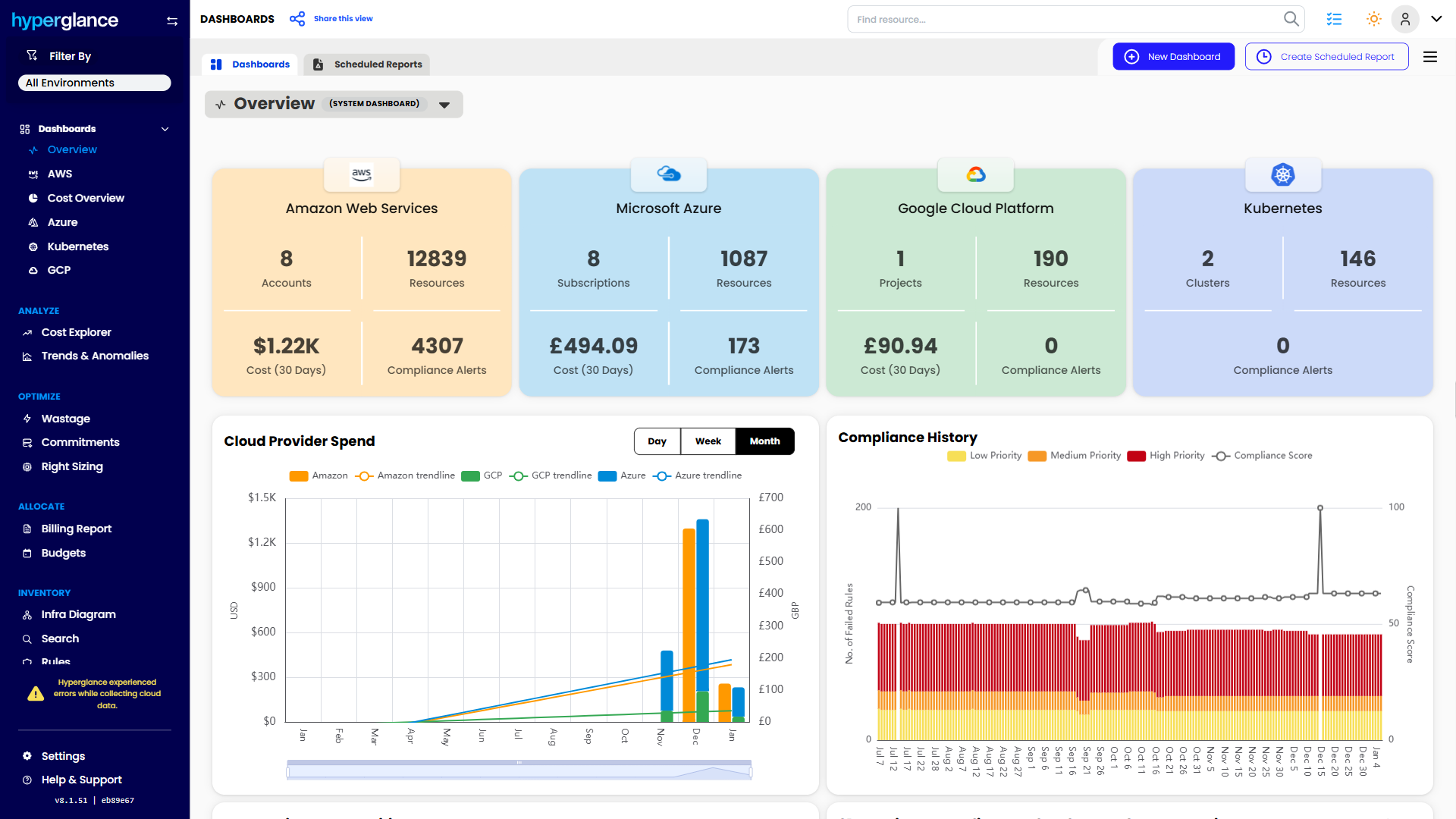
- See cost, resources, relationships, and ownership in one place
- Visualize cloud architecture with interactive diagrams
- Find waste, policy issues, and cost anomalies faster
- Route findings to the right team through existing workflows
- Use no-code automation for approved fixes
- Run Hyperglance in your own environment when data control matters
Want to see where Hyperglance fits in your FinOps stack?
Explore the product, start a free trial, or book a demo with the team.

About The Author: David Gill
As Hyperglance's Chief Technology Officer (CTO), David looks after product development & maintenance, providing strategic direction for all things tech. Having been at the core of the Hyperglance team for over 10 years, cloud optimization is at the heart of everything David does.