FinOps & Cloud Management for Telecoms
Understand What Your Cloud Costs Support Before Deciding What To Change


Make Complex Telecom Cloud Estates Easier To Understand
Telecom cloud estates rarely map neatly to a single account, team, or product. Infrastructure may support shared platforms, customer-facing services, regional workloads, development environments, and Kubernetes clusters at the same time.
Hyperglance connects cloud cost to resources, ownership, architecture, risk, and action, so engineering and FinOps teams can investigate spend without losing the technical context behind it.
See resources and relationships across AWS, Azure, Google Cloud, and Kubernetes
Connect spend to owners, services, regions, platforms, and other business groupings
Investigate waste and cost spikes with architecture context before engineering teams act
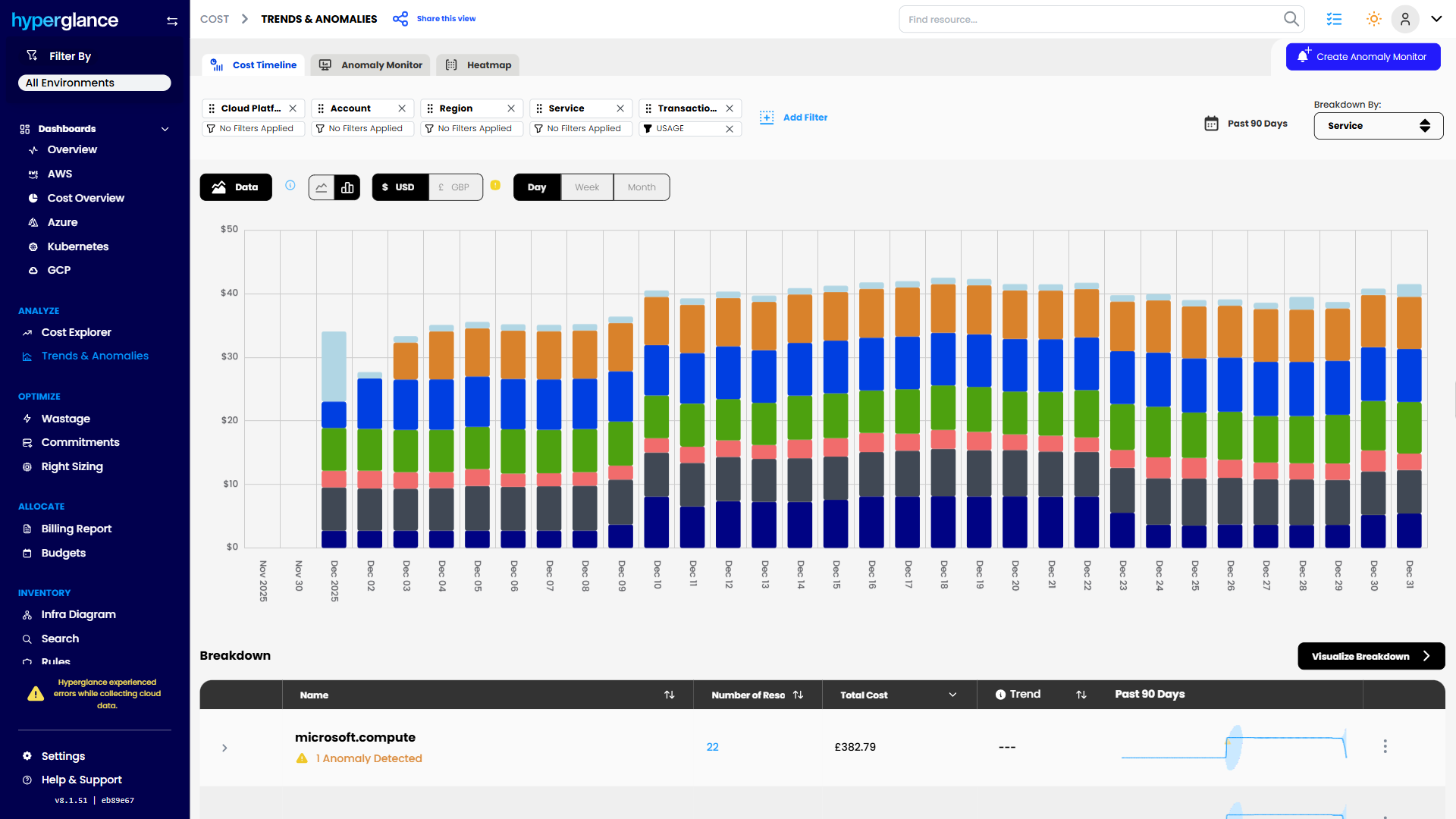
Cost Trend Analysis

What Makes Cloud Hard In Telecoms
Telecom environments can combine large cloud estates, Kubernetes, shared platforms, distributed teams, and infrastructure that has grown through migration, acquisition, or new service launches.
That creates a problem when someone asks a simple question:
“Why did our cloud bill increase?”
The answer might sit across several accounts, subscriptions, projects, clusters, or teams.
And identifying the expensive resource is only the first step.
You still need to know:
- What service does it support?
- Who owns it?
- Is the cost expected?
- Is it shared across several products or regions?
- Is it redundant capacity, or deliberately provisioned for resilience?
- What else depends on it?
- Can engineering safely change it?
A low-utilization resource can look like waste in a cost report. In a telecom environment, it may also be standby capacity or part of a service that needs headroom during peak demand.
Cost data tells you where to investigate. Architecture and ownership context tell you what to do next.
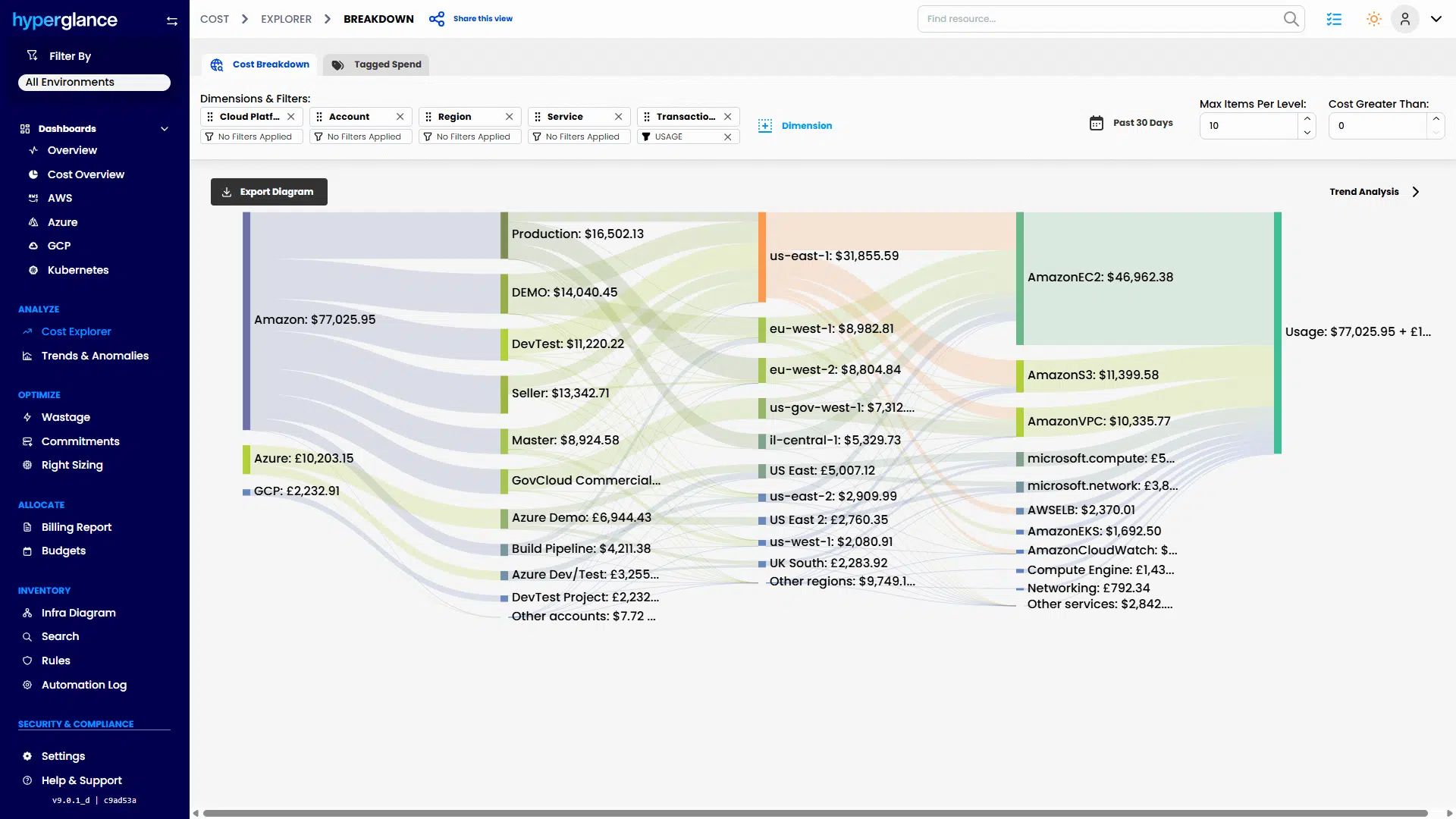
Multicloud Cost Explorer
The 3 Problems We See Most
Cost Is Spread Across Too Many Places
Cloud costs can span multiple AWS accounts, Azure subscriptions, Google Cloud projects, Kubernetes environments, and internal teams.
Finance may want costs grouped by business unit or service. Engineering may think in terms of clusters, applications, environments, and infrastructure.
Hyperglance gives both sides a shared view of the underlying resources, so teams can investigate what is actually creating the spend and organize reporting around the way the business operates.
That can support allocation by areas such as product or service, Region, Platform, Business unit, Customer or tenant, or Environment.
The important part isn't creating another reporting structure. It's being able to trace the numbers back to the resources creating them.


Ownership Is Hard To Prove
Tags are useful, but telecom estates change faster than tagging standards.
Teams reorganize. Services move. Infrastructure gets migrated. Kubernetes workloads appear and disappear. Resources inherited from previous projects can remain long after the original owner has moved on.
Hyperglance brings inventory, tagging, cost, and architecture information together so teams can investigate ownership instead of relying on one metadata field being correct.
When a cost spike appears, you can move from:
“Which account is this in?”
to:
“What does this support, who is responsible for it, and who should review the cost?”
Risk And Waste Are Hard To Separate
Finding an idle resource is easy.
Deciding whether it should be removed is harder.
A cost recommendation without technical context can create another investigation for engineering. Teams still need to understand dependencies, ownership, environment, and operational importance.
Hyperglance lets users inspect the surrounding architecture before acting.
That means a recommendation can be reviewed in context rather than treated as an automatic instruction.
Sometimes the right answer is to remove the resource.
Sometimes the right answer is to keep it.
The important thing is knowing why.

How Hyperglance Helps

See
Build a connected inventory of resources across AWS, Azure, Google Cloud, and Kubernetes.
Use architecture views to understand what is running, where it sits, and how resources relate to each other rather than jumping between cloud consoles and exports.

Validate
Investigate cost anomalies, unused resources, inconsistent tags, unclear ownership, and other areas needing attention.
Then check the surrounding context.
Is the resource attached to a production service? Does something else depend on it? Is the owner clear? Is the recommendation worth the operational risk?

Fix
Move from investigation to action.
Teams can correct tags, assign ownership, investigate waste, and use rules and automation where appropriate to support repeatable governance workflows.
The aim isn't to automate every cloud decision; it's to reduce the manual work around decisions that already need to be made.

Stay Fixed
Telecom cloud estates do not stay tidy.
New workloads appear. Teams create resources. Ownership changes. Tags drift.
Hyperglance can support ongoing rules, reporting, and governance checks so teams can identify problems as the estate changes rather than waiting for the next cost review.
Who Hyperglance Helps
Cloud & Platform Teams
See the architecture behind cost recommendations.
Instead of receiving another spreadsheet of “waste,” engineers can investigate what a resource supports, how it connects to the surrounding environment, and whether changing it makes technical sense.
FinOps & Finance Partners
Trace cloud spend back to resources and the teams, services, regions, or business units responsible for it.
That gives FinOps and engineering a better starting point when they need to explain a cost increase, improve allocation, or decide where optimization work should begin.
Security & Compliance Teams
Understand what exists across the cloud estate and identify areas such as unclear ownership, missing metadata, configuration concerns, and policy issues that need review.
For organizations with stricter deployment or data-handling requirements, Hyperglance can also be self-hosted, giving teams more control over where the platform runs and how cloud metadata is handled.
A Typical Scenario
A shared telecom platform suddenly costs significantly more this month.
Finance can see the increase but cannot easily explain it. The AWS account contains several services. Kubernetes costs are mixed together. Tags are incomplete, and several teams use the underlying infrastructure.
A pure cost tool might tell you which resources increased.
The harder questions come next.
Why did they increase? Who owns them? What do they support? And can anything safely change?
With Hyperglance, the team can inspect the resources behind the spend, review ownership and tagging, see related infrastructure, and narrow the investigation before asking engineering to act.
They may find unused capacity.
Or they may find deliberate resilience, a new workload, or infrastructure supporting several services.
Either way, the conversation starts with context rather than assumption.
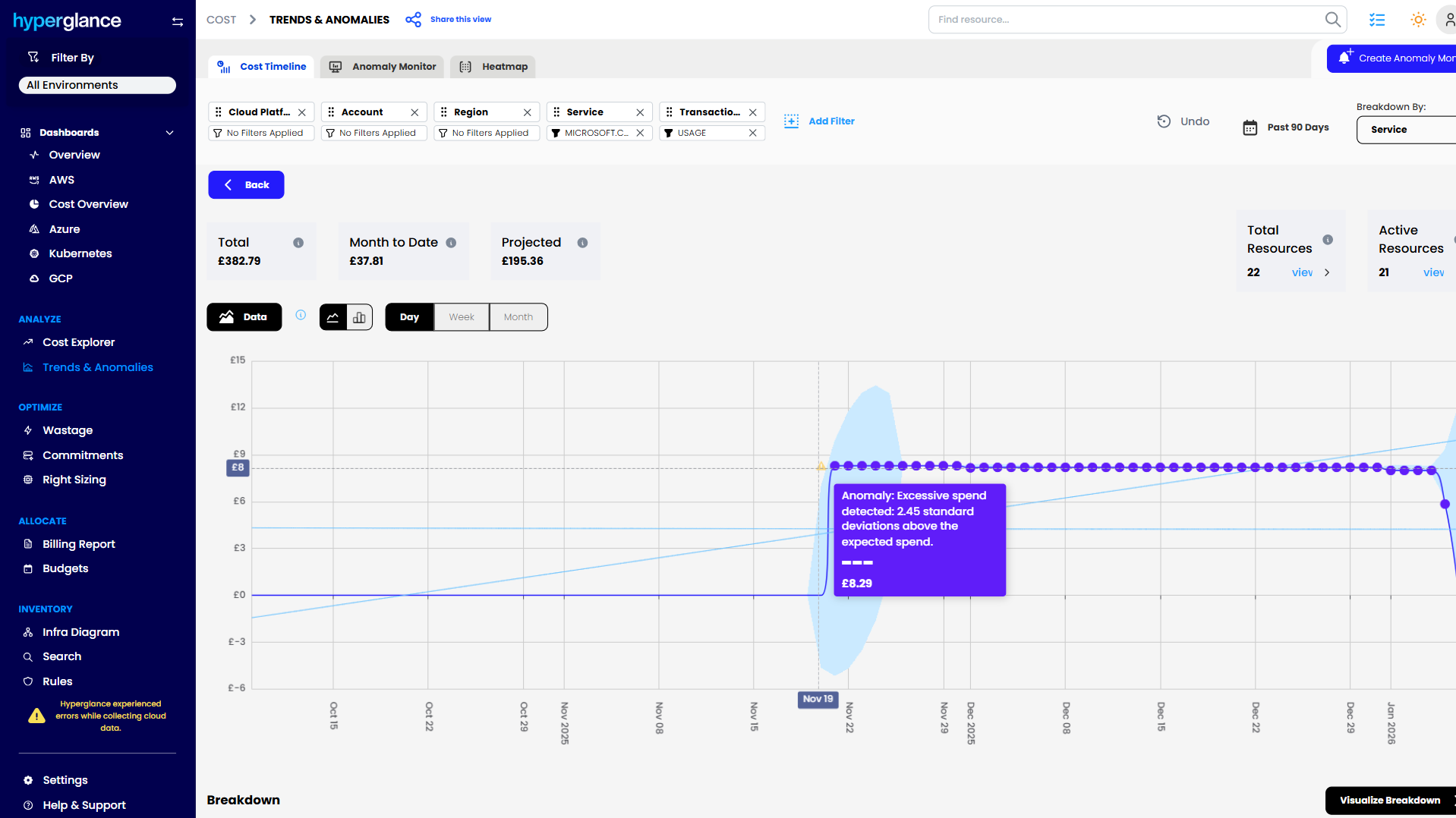
Cost Anomaly Detection
Why Hyperglance
Telecom teams rarely need another isolated dashboard.
They need a way to connect information that normally sits in different places.
Hyperglance brings together:
- Cloud inventory and architecture
- Cost and FinOps data
- Ownership and tagging
- Governance rules
- Optimization opportunities
- Security and compliance context
- Action and automation workflows
It supports AWS, Azure, Google Cloud, and Kubernetes, making it useful where cloud responsibilities span more than one platform.
And because Hyperglance is self-hosted, organizations that don't want operational cloud metadata or governance workflows sitting in another SaaS platform have another deployment option.
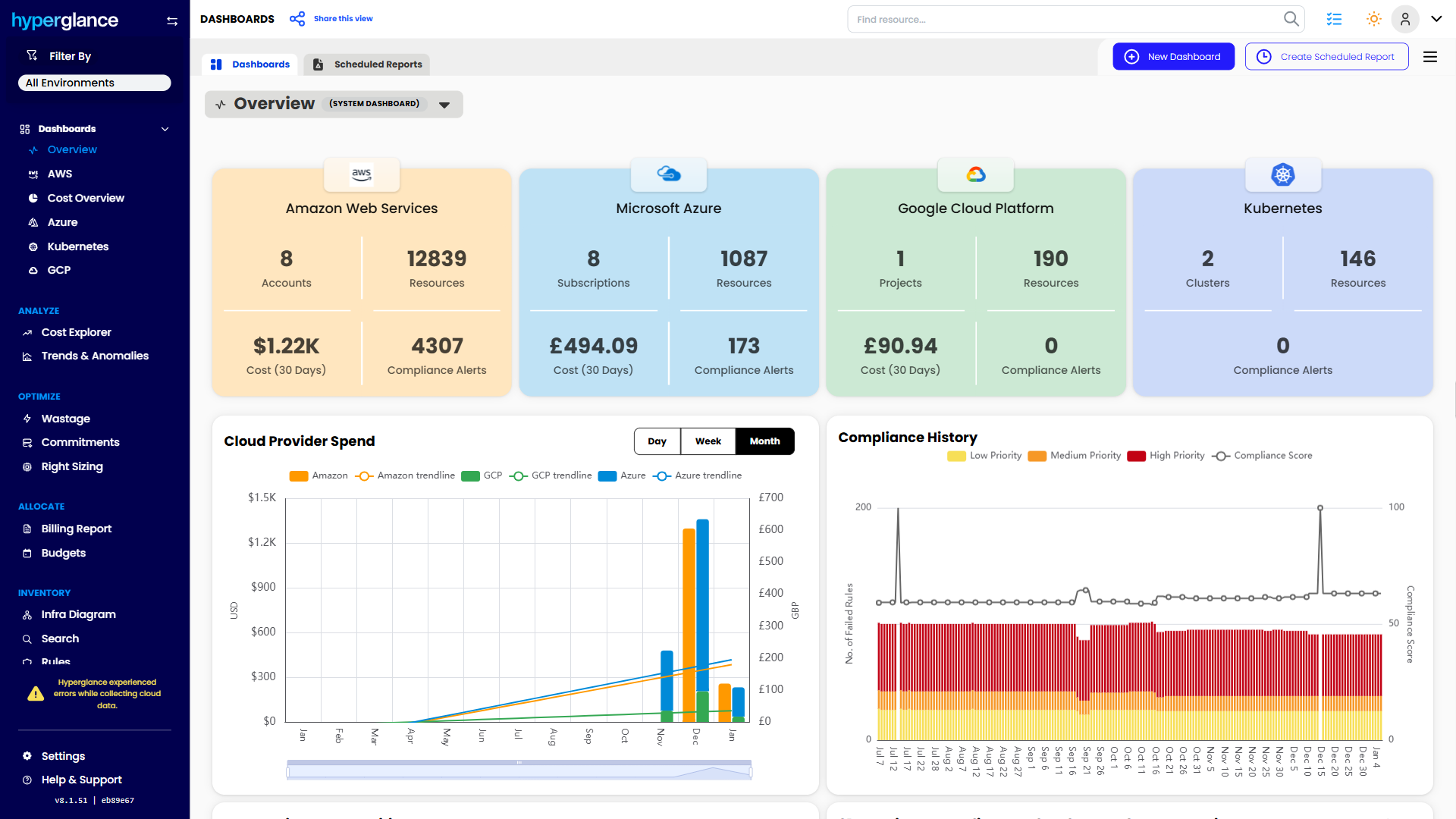
Multicloud Dashboard
The FinOps Tool for Every Stakeholder
Find out why so many Cloud & FinOps teams are making the move from tools like CloudHealth and Cloudability to Hyperglance.
FAQs
Can Hyperglance Work Across Multiple Cloud Providers?
Yes. Hyperglance supports AWS, Azure, Google Cloud, and Kubernetes, allowing teams to investigate resources, cost, ownership, and architecture across complex environments.
Can We Allocate Telecom Cloud Costs By Service Or Business Unit?
Hyperglance can support cost organization and reporting using tags and cost-center-style groupings. The right model depends on how your organization allocates cloud spend, such as by service, region, product, customer, or business unit.
Does Hyperglance Have To Run As SaaS?
No. Hyperglance is self-hosted. This can be useful where security, procurement, data-handling, or operational requirements make another externally hosted SaaS platform difficult to approve.

91% of Fortune 100 Companies Use Partner Solutions
We're part of all 3 cloud partner networks - AWS, Microsoft Azure, and Google Cloud. That independent validation means we align with provider best practices, integrate cleanly with first-party APIs and billing data, and meet enterprise security and support standards, so procurement is smoother and adoption is faster.
Our Latest Thinking
Guides, tips, and product updates from our blog.