
Cloud Rightsizing & Commitment Planning
Cut Compute Waste, Lock In Savings & Right-Size Confidently






















Cut Compute Waste and Turn Recommendations into Lasting Savings
Right-size with confidence: Automatically detect oversized or idle cloud resources, then adjust instance types or VMs without risking performance or uptime
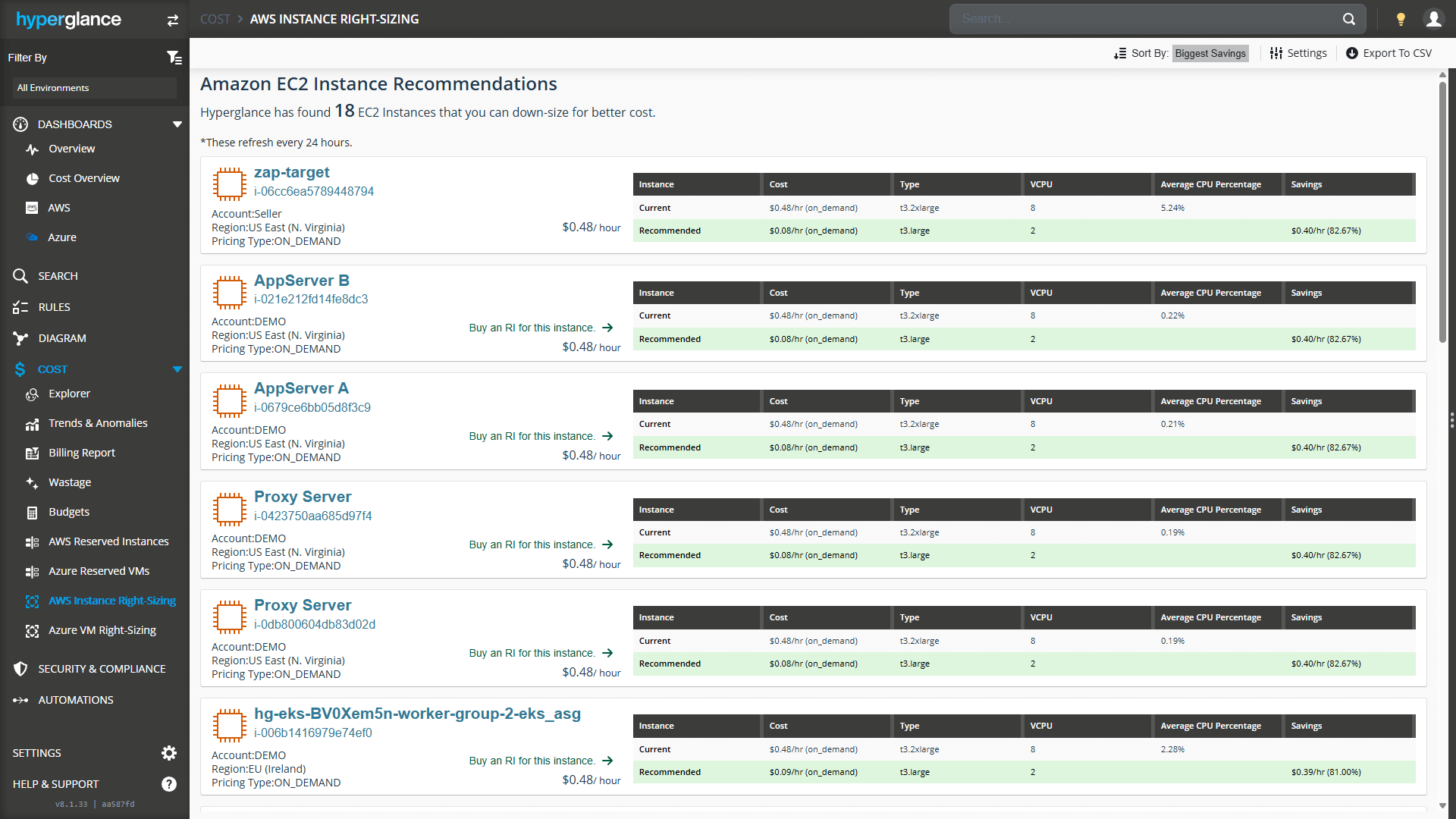
An AWS example of Right-Sizing in Hyperglance

Make Smarter, Faster FinOps Decisions
Turn complex cloud cost data into clear, actionable insights so you can optimize spend and confidently prove value.

Explore Costs
Visualize multicloud spend using interactive diagrams, heatmaps, and tag-based breakdowns.

Trends & Anomalies
Spot cost trends and anomalies in real time, with alerts and analysis that help you stay in control.

Custom Dashboards
Create flexible dashboards tailored to your FinOps goals, and share them with your team.

Manage Budgets
Set fixed & rolling cloud budgets, track real-time spend, and get alerted when it matters.

Generate Billing Reports
Create and schedule multi-cloud billing reports, perfect for chargebacks and showbacks.

RIs & Right Sizing
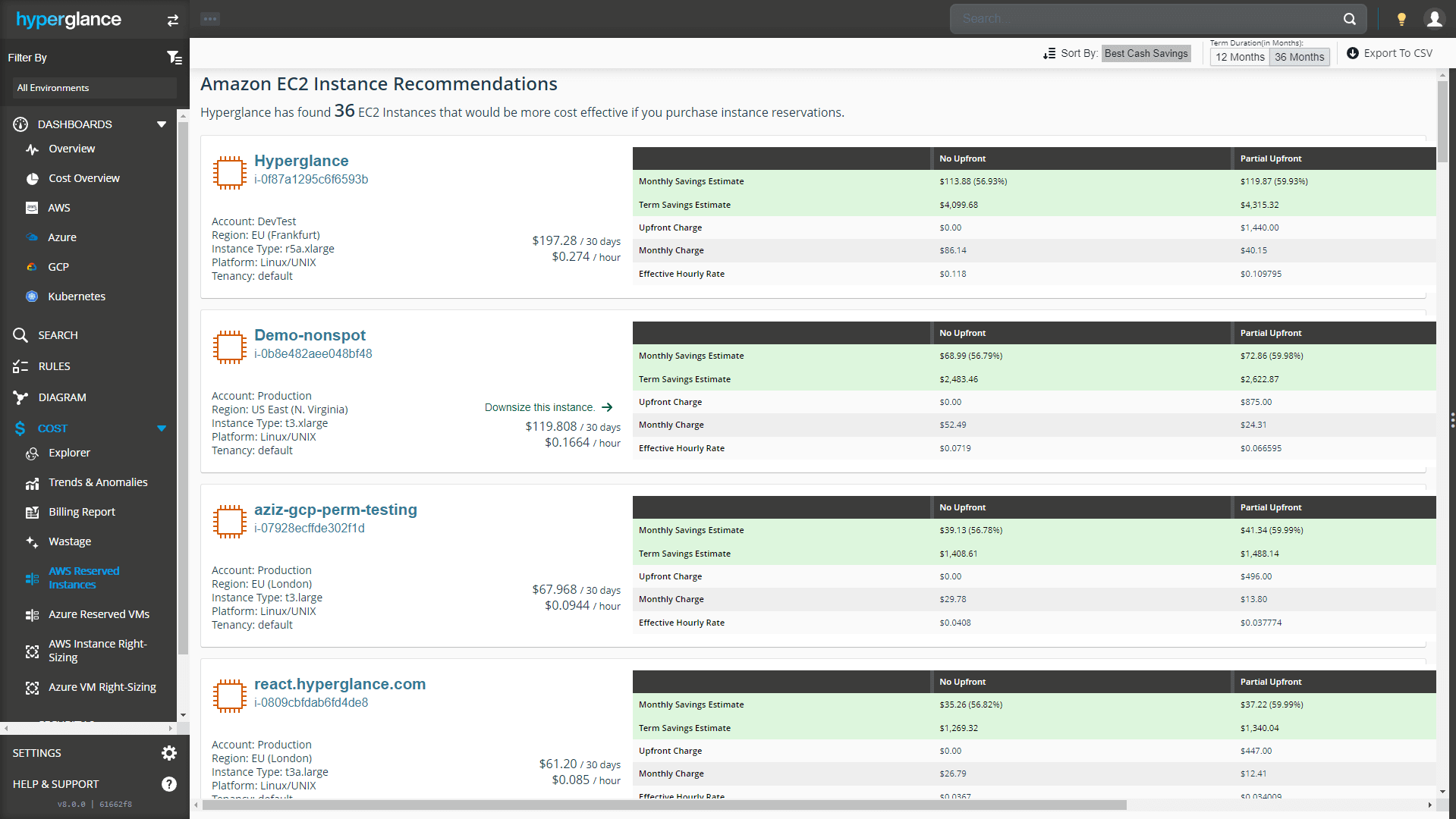
Cut wasted compute with recommendations that right-size, optimize commitments, and lower costs.

Identify Waste
From right-sizing to orphaned resources, our rules engine typically identifies 20%+ wastage.

Automated Optimization
Trigger actions directly from configurable rules, so issues get fixed before they impact spend or performance.

Integrations
Connect to AWS, GovCloud, Azure, GCP, Kubernetes, OpenOps, Jira, ServiceNow, Slack and Teams.

Cost Centers
Model cost centers and allocate multi-cloud spend for chargebacks, showbacks and budgets.
Coming Soon
Enterprise-Grade Goodness
Built to fit complex teams, strict policies, and secure environments.

Agentless & Secure
Hyperglance is self-hosted on your VM. SaaS cannot compete on deployment security - here's why.

Multicloud by Default
Hyperglance connects to the AWS, Azure, GCP & K8s APIs in parallel, giving you 1 view of your cloud inventory.

Diagrams & Inventory
Explore & export extraordinary automatically generated multi-cloud diagrams and inventory.

Security & Compliance
Built-in monitoring to scan your cloud for security & compliance issues, based on industry frameworks.

Tame Your Tagging
Standardize, normalize, and group tags to cut errors, improve efficiency, and unlock clearer cost & usage insights.

GovCloud Support
Public sector and defense organizations benefit from GovCloud compatibility from the outset.

SAML as Standard
Managing permissions is easy. There's no extra cost to use your SAML provider, e.g. Okta or Active Directory.

RESTful API Access
Every customer gets access to Hyperglance's easy-to-use RESTful, JSON-based API.
You're Among Friends
Cloud Professionals worldwide choose Hyperglance to manage & optimize their cloud.
Cloud Engineers, Architects & Operations
FinOps & Cloud Economists
DevOps, SRE, SecOps & InfoSec
MSPs & Consultants


Proudly Best-in-Class
"It’s worked great for us and has probably paid for itself 100 times over.
We faced significant challenges keeping our environment under control, and the related costs were not small. Hyperglance cut those down immediately.
The information it provides enables strategic decision-making for current and future cost optimization."
The FinOps Tool for Every Stakeholder
Find out why so many Cloud & FinOps teams are making the move from tools like CloudHealth and Cloudability to Hyperglance.
91% of Fortune 100 Companies Use Partner Solutions
We're part of all 3 cloud partner networks - AWS, Microsoft Azure, and Google Cloud. That independent validation means we align with provider best practices, integrate cleanly with first-party APIs and billing data, and meet enterprise security and support standards, so procurement is smoother and adoption is faster.
Our Latest Thinking
All things Cloud & FinOps, including guides, tips, and product updates from our blog.
-

Hyperglance Setup Is Now Easier With Guided Onboarding
Hyperglance’s new setup experience guides you through connecting cloud environments step by step, with clearer management of environments, cost sou...
-
COIN Score In FinOps: Cost Optimization Index Explained
COIN Score gives FinOps teams a simple way to measure known cloud cost efficiency. But the number only helps if you trust the savings opportunities...
-
FinOps Cost Optimization: 5 Cloud Costs Hiding in Plain Sight
The hardest cloud costs to find are not always idle or untagged. Some sit inside active infrastructure, shared services, migration projects, and co...



-
Hyperglance Setup Is Now Easier With Guided Onboarding
Hyperglance’s new setup experience guides you through connecting cloud environments step by step, with clearer management of environments, cost sou...
-
COIN Score In FinOps: Cost Optimization Index Explained
COIN Score gives FinOps teams a simple way to measure known cloud cost efficiency. But the number only helps if you trust the savings opportunities...
-
FinOps Cost Optimization: 5 Cloud Costs Hiding in Plain Sight
The hardest cloud costs to find are not always idle or untagged. Some sit inside active infrastructure, shared services, migration projects, and co...
Frequently Asked Questions
Is Hyperglance SaaS?
No, it's not a shared service. Hyperglance is self-hosted on your VM, so alternative SaaS solutions cannot compete when it comes to application security.
Is data secure in Hyperglance?
Yes. Because Hyperglance is self-hosted on your VM, alternative SaaS solutions cannot compete when it comes to application security.
Can I add data into Hyperglance?
Yes, you can.
Hyperglance comes with an extensive RESTful API that you can use to augment or create links, interfaces, alarms and attributes. You can also add hyperlinks to any entity.
Does Hyperglance support AWS GovCloud?
Yes, Hyperglance supports the GovCloud regions (more information). Hyperglance can run as an isolated instance in a GovCloud region or it can connect to the GovCloud regions API endpoint when running in another region.
Does Hyperglance support Azure Government?
Yes, Hyperglance supports Azure Government (more information).
Does Hyperglance support Google Cloud Public Sector?
Not yet, but we will be adding support in the future (more information).
How much does Hyperglance cost?
Unlike similar apps, we don't charge a percentage of your cloud bill, or by how many AWS accounts and Azure subscriptions you have (although they will count towards your overall resource limit).
The cost is based on the number of cloud resources ingested and inventoried by the Hyperglance app. Plans start as low as 250 resources, but Hyperglance can scale to tens of thousands, even millions, of cloud resources.
Resource count can vary dramatically but, to give you an idea, the cost of running Hyperglance for an average customer is between $3000 - $7,000 a month (paid annually). In almost every case, Hyperglance quickly pays for itself, and plenty more, thanks to the average 20-30% savings it generates.
Your license provides unlimited users and can be deployed to manage a single or multi-cloud environment.
How do I pay for Hyperglance?
Hyperglance will invoice you directly and you can pay by bank/wire transfer, ACH debit or credit/debit card.
Hyperglance also offers select plans on the AWS, Azure and GCP marketplaces. These will be billed via your existing marketplace invoice.
Can I cancel Hyperglance?
Hyperglance comes with a 14-day free trial. You can stop your trial at any point by contacting us, or stopping the Hyperglance instance.
If you'd like to continue using Hyperglance after your trial, let us know.