FinOps and Cloud Management for SaaS And ISVs
Understand What Your Cloud Costs, What Supports Your Products, And What Can Safely Change


When Cloud Spend Becomes A Product & Margin Problem
As SaaS platforms grow, cloud cost becomes harder to separate from engineering decisions.
A spike in AWS, Azure, Google Cloud, or Kubernetes spend might come from customer growth, inefficient architecture, idle infrastructure, a new deployment pattern, or resources nobody clearly owns anymore.
Hyperglance brings cost, ownership, architecture, and governance context together so platform, FinOps, and engineering teams can investigate the right problem before deciding what to change.
Break cloud spend down by product, service, team, tenant, environment, or other business structures
See the resources and dependencies behind a cost spike before acting on a recommendation
Find tagging, ownership, cost, and governance issues across complex cloud estates
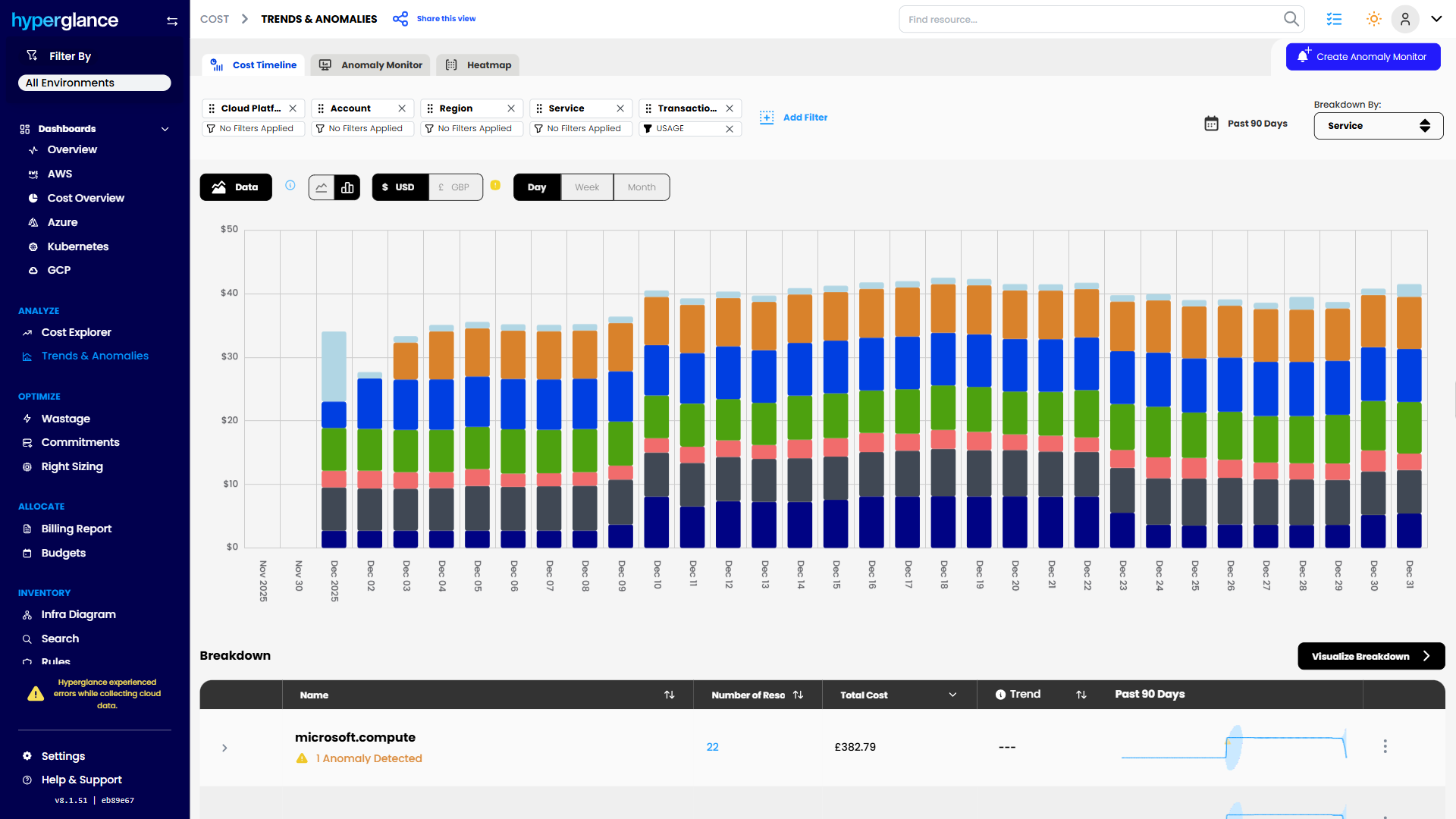
Cost Trend Analysis

What Makes Cloud Hard In SaaS & ISVs
Cloud cost rarely stays neatly aligned with product architecture.
A SaaS business might run hundreds of services across multiple AWS accounts, Azure subscriptions, Google Cloud projects, Kubernetes clusters, and environments. Shared infrastructure can support several products or customers at once. Platform teams may own the foundations while application teams own the workloads running on top.
That makes simple questions surprisingly hard to answer:
“Which product caused the increase?”
“Who owns this workload?”
“Is this genuinely unused?”
“Can we remove it without affecting production?”
“Why is this customer or tenant becoming more expensive to serve?”
For software businesses, these questions can affect more than the cloud bill. They can affect product margins, engineering priorities, customer pricing, and decisions about where teams spend their time.
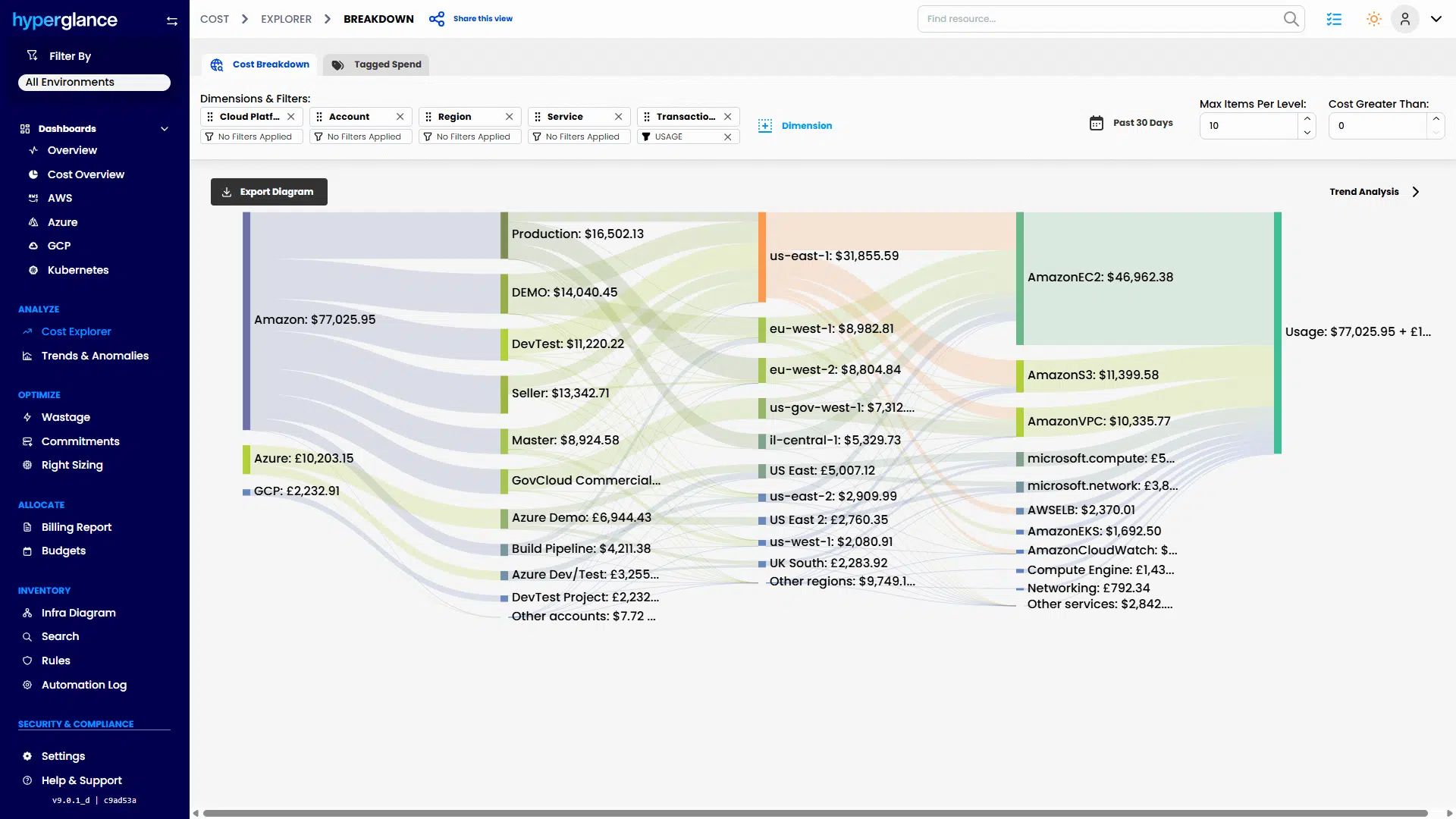
Multicloud Cost Explorer
The 3 Problems We See Most
Cost Is Spread Across Too Many Places
SaaS platforms often distribute spend across shared services, products, accounts, subscriptions, clusters, regions, and environments.
Native cloud billing tools can tell you where money was spent. The harder part is mapping that spend back to how the business actually works.
Hyperglance lets teams organize cloud cost around structures such as product, team, environment, customer, tenant, or service, rather than relying only on provider billing boundaries.
That gives FinOps and engineering a better starting point for questions like:
- Which product line is driving the increase?
- Is shared infrastructure being allocated fairly?
- Which environments are disproportionately expensive?
- Where is cost growing faster than usage or revenue?


Ownership Is Hard To Prove
Tags help, but SaaS estates change quickly.
Teams reorganize. Services move. New Kubernetes workloads appear. Projects get inherited. Tags are missed, copied incorrectly, or no longer reflect who actually owns the service.
Hyperglance combines resource inventory, relationships, tags, and other context so teams can investigate ownership instead of treating one metadata field as the final answer.
That matters when somebody wants an expensive resource shut down.
The real question is not only “Who owns it?”
It is also “What does it support, what depends on it, and who needs to approve the change?”
Risk And Waste Are Hard To Separate
A recommendation can look obvious in a cost report and still be risky in production.
A low-utilization database, instance, or Kubernetes workload might be waste.
Or it might support a low-volume enterprise customer, failover process, scheduled workload, or quiet but important production dependency.
Cost data should start the investigation, not end it.
Hyperglance gives engineers architecture and ownership context alongside cost information so they can decide whether a recommendation is worth acting on.

How Hyperglance Helps

See
Bring AWS, Azure, Google Cloud, and Kubernetes resources into a shared view.
See what is running, where it sits, how resources relate to one another, what they cost, and how they map to teams, products, environments, or other business structures.
This reduces the need to jump between billing exports, cloud consoles, diagrams, tag reports, and Kubernetes tooling just to understand one problem.

Validate
Before changing something, investigate the context around it.
Check:
- Who appears to own the resource
- What it connects to
- Whether it supports production or shared infrastructure
- Whether related tags or metadata are missing
- What cost is associated with it
- Whether other governance or risk issues are present
That gives engineering teams more confidence when deciding whether a saving is real and whether the change is worth the operational risk.

Fix
Once the issue is understood, teams can move from investigation to action.
That might mean removing unused infrastructure, correcting tags, assigning ownership, addressing a governance issue, or routing the work to the right engineering team.
The important part is that the action follows the context.
A $500 monthly saving is not useful if removing the resource causes a customer-facing outage.

Stay Fixed
SaaS estates do not stay tidy for long.
New services are deployed. Customers grow. Teams change. Kubernetes workloads appear. Tags drift.
Hyperglance can support repeatable checks around ownership, tagging, cost, and governance so teams can find recurring issues instead of relying on occasional cleanup projects.
Who Hyperglance Helps
Cloud & Platform Teams
Understand what infrastructure supports before changing it.
Platform teams can investigate relationships across accounts, subscriptions, projects, and Kubernetes rather than treating resources as isolated line items.
This is especially useful when shared platform services support several development teams or products.
FinOps & Finance Partners
Connect cloud spend to the way the SaaS business actually operates.
Instead of stopping at account or subscription totals, teams can investigate spend by product, environment, team, customer, tenant, or another useful allocation model.
That gives finance and engineering a shared view when they need to explain why costs moved and what can realistically be done about it.
Security & Compliance Teams
See cloud resources alongside ownership, architecture, and governance context.
That can make it easier to investigate exposed, unowned, incorrectly tagged, or otherwise questionable resources and work with engineering on the right next step.
For SaaS companies with stricter customer, data, security, or procurement requirements, Hyperglance can also be self-hosted, giving teams more control over deployment and data handling.
A Typical Scenario
A SaaS company sees infrastructure cost for one of its products rise sharply over 2 months.
Finance can see the increase but cannot explain it.
The product team thinks Kubernetes is responsible.
The platform team suspects new database capacity.
Tags are incomplete, and several shared services sit outside the product's main cloud account.
Instead of starting with a blanket cost-cutting exercise, the team uses Hyperglance to trace the spend back to the relevant resources, workloads, owners, and relationships.
They find that part of the increase comes from genuine product growth.
Another part comes from temporary infrastructure left behind after a migration.
A third part comes from shared services that were being allocated entirely to the product even though several teams use them.
The result isn't a list of “waste.”
It's a clearer explanation of what the bill means, which costs are justified, which costs should be reallocated, and which resources can be reviewed for removal.
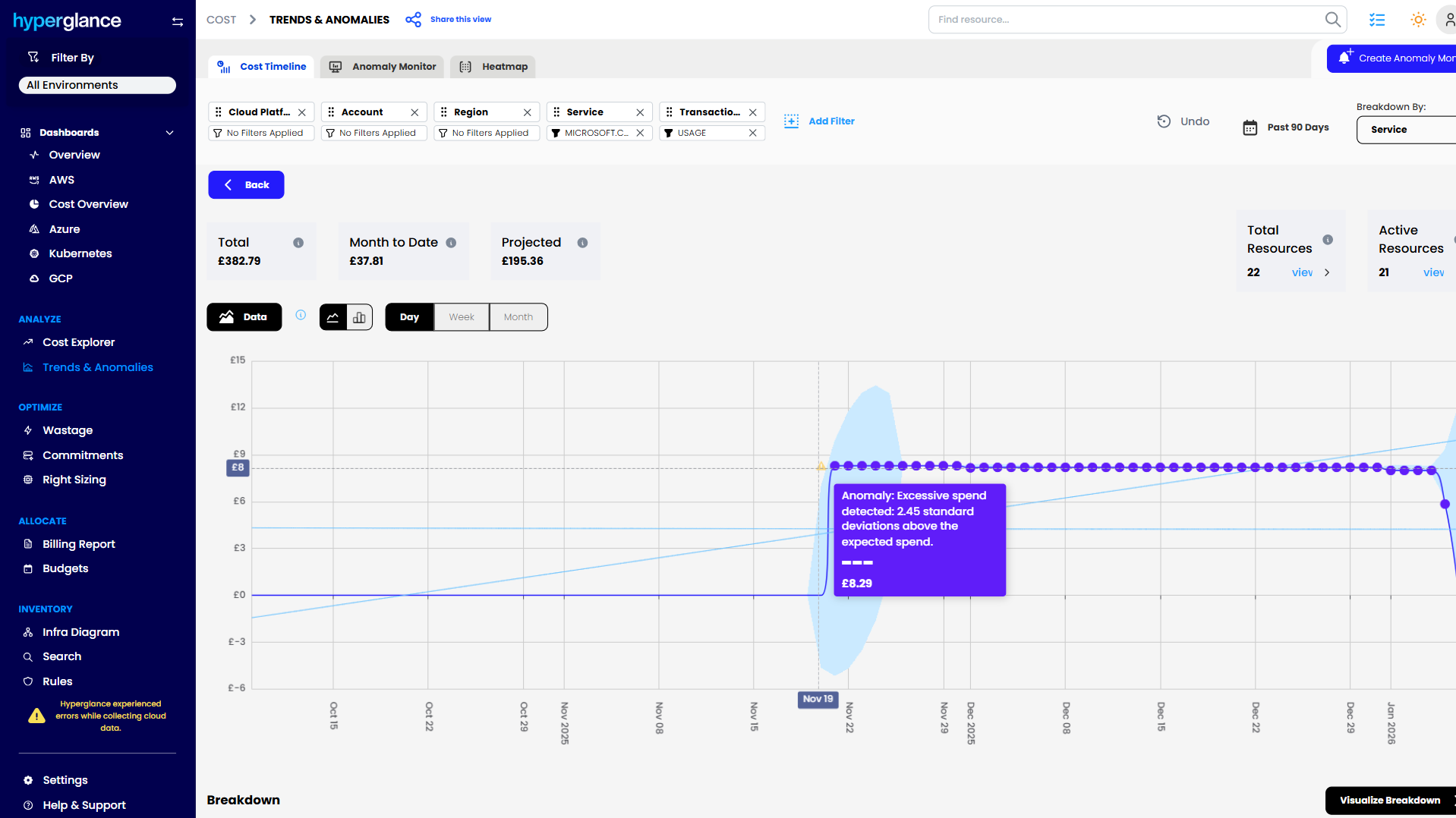
Cost Anomaly Detection
Why Hyperglance
SaaS teams rarely need another dashboard that only tells them the bill went up.
They need to understand why.
Hyperglance connects several parts of the investigation that are often split across different tools:
- Cloud cost
- Resource inventory
- Architecture relationships
- Ownership
- Tagging and allocation
- Governance issues
- Actions and follow-up
It works across AWS, Azure, Google Cloud, and Kubernetes, which matters when product infrastructure has grown beyond one clean provider boundary.
And because Hyperglance can be self-hosted, organizations that do not want cloud metadata, governance workflows, or operational data handled through another SaaS platform have another deployment option.
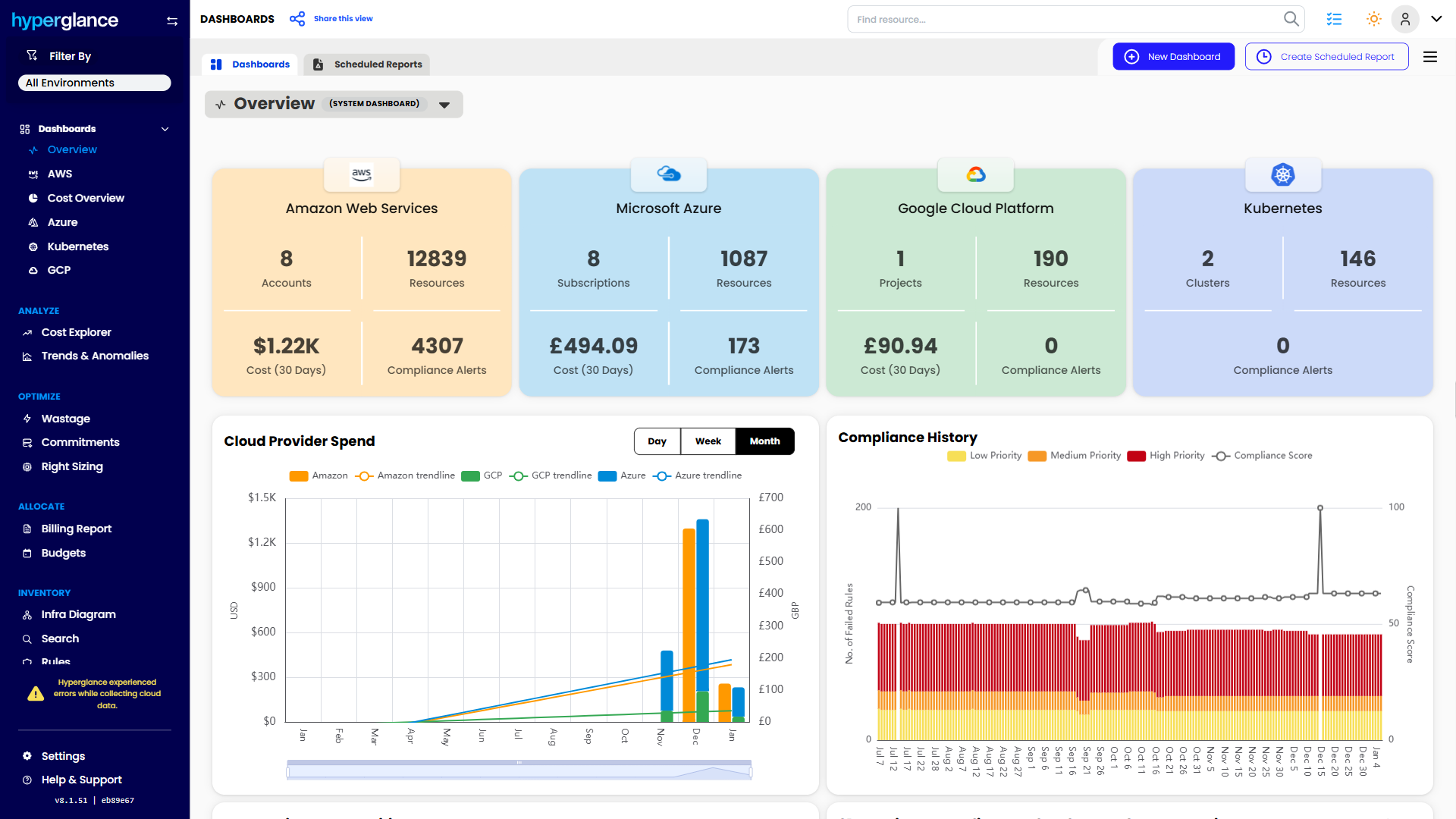
Multicloud Dashboard
The FinOps Tool for Every Stakeholder
Find out why so many Cloud & FinOps teams are making the move from tools like CloudHealth and Cloudability to Hyperglance.
FAQs
Can Hyperglance Allocate SaaS Cloud Costs By Product Or Customer?
Hyperglance can support cost organization around structures such as products, teams, environments, customers, tenants, or other business groupings. The right model depends on how your cloud estate and tagging strategy are structured.
Does Hyperglance Work With Kubernetes As Well As Cloud Providers?
Yes. Hyperglance supports AWS, Azure, Google Cloud, and Kubernetes, which can be useful when SaaS infrastructure spans cloud-provider resources and containerized workloads.
Why Would A SaaS Company Choose A Self-Hosted FinOps Tool?
Some SaaS and ISV teams have customer, security, data-handling, or procurement requirements that make another SaaS platform difficult to approve. Self-hosting gives those teams more control over where the tooling runs and how associated cloud data is handled.

91% of Fortune 100 Companies Use Partner Solutions
We're part of all 3 cloud partner networks - AWS, Microsoft Azure, and Google Cloud. That independent validation means we align with provider best practices, integrate cleanly with first-party APIs and billing data, and meet enterprise security and support standards, so procurement is smoother and adoption is faster.
Our Latest Thinking
Guides, tips, and product updates from our blog.