A Safer SaaS Alternative
Keeping your cloud environment secure is more important than ever.
What else is increasingly essential? Third-party apps to manage and optimize your cloud.
Here lies a dichotomy.
Many regular SaaS (Software-as-a-Service) applications bring risks that can expose your data to hackers, leaks, or mistakes.
We do cloud management differently. Hyperglance focuses on security, control, and keeping everything inside your cloud.
This approach makes Hyperglance much safer compared to typical SaaS tools.

Why is Hyperglance So Secure?
This is why customers in every continent trust Hyperglance over other SaaS cloud management, cloud optimization & FinOps tools.
1. Self-Hosted & Under Your Control
Hyperglance runs directly in your cloud environment - whether AWS, Azure, GCP, or K8s. Because you host it yourself, you have full control over how it works. You control what data comes in (ingress) and what goes out (egress). Unlike SaaS tools that depend on third-party servers, Hyperglance doesn’t rely on anyone else. Everything happens in your cloud, giving you complete oversight of your architecture.

2. Your Data Stays in Your Cloud
Most SaaS tools send your data to outside servers to process or analyze it. Hyperglance avoids this risk entirely. It works completely inside your cloud environment, so your data never leaves. This means hackers or outsiders can’t intercept or access it. Your cloud details, settings, and metadata stay protected and under your control. You know exactly where your data is at all times.

3. Doesn’t "Call Home"
Some other applications, even when self-hosted, may connect to their vendor’s servers to work properly or get updates. This opens a risk of sending your data to places you can’t control. Hyperglance doesn’t do that. It doesn’t “call home” or send data back to external servers. This makes it safer because it works in isolation and isn’t exposed to outside threats.

4. Read-Only Access Keeps Your Resources Safe
When Hyperglance connects to your cloud accounts, it uses read-only access enforced by read-only policies. That means it can see and analyze your cloud resources, but cannot make changes. It won’t modify your settings, policies, or data. This protects your systems from accidental or unwanted changes. You get the insights you need to monitor and optimize your cloud without worrying about damage or disruptions.

5. Secure Communication with Encryption
Hyperglance keeps all communication between your cloud and its operations safe using encryption. Whether it’s gathering data, analyzing resources, or sending insights, everything is protected. Hyperglance uses trusted, industry-standard encryption so your data stays secure during transit. This reduces the risk of interception or hacking when data moves within your cloud environment.

6. Easy & Safe User Access with SAML Single Sign-On (SSO)
Hyperglance makes user access safer with SAML-based SSO. With SAML, Hyperglance authenticates to your existing identity system such as Okta or Azure Entra ID. This lets you manage who can use Hyperglance without creating new credentials. It simplifies user management while keeping access secure and centralized.

7. Zero Trust Security Approach
Hyperglance uses a “zero trust” approach to security. This means it doesn’t automatically trust any part of your environment and only uses the minimum permissions needed to work. By following the principle of “least privilege,” Hyperglance avoids unnecessary risks and keeps your cloud locked down. You get critical cloud insights without creating new security holes.

8. Open Source Automations
Hyperglance gives you access to open-source automations. These tools let you customize the way Hyperglance works to match your specific needs. Since the automations are open source, you can review, edit, and improve them as needed. This gives you the flexibility to create workflows that enhance security, fix problems, or make tasks easier, all while knowing exactly how they work.

9. Real-Time Processing Without Storing Data
Hyperglance processes data in real time but never stores it to disk. Once Hyperglance analyzes the data a minimal representation is held in-memory and the rest is discarded immediately. This means there is a very small data footprint for hackers to target. Many SaaS tools store multiple copies of your data, even in their backups, which can pose extra risk. Hyperglance avoids this completely, keeping your sensitive info safe.

10. Reducing Risks from Third Parties
Many SaaS tools rely on outside vendors to store and process data. If those vendors get hacked or breached, your data can be at risk. Hyperglance doesn’t depend on third-party servers. It operates entirely in your environment, reducing the chance of a third-party security failure putting your data in danger.

11. Transparency You Can Trust
Some SaaS tools operate like black boxes - you don’t know what they’re doing or where your data goes. Hyperglance is different. It works inside your cloud, and you can monitor and audit its operations whenever you want. You’ll always know how Hyperglance works, what it accesses, and where data flows. This transparency makes it easier to trust and verify its security.

The Bottom Line
We've designed Hyperglance to be more secure than regular SaaS cloud management tools.
By running inside your cloud environment, using read-only access, and never storing data, Hyperglance eliminates a myriad of security risks.
You stay in control of your data, systems, and user access while benefiting from the insight and optimization that our users love.
With encryption, no “call home”, and open-source automations, Hyperglance gives you security, flexibility, and transparency without compromise.
If keeping your cloud safe is a top priority, Hyperglance is the solution you should trust.
Why Teams Choose Hyperglance in 2026
Hyperglance is a strong fit when cost data alone doesn’t give your team enough context.
That often happens when teams are asking questions like:
- What is running across our cloud estate?
- Who owns this resource?
- Why did this cost change?
- What else depends on it?
- Is it safe to clean up?
- Which policy, security, or compliance issue needs attention?
- Can we route this to the right owner or trigger an approved action?
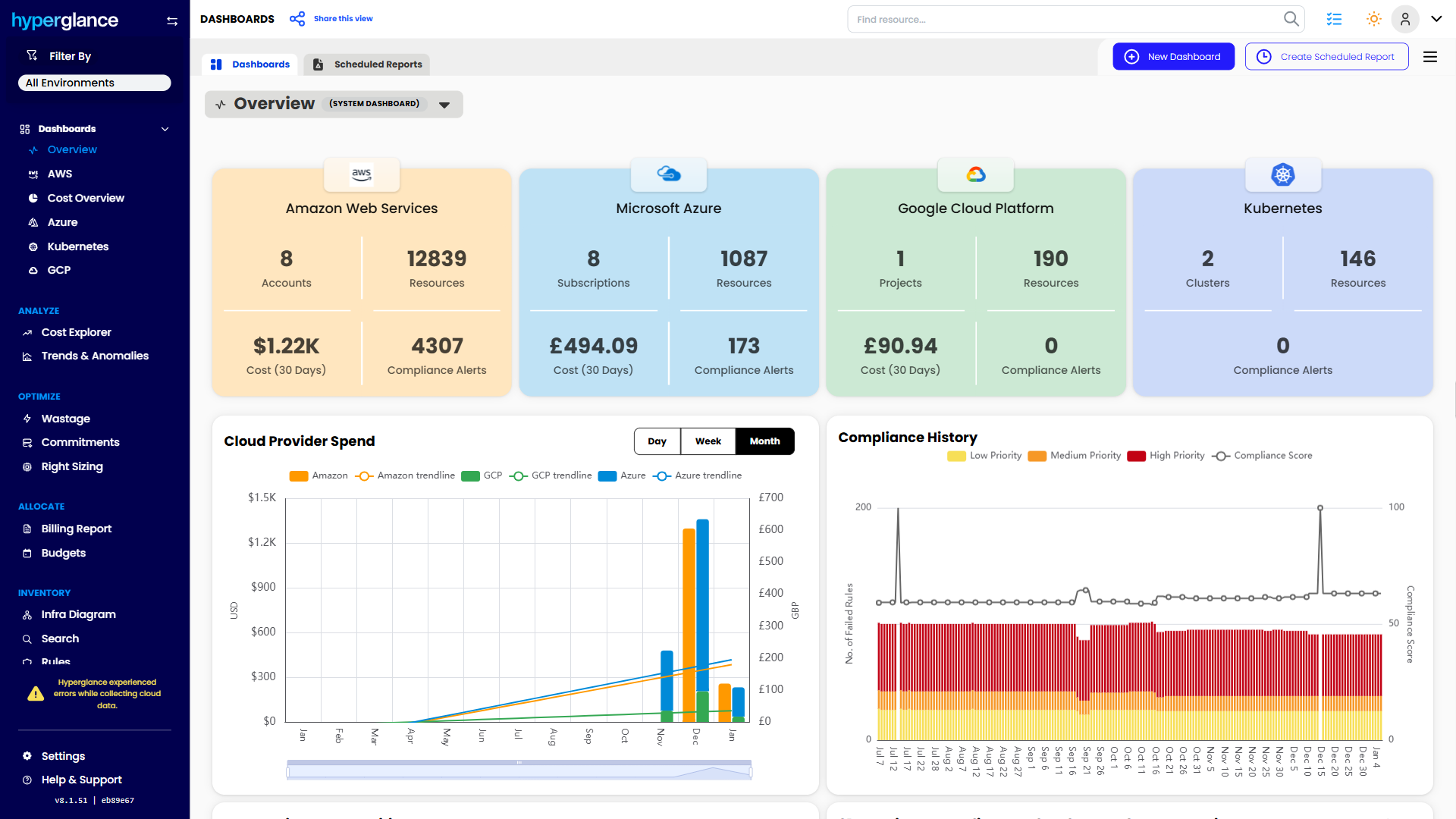
We help teams connect cloud cost to infrastructure context across AWS, Azure, Google Cloud, and Kubernetes. That means FinOps, CloudOps, platform, security, and leadership teams can work from the same view.
Hyperglance is especially useful for mid-market, enterprise, MSP, public sector, and regulated teams where ownership, governance, automation, and data control matter.
What You Can Do With Hyperglance
- See cost, resources, relationships, and ownership in one place
- Visualize cloud architecture with interactive diagrams
- Find waste, policy issues, and cost anomalies faster
- Route findings to the right team through existing workflows
- Use no-code automation for approved fixes
- Run Hyperglance in your own environment when data control matters
Want to see where Hyperglance fits in your FinOps stack?
Explore the product, start a free trial, or book a demo with the team.
About The Author: David Gill
As Hyperglance's Chief Technology Officer (CTO), David looks after product development & maintenance, providing strategic direction for all things tech. Having been at the core of the Hyperglance team for over 10 years, cloud optimization is at the heart of everything David does.