🆕The Cloud Cost Efficiency Guide-Built on 5 Core Pillars
As enterprises scale their cloud environments, efficiency becomes just as important as innovation. The challenge isn’t only keeping costs down, it’s making cloud operations sustainable, predictable, and accountable at every level. That’s where cloud cost efficiency comes in.
Cloud cost optimization strategies must extend beyond trimming a few dollars here and there. Actual efficiency means driving repeatable, scalable savings without compromising performance or reliability using FinOps automation.
This blog examines the five pillars of cloud cost efficiency that every large-scale organization must master. From visibility and automation to governance and collaboration, you’ll see how a structured FinOps approach can help you reduce waste, strengthen accountability, and drive long-term financial health across your cloud operations.
Pillar 1: Visibility and accountability
The first step toward cloud cost efficiency is clarity. You can’t optimize what you can’t see. Visibility across resources, accounts, services, and regions, whether in AWS, Azure, GCP, or all three, is non-negotiable.
In large-scale environments, teams often deploy resources independently, leading to broken billing, untagged assets, and untracked expenses. Without visibility, teams can't be held accountable for their consumption, and that's where cost inefficiency starts.
Key practices:
- Enforce tagging standards to link resources to business units, projects, or teams.
- Use real-time dashboards filterable by tags, accounts, and regions.
- Implement chargeback and showback models for accountability.
How Hyperglance helps:
Hyperglance’s Cost Explorer provides teams with a powerful way to understand precisely where cloud costs are being allocated. With interactive visualizations like Sankey diagrams and heatmaps, you can filter costs by tags, accounts, and regions, giving you the context that standard billing dashboards often lack.
Want to know which department is driving up storage spend in us-west-2? Or how much of your last invoice is tied to untagged resources? You can break it all down with just a few clicks. Our interface even supports normalized Business Tags, allowing teams that use inconsistent tagging to still extract reliable insights.

Cost flow visualization breaking down expenses by platform, region, and service
🤓 What's the FinOps Framework? Find out in our guide to FinOps.
Pillar 2: Resource optimization
Cloud environments can become wasteful with unused instances, oversized VMs, and orphaned disks if not actively managed. FinOps automation plays a crucial role, helping teams identify and eliminate inefficiencies at scale without relying on slow, manual reviews.
To achieve cloud cost efficiency, it’s not enough to identify idle assets; you need to continuously right-size and schedule resources based on actual usage patterns.
For predictable, steady-state workloads, organizations should also use provider-specific commitment models (e.g., AWS Savings Plans/RIs, Azure Reservations/Savings Plan for compute, GCP Committed Use Discounts). These offer substantial long-term discounts compared to on-demand pricing, provided they are aligned with accurate usage forecasts.
Real-time cost control with Hyperglance enables teams to identify underutilized resources, optimize sizing, and automatically schedule workloads, turning insights into immediate cost-saving actions.
Key practices:
- Automatically detect unused or underused resources
- Schedule start/stop for non-production workloads
- Rightsize resources using performance data over time
- Commit steady workloads to RIs or Savings Plans to reduce unit costs
How Hyperglance helps:
Hyperglance’s cloud wastage recommendations flag underused instances, oversized VMs, and idle volumes. It continuously analyzes your environment, flagging resources that are costing more than they should based on actual usage patterns, and integrates these insights into your cloud architecture map.
By combining these insights with forecast data, teams can confidently identify which workloads are stable enough to commit to RIs or Savings Plans, turning predictable usage into predictable savings.
Instead of sorting through spreadsheets or relying on guesswork, teams gain clear, actionable insights, such as which EC2 instances are underutilized or which storage volumes haven't been accessed in weeks. These aren’t just passive suggestions; they’re integrated into your cloud architecture map, allowing you to visualize where inefficiencies reside and take immediate action.

Estimated monthly savings for EC2 Instance Commitments across three payment plans
Pillar 3: Budgeting and forecasting
Cost optimization without forecasting is reactive. For complete cloud cost efficiency, organizations must forecast future usage based on trends, seasonality, and product roadmaps, rather than simply reviewing past bills.
Budgeting needs to be granular (project, team, or workload) and flexible enough to pivot as the environment evolves.
Key practices:
- Build forecasts using historical data and growth trends
- Align budgets with team ownership
- Set alerts for budget overruns before month-end
How Hyperglance helps:
Hyperglance’s forecasting engine analyzes historical spend across services, regions, and accounts to deliver actionable projections. This supports multi-cloud cost efficiency by helping teams anticipate costs and prepare for demand spikes.
With tools like these, using Hyperglance to reduce multicloud spending becomes a proactive advantage, rather than a reactive scramble. This reduces surprises and minimizes financial risk. Teams can compare actual spend with projections, adjust strategies in real-time, and keep business stakeholders aligned.
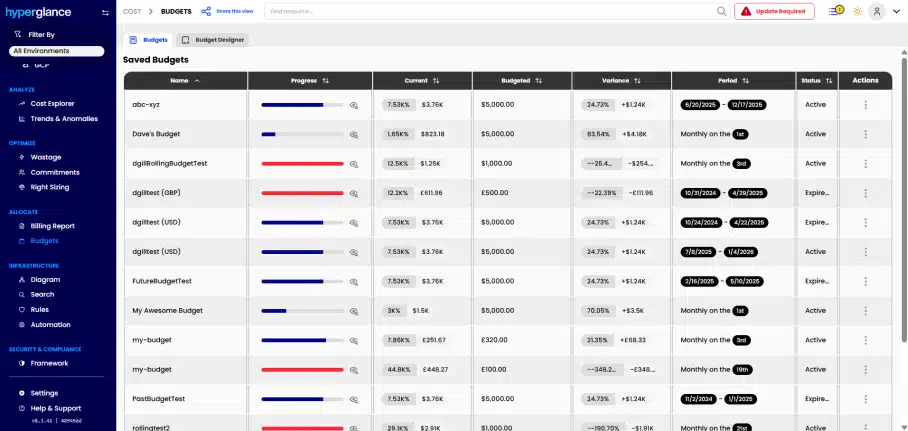
Tracking progress and variance of various saved cloud spending budgets
🏷️ Looking to level up your tagging strategy? Check out our tagging best practices.
Pillar 4: Codified controls and codeless policy automation
Even the best savings strategies crumble without governance. Governance provides the structure to keep environments in check and maintain automated cloud cost control, especially when multiple teams, accounts, and services are involved.
The modern best practice is to codify the rules where you need versioning and auditability (policy-as-code) and to automate the day-to-day checks and fixes with codeless rules for speed. Together, they deliver consistent, scalable control across AWS, Azure, and GCP.
Key practices:
- Enforce tags & names at create-time: Require cost-allocation tags and sensible naming when resources are provisioned; block or flag non-compliant resources.
- Use central, reusable policies: Keep guardrails in a shared library (e.g., AWS Config/Control Tower, Azure Policy, GCP Org Policy, Terraform/OPA) with Git-based review and change history.
- Layer fast, no-code checks: Add codeless rules for day-two issues (untagged spend, idle/oversized resources, orphaned volumes/IPs) to drive quick wins without pipeline work.
- Automate routing & remediation: Send violations to the right owners (Slack/Teams/Email/Jira) and, where approved, auto-tag, stop, resize, or quarantine non-compliant resources.
- Measure & iterate: Track policy hits, exceptions, and time-to-resolution; tighten controls where drift persists and relax where noise appears.
How Hyperglance helps:
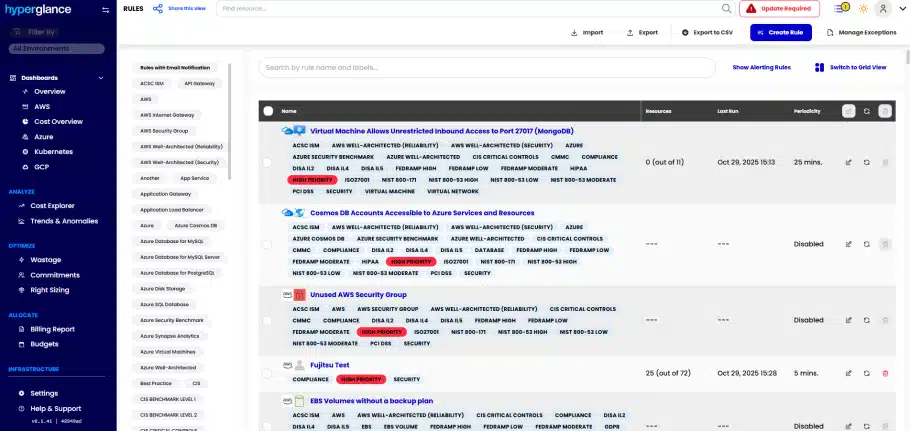
Hyperglance keeps teams ahead of policy violations and budget drift with no-code, rule-based detection and automation across AWS, Azure, and GCP.
Define conditions on tags, resources, or budgets and get real-time alerts via Slack, Teams, Email, or Jira so owners can act quickly, without slowing development. For approved scenarios, Hyperglance supports native remediation: automatically attach missing tags, open/assign Jira issues with context, schedule or stop idle instances, or flag orphaned storage for cleanup.
Everything is logged for auditability, and RBAC controls ensure only authorized users can modify rules or actions.
This blended approach, policy-as-code, where you need Git-level governance, codeless automation, and where you want speed, reduces compliance risk and keeps cloud environments consistently cost-efficient at scale.
The AWS dashboard summary for cost history, compliance, and service expenditure
Pillar 5: Teamwide Collaboration
Cloud cost efficiency is a shared responsibility. Engineers focus on performance, finance on predictability, and leadership on ROI. Collaboration aligns these priorities into a single strategy. Breaking down silos ensures better decision-making, increased accountability, and greater value.
Key practices:
Provide dashboards tailored to different stakeholders
Include cost reviews in sprint planning and quarterly reviews
Foster cross-functional FinOps reviews
How Hyperglance helps:
Hyperglance’s Role-Based Access Control for cloud cost automation lets you decide exactly who gets to see what. Instead of giving everyone access to everything, you can set explicit permissions based on roles, departments, or even individual responsibilities.
Maybe your finance team needs to view cost reports across all accounts, while engineers only need access to their own project’s usage and alerts. With RBAC, it’s easy to tailor those views so each team gets only what’s relevant to them, without clutter.
It’s not just about controlling access. It’s about reducing confusion, preventing mistakes, and helping teams focus on the insights that matter most to them. As your FinOps practice grows across different teams and regions, RBAC helps keep things organized, secure, and efficient. Everyone stays informed, no one is overwhelmed, and accountability is built into the process.

Identifying cloud resources that violate key regulatory compliance rules
🤝 Everything you need to know about FinOps-Ops-as-a-Service (FaaS)
Driving Long-term Cloud Cost Efficiency
By aligning with the five pillars of cloud cost efficiency, visibility, optimization, forecasting, governance, and collaboration, organizations can achieve sustainable results.
It takes the right balance of people, processes, and tools. Platforms like Hyperglance cloud management provide the automation and visibility needed to support this journey. No tool is a silver bullet, but with real-time insights, teams can unlock lasting efficiency.
Frequently Asked Questions (FAQs)
How to automate FinOps across AWS, Azure, and GCP?
You can automate FinOps by integrating cost monitoring, policy enforcement, and resource optimization across all major cloud providers. Tools like Hyperglance bring this together with unified dashboards, alerts, and automation policies.
How does Hyperglance support FinOps workflows in multicloud setups?
Hyperglance provides real-time visibility, policy enforcement, wastage detection, and forecasting across AWS, Azure, and GCP. This simplifies collaboration between engineering, finance, and leadership.
What is FinOps automation?
FinOps automation applies policies, alerts, and optimization workflows to cloud environments, eliminating the need for manual intervention. This ensures consistency, reduces cloud waste, and improves efficiency at scale.
Why Teams Choose Hyperglance in 2026
Hyperglance is a strong fit when cost data alone doesn’t give your team enough context.
That often happens when teams are asking questions like:
- What is running across our cloud estate?
- Who owns this resource?
- Why did this cost change?
- What else depends on it?
- Is it safe to clean up?
- Which policy, security, or compliance issue needs attention?
- Can we route this to the right owner or trigger an approved action?
We help teams connect cloud cost to infrastructure context across AWS, Azure, Google Cloud, and Kubernetes. That means FinOps, CloudOps, platform, security, and leadership teams can work from the same view.
Hyperglance is especially useful for mid-market, enterprise, MSP, public sector, and regulated teams where ownership, governance, automation, and data control matter.
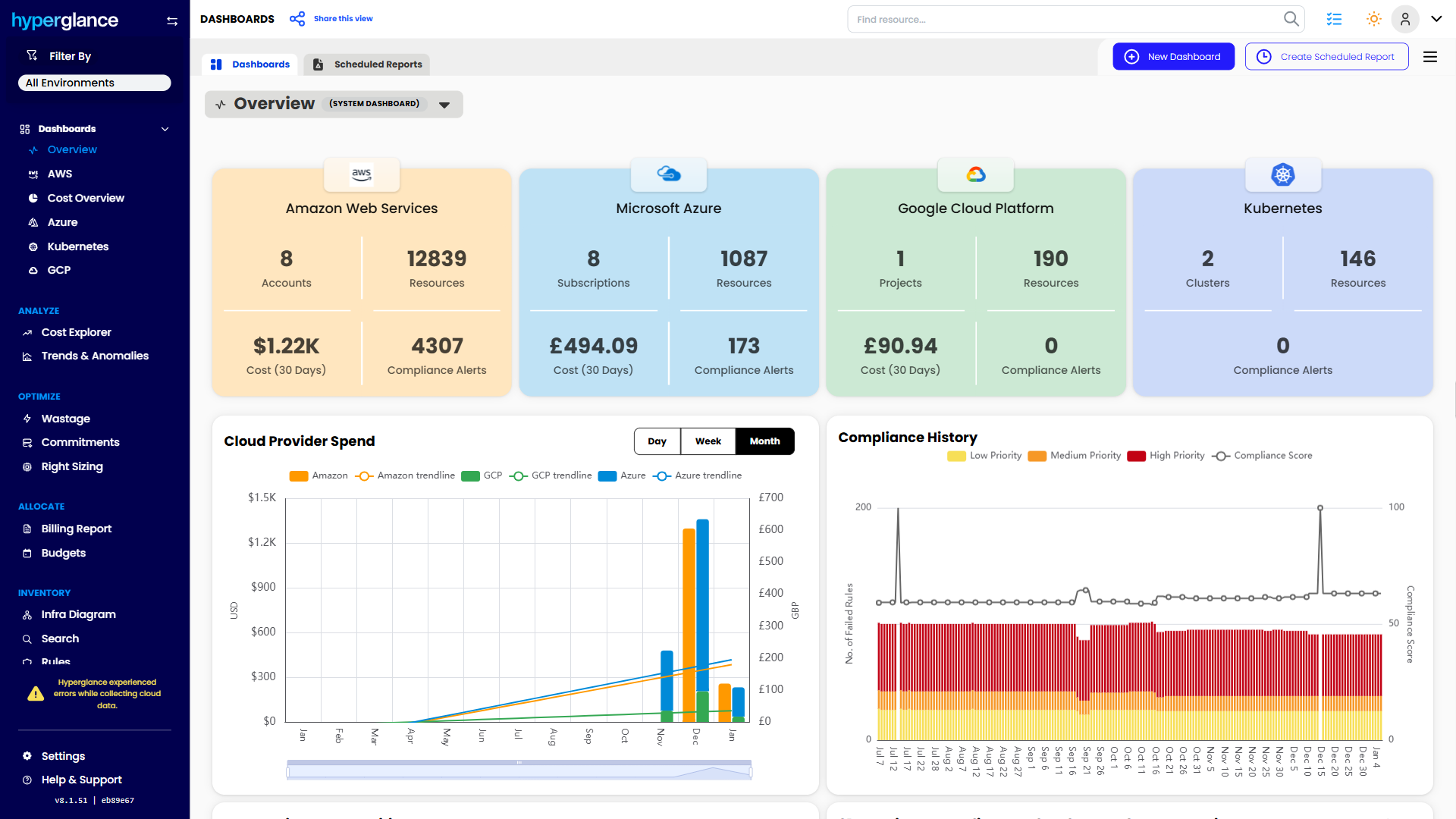
What You Can Do With Hyperglance
- See cost, resources, relationships, and ownership in one place
- Visualize cloud architecture with interactive diagrams
- Find waste, policy issues, and cost anomalies faster
- Route findings to the right team through existing workflows
- Use no-code automation for approved fixes
- Run Hyperglance in your own environment when data control matters
Want to see where Hyperglance fits in your FinOps stack?
Explore the product, start a free trial, or book a demo with the team.
About The Author: David Gill
As Hyperglance's Chief Technology Officer (CTO), David looks after product development & maintenance, providing strategic direction for all things tech. Having been at the core of the Hyperglance team for over 10 years, cloud optimization is at the heart of everything David does.