In this article
- Start With The Workload Question
- AI Infrastructure Waste Is Easy To Miss
- Find Every GPU-Backed Resource
- Check Who Owns Each AI Resource
- Look For Idle Development And Experiment Environments
- Review Kubernetes Workloads On Expensive Hosts
- Separate Real Waste From Necessary Spend
- Use Rules To Flag What Needs Attention
- Bring AI Spend Into Budgets And Reports
- Build A Repeatable Review Workflow
- Where Hyperglance Helps
- Final Thought
AI infrastructure can get expensive quickly.
That does not automatically mean the spend is waste. Some AI workloads need powerful models, low latency, GPU acceleration, and dedicated infrastructure. If the workload is valuable and the infrastructure is being used well, higher cost may be justified.
The challenge is that AI infrastructure waste can be hard to spot.
It often hides inside normal cloud operations: a notebook left running, a GPU-backed instance with no clear owner, a temporary test environment that became permanent, or a Kubernetes workload running on expensive capacity it does not need.
By the time the bill lands, the infrastructure story behind the spend may already be unclear.
Cloud teams need a way to find the parts of AI infrastructure that deserve review, without treating every expensive resource as a problem.
Start With The Workload Question
Before looking for infrastructure waste, teams should ask whether the workload itself makes sense.
Some AI cost optimization happens before anything is deployed.
For example:
- Does this task need a frontier model?
- Would a smaller model be good enough?
- Does the output need to be generated in real time?
- Could the work happen asynchronously?
- Does the workload need GPU acceleration?
- Could CPU inference meet the requirement?
- Does the business value justify the speed, scale, or infrastructure choice?
A meeting summary may not need to be generated instantly. A basic classification task may not need the largest available model. A low-priority internal workflow may be able to trade speed for lower cost.
These are important questions.
But once those decisions have been made, cloud teams still need to inspect the infrastructure those choices create.
That is where waste can hide.
AI Infrastructure Waste Is Easy To Miss
AI teams often move quickly.
A proof of concept turns into a pilot. A pilot becomes a production service. A temporary notebook supports one more experiment. A training environment remains available “just in case.” A Kubernetes cluster grows to support new workloads, then keeps growing.
This is normal cloud behavior. AI just makes the stakes higher because the supporting infrastructure can be more expensive.
Waste can appear as:
- GPU-backed instances running after experiments finish
- AI development environments left active
- Notebooks, apps, or test systems running outside working hours
- Expensive nodes used for workloads that do not need them
- Kubernetes pods scheduled onto the wrong node types
- AI resources with missing or vague tags
- Shared environments with no clear cost owner
- Spend that is not mapped to budgets, reports, teams, projects, or customers
The hard part is not always spotting that a cost exists.
The hard part is understanding what the cost belongs to, who owns it, and whether it is safe to change.
Find Every GPU-Backed Resource
The first practical step is simple: find the expensive infrastructure.
That means locating GPU-backed instances, GPU-backed Kubernetes nodes, and related resources across your cloud estate.
This sounds obvious, but it can be harder than expected in a large or fast-moving environment.
AI infrastructure may be spread across:
- AWS accounts
- Azure subscriptions
- Google Cloud projects
- Kubernetes clusters
- Development environments
- Shared platform accounts
- Sandbox or proof-of-concept areas
Different teams may use different naming patterns. Some resources may be tagged well. Others may not. Some may be attached to active production workloads. Others may be leftovers from experiments.
Cloud teams should not rely on memory or manual lists.
They need a current view of what exists.
With Hyperglance, teams can bring cloud inventory into one place and see where resources sit in the wider architecture. That matters because a GPU-backed resource is not just a line item. It may have relationships with networks, storage, security groups, applications, Kubernetes workloads, and other services.
Before deciding what to do, teams need that context.
Check Who Owns Each AI Resource
Once you find AI-related infrastructure, the next question is ownership.
Who is responsible for it?
This is where many AI cost reviews get stuck.
A resource might be clearly expensive, but if no one knows who owns it, no one wants to touch it. That is especially true when the resource might support a model, customer-facing application, data pipeline, or internal AI workflow.
Look for signs of weak ownership:
- Missing owner tags
- Missing application tags
- Generic project names
- Shared accounts or subscriptions
- “Test” or “sandbox” resources that have been running for months
- Resources with no clear team, product, customer, or business unit
- Environments that no one wants to shut down because no one knows what depends on them
The goal is not to shame teams for imperfect tagging. AI work often starts quickly, and governance may catch up later.
The goal is to make ownership gaps visible.
Hyperglance can help teams review tags, metadata, and cloud context, then use rules to flag resources that do not meet expected ownership standards.
For AI infrastructure, this is especially useful because missing ownership and high cost are a bad combination.
Look For Idle Development And Experiment Environments
AI development often involves experimentation.
That is fine. Teams need room to test ideas, tune models, compare approaches, and validate whether a use case is worth pursuing.
The waste starts when temporary environments quietly become permanent.
Common examples include:
- Notebooks left running
- Development apps that stay active after use
- Training environments kept alive between jobs
- Test instances running overnight or through weekends
- Proof-of-concept infrastructure that no one reviewed after the project ended
- Resources created for a demo, benchmark, or experiment that were never removed
SageMaker is a useful example here because it is easy for AI development environments to keep generating cost when resources remain active. AWS specifically supports idle shutdown for SageMaker AI resources to help manage costs and prevent overruns from idle, billable resources.
The same general principle applies beyond SageMaker.
If an AI resource is expensive, temporary, and not clearly owned, it should be reviewed.
Hyperglance can help by making these resources easier to find and by supporting rules for patterns such as missing tags, policy issues, expensive resource types, or resources that need human review.
The important word is “review.”
A tool should not blindly remove resources without context. It should help teams find the places where a safe decision needs to be made.
Review Kubernetes Workloads On Expensive Hosts
Kubernetes can make AI infrastructure harder to understand.
It gives teams flexibility, but it can also make the relationship between workloads, nodes, cloud resources, and cost less obvious.
This is especially important when GPU-backed nodes are involved.
Cloud teams should check whether:
- GPU-backed nodes are being used by workloads that actually need GPUs
- Non-AI workloads are landing on expensive GPU capacity
- GPU nodes are sitting underused
- AI workloads are spread inefficiently across nodes
- Workloads are scheduled onto the right node types
- Teams can connect pod activity back to the cloud resources carrying the cost
Kubernetes provides controls such as node affinity, node selectors, taints, and tolerations to influence where pods run.
These controls can help teams keep workloads on the right infrastructure. But they only help if teams can see what is happening and review whether the scheduling model still makes sense.
For example, a GPU-backed node pool might be created for model training or inference. Over time, other workloads may land there because labels, tolerations, or scheduling rules are too broad. The result is not always an obvious failure. The application may run perfectly. The cost problem may still be real.
Hyperglance can help teams see Kubernetes workloads alongside the supporting cloud infrastructure. That gives platform, DevOps, and FinOps teams a better starting point for investigating whether expensive capacity is being used as intended.
Separate Real Waste From Necessary Spend
Not all expensive AI infrastructure is waste.
That point matters.
A GPU-backed production inference service may be expensive because it supports an important customer-facing feature. A training environment may need to run for a valid project. A dedicated node pool may exist for performance, data control, or reliability reasons.
The aim is not to create a list of expensive resources and cut it blindly.
The aim is to find review points.
Useful questions include:
- Is this resource still needed?
- Who owns it?
- Is it tagged correctly?
- Which workload depends on it?
- Is it running in the right environment?
- Does it need GPU-backed capacity?
- Does it need to run continuously?
- Could it run on a smaller or cheaper resource?
- Could the workload run asynchronously?
- Is it covered by a budget?
- Is the cost visible in reports?
- Are there security, compliance, or data-control reasons for this setup?
- What would need to be checked before changing it?
These questions help teams avoid two bad outcomes.
The first is doing nothing because the environment is too unclear.
The second is making risky cuts without understanding the impact.
Good AI infrastructure cost management sits between those extremes.
Use Rules To Flag What Needs Attention
Rules are useful because AI infrastructure waste often follows patterns.
A single resource may not look dramatic on its own. But repeated patterns across accounts, subscriptions, projects, and clusters can become expensive quickly.
Examples of useful rule patterns include:
- GPU-backed resources missing owner tags
- AI-related resources missing project or cost allocation tags
- Expensive resources running in sandbox environments
- Resources using naming patterns linked to old experiments
- Kubernetes nodes or workloads that do not match expected labels
- Infrastructure that violates internal tagging or governance policies
- Resources that should be reviewed before budget periods close
Rules work best when they support human decisions, not when they pretend every issue has the same answer.
For example, a GPU-backed instance missing an owner tag should not automatically be deleted. But it should be flagged because the cost, ownership, and risk are unclear.
Hyperglance rules can help teams find these issues faster, so FinOps and engineering teams can focus their time on review and action rather than manual discovery.
Bring AI Spend Into Budgets And Reports
AI-related infrastructure should not sit outside normal cost management.
If AI spend is treated as a vague shared platform cost, it will be harder to manage, explain, or defend.
Cloud teams should aim to connect AI infrastructure spend to:
- Teams
- Projects
- Applications
- Environments
- Customers
- Business units
- Products
- Internal platforms
- Cost centers, where used
This supports better conversations.
Instead of asking, “Why is AI so expensive?” teams can ask:
- Which project is driving the increase?
- Which team owns the spend?
- Which environments are growing?
- Which workloads are expected to run continuously?
- Which costs are tied to customer-facing value?
- Which resources are unallocated or unclear?
Hyperglance budgets, dashboards, and billing reports can help teams keep AI-related infrastructure visible as part of ongoing cloud management.
That matters because AI cost should not only be reviewed after a spike.
It should be visible before the surprise arrives.
Build A Repeatable Review Workflow
One-off cleanup exercises can help, but they are not enough.
AI infrastructure is likely to keep changing. New models, experiments, workloads, data pipelines, and use cases will appear. Teams need a repeatable way to review what exists and what needs attention.
A simple workflow could look like this:
- Find GPU-backed and AI-related infrastructure
- Check tags and ownership
- Review architecture and dependencies
- Check Kubernetes workloads and node placement
- Flag missing ownership, policy issues, and expensive patterns
- Map spend to budgets and reports
- Review findings with the teams that own the workloads
- Decide what can be removed, resized, retagged, reconfigured, or left as-is
This workflow keeps the focus on safe action.
It also helps bridge the gap between teams.
FinOps can bring the cost view. Platform and DevOps can bring the infrastructure view. MLOps can explain workload purpose and performance needs. Security can review risk and data control. Business owners can confirm value.
The better those views connect, the easier it becomes to make sensible decisions.
Where Hyperglance Helps
Hyperglance helps cloud teams find AI infrastructure waste by connecting resources, ownership, Kubernetes context, rules, budgets, dashboards, and billing reports in a self-hosted platform.
It does not need to be positioned as a dedicated AI optimization tool.
Instead, it helps with the cloud management problems AI infrastructure creates.
Teams can use Hyperglance to:
- Find GPU-backed resources across supported cloud environments
- See those resources in architecture context
- Review tags, ownership, and metadata
- Understand how Kubernetes workloads sit on supporting cloud infrastructure
- Use rules to flag missing tags, policy issues, or expensive patterns
- Track spend through budgets, dashboards, and billing reports
- Support allocation and showback-style workflows
- Keep cloud visibility tooling under their own control
That shared context helps teams move from a vague concern, such as “AI spend is rising”, to more useful questions:
- What is running?
- Where is it running?
- Who owns it?
- Why does it exist?
- What does it cost?
- Is it governed properly?
- What needs review?
- What can safely change?
That is where practical AI infrastructure cost management begins.
Final Thought
AI infrastructure waste is not always obvious from the bill.
A cost report can show that spend increased, but it may not explain whether the cause is an idle notebook, an unnecessary GPU-backed resource, a Kubernetes scheduling issue, poor tagging, unclear ownership, or a valid production workload.
Cloud teams need more than cost data.
They need infrastructure context.
When teams can connect AI-related spend to resources, workloads, ownership, architecture, rules, budgets, and reports, they can find the right places to review.
Some resources will need to stay.
Some will need better tags.
Some will need a clearer owner.
Some will need to move.
Some may be safe to shut down.
The value is not just in finding waste. It is in knowing what to do next.
Why Teams Choose Hyperglance in 2026
Hyperglance is a strong fit when cost data alone doesn’t give your team enough context.
That often happens when teams are asking questions like:
- What is running across our cloud estate?
- Who owns this resource?
- Why did this cost change?
- What else depends on it?
- Is it safe to clean up?
- Which policy, security, or compliance issue needs attention?
- Can we route this to the right owner or trigger an approved action?
We help teams connect cloud cost to infrastructure context across AWS, Azure, Google Cloud, and Kubernetes. That means FinOps, CloudOps, platform, security, and leadership teams can work from the same view.
Hyperglance is especially useful for mid-market, enterprise, MSP, public sector, and regulated teams where ownership, governance, automation, and data control matter.
What You Can Do With Hyperglance
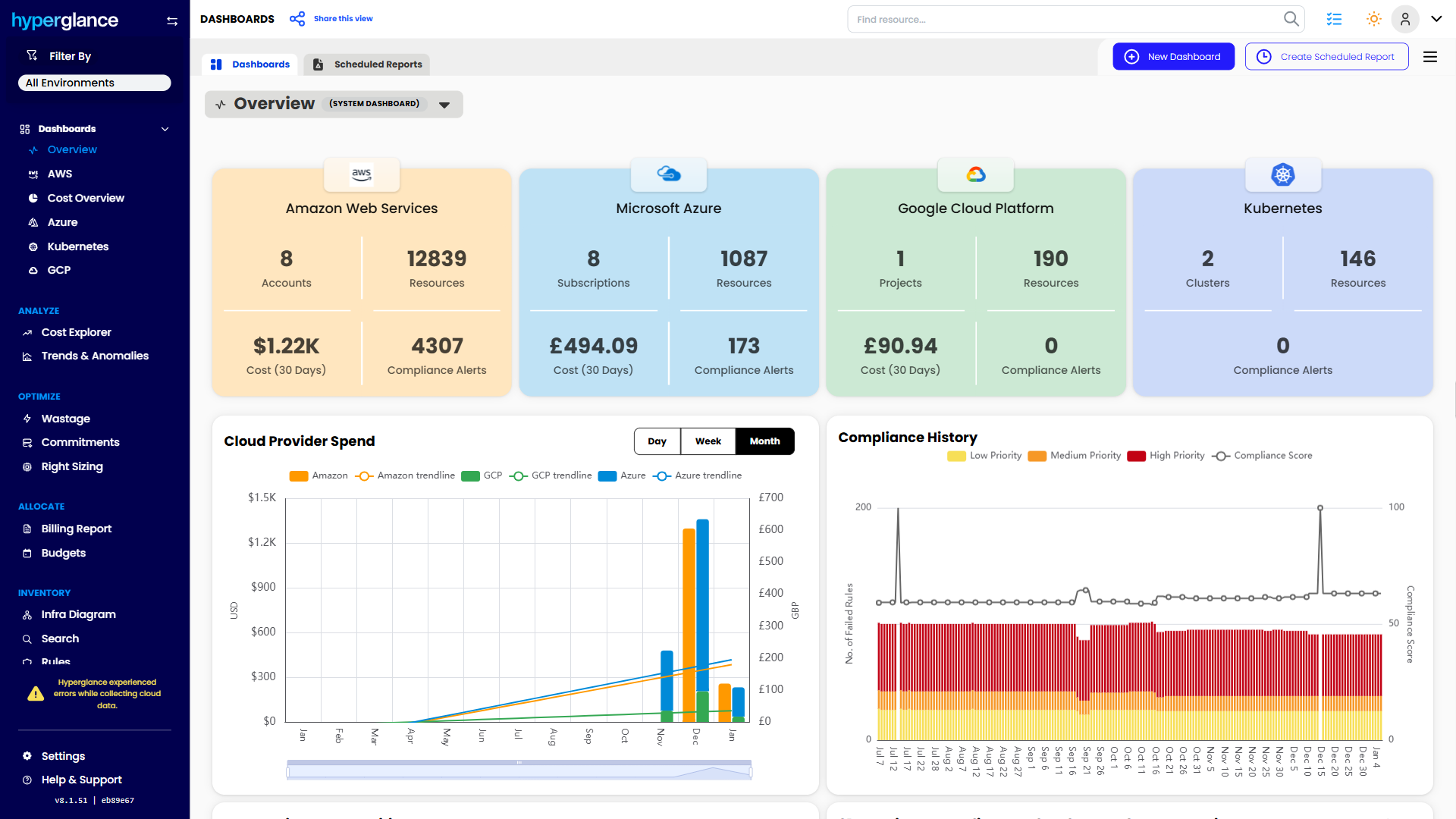
- See cost, resources, relationships, and ownership in one place
- Visualize cloud architecture with interactive diagrams
- Find waste, policy issues, and cost anomalies faster
- Route findings to the right team through existing workflows
- Use no-code automation for approved fixes
- Run Hyperglance in your own environment when data control matters
Want to see where Hyperglance fits in your FinOps stack?
Explore the product, start a free trial, or book a demo with the team.

About The Author: David Gill
As Hyperglance's Chief Technology Officer (CTO), David looks after product development & maintenance, providing strategic direction for all things tech. Having been at the core of the Hyperglance team for over 10 years, cloud optimization is at the heart of everything David does.