In this article
- AI Spend Is Becoming A Shared Cloud Problem
- Not All AI Waste Is Infrastructure Waste
- Infrastructure Still Matters Once AI Workloads Hit The Cloud
- GPU-Backed Resources Raise The Cost Of Poor Visibility
- Kubernetes Can Hide AI Cost And Ownership Problems
- FinOps For AI Needs Shared Context
- Where Hyperglance Fits
- What To Review First
- Final Thought
Cloud cost management is rarely just a finance problem.
For regulated teams, it quickly becomes a control problem too.
You need to understand where spend is coming from, but you also need to know where your FinOps platform runs, what it can see, what data leaves your environment, and whether it can take action inside your cloud accounts.
That matters for public sector teams, financial services, healthcare, defense-adjacent organizations, critical infrastructure providers, managed service providers, and any team working under strict security or data-control requirements.
A standard SaaS FinOps tool may be the right fit for many organizations. But when data residency, private networking, authorization boundaries, least privilege, or internal security policies matter, the evaluation has to start somewhere else.
Before you compare dashboards, reports, forecasts, or rightsizing recommendations, start with the operating model.
What Regulated Teams Should Check First
A good evaluation should start with practical control questions.
Features still matter, but they come after the basics.
1. Where Does The Platform Run?
Start here.
Does the platform run as SaaS, in the vendor’s environment, in your cloud account, in your Kubernetes cluster, on your virtual machine, or in another customer-managed setup?
There is no universal right answer.
SaaS can be faster to deploy and easier to maintain. Self-hosted software usually requires more ownership from your team, but it may fit better when you need tighter control over data, access, and network paths.
For regulated teams, this question often shapes the whole shortlist.
Ask:
- Can the platform run inside our cloud environment?
- Can it run in a private network?
- Does it need inbound internet access?
- Does it call home?
- How are updates handled?
- Can it support offline or restricted update processes?
- What infrastructure do we need to operate it?
The more sensitive your environment, the more these details matter.
2. What Data Leaves The Environment?
FinOps tools can process a lot of cloud metadata.
That metadata may not include customer data, but it can still expose sensitive operational context. Account names, resource names, network structures, tags, workload names, and service relationships can reveal how your environment works.
Ask vendors to explain exactly what data leaves your environment, if anything.
Useful questions include:
- Is billing data stored outside our environment?
- Is resource metadata sent to the vendor?
- Are logs, diagnostics, or telemetry exported?
- Can telemetry be disabled?
- What data is used for support?
- What data is used for product analytics?
- Are AI features involved?
- If AI features exist, can they be disabled?
- Are subprocessors involved?
- Where is exported data stored?
Be careful with vague answers. “Secure by design” is not enough. You need to know what happens in your actual deployment model.
3. What Permissions Does It Need?
A FinOps tool should not need broad write access just to show cost, inventory, or optimization opportunities.
For many teams, the safest starting point is read-only access for discovery and analysis. Write permissions should be optional, deliberate, and clearly scoped.
Ask:
- Can the platform run read-only?
- Which IAM roles or permissions are required?
- Are write permissions optional?
- Which features require write access?
- Can different teams have different levels of access?
- Is access controlled through SSO, SAML, OIDC, or another identity provider?
- Is role-based access control available?
- Is there an audit trail for user activity and automated actions?
This is especially important when the tool can make changes, trigger automation, or integrate with ticketing and IT service management systems.
Finding waste is useful. Changing infrastructure is riskier.
The tool should make that boundary clear.
4. Can It Work Inside Government Or Regulated Cloud Environments?
Some teams need support for environments such as AWS GovCloud or Azure Government.
Others need to operate inside specific authorization boundaries, private network designs, or isolated deployment models.
Don't assume that “cloud support” means “regulated cloud support.”
Ask:
- Does the platform support AWS GovCloud?
- Does it support Azure Government?
- Does it support private or isolated deployments?
- Does it have hardening guidance?
- Does it support customer-managed certificates?
- Can it work through proxies?
- Can it run without public internet access?
- What documentation is available for security review?
Be precise here.
A platform being suitable for regulated deployment is not the same thing as the platform making your environment compliant.
Compliance depends on how the tool is deployed, configured, operated, monitored, and governed.
5. Does It Connect Cost To Ownership?
Cost data is much easier to act on when you know who owns the resource.
This is one of the most common places FinOps efforts get stuck.
A report says spend is rising. Finance wants an answer.
Engineering sees a list of resources, but nobody knows who owns them, why they exist, or whether they support something important.
That creates delay.
In regulated environments, the delay can be even worse because teams may be rightly cautious about changing anything without context.
Ask:
- Can the platform group cost by owner, team, application, account, tag, or business unit?
- Can it help identify unowned resources?
- Can it show missing or inconsistent tags?
- Can it support showback or chargeback?
- Can it reflect how our organization is actually structured?
- Can it help route findings to the right team?
Ownership isn't just a reporting feature. It is what turns a cost issue into someone’s responsibility.
6. Does It Connect Cost To Architecture?
Cost spikes rarely happen in isolation.
A resource may support an application, depend on another service, sit inside a network path, or be part of a regulated workload. Before someone resizes it, stops it, deletes it, or changes its configuration, they need to understand what it connects to.
This is where many FinOps tools are weaker.
They can show the cost problem, but not enough architectural context to support a safe decision.
Ask:
- Can the platform show live cloud inventory?
- Can it show relationships between resources?
- Can it map dependencies?
- Can it generate architecture views or diagrams?
- Can it show cost alongside architecture, risk, and ownership?
- Can engineers check what a resource supports before acting?
This matters because the best cost recommendation is not always the safest action.
A resource can look wasteful in a report and still be risky to change without context.
7. Does It Support Safe Action?
A useful FinOps platform should help teams move from finding issues to fixing them.
But, for regulated teams, that path needs control.
You may not want a tool to make changes directly. You may prefer to create tickets, route issues into ServiceNow or Jira, notify owners in Slack or Teams, or provide a clear review step before action happens.
Ask:
- Can findings be routed into existing workflows?
- Does the platform integrate with Jira, ServiceNow, Slack, Teams, or other tools?
- Can teams review recommendations before changes are made?
- Can automation be limited to specific actions?
- Can write-enabled actions be separated from read-only analysis?
- Is there an audit trail?
- Can actions be approved, tracked, and reported?
The goal is not just automation. It is controlled action.
That distinction matters.
8. How Strong Is The Evidence?
Vendor claims need evidence, especially in regulated environments.
Look for clear documentation, not just high-level messaging.
Useful evidence may include:
- Deployment architecture
- Security documentation
- Trust center materials
- Audit reports
- Access-control documentation
- Data-flow diagrams
- Hardening guides
- Marketplace deployment details
- Support access policies
- Compliance-related documentation
- Customer-managed deployment guides
Also look for what is missing.
A vendor may have a strong product but weak public documentation. That does not mean the product is unsuitable, but it does mean your team should ask more direct questions before relying on the claim.
How Different Tool Types Fit
A regulated team might use more than one type of tool.
For example, a platform team may use OpenCost or Kubecost for detailed Kubernetes allocation, Cloud Custodian for policy enforcement, and a broader platform for multi-cloud inventory, ownership, cost, governance, and action.
Here is a simple way to think about the fit.
Full-Stack Self-Hosted Platforms
Best when you need broad multi-cloud visibility, cost context, ownership, governance, and workflow support.
They are usually a better fit when:
- You use AWS, Azure, Google Cloud, and/or Kubernetes
- You have many accounts, subscriptions, projects, or teams
- Ownership is unclear
- Tagging is inconsistent
- You need showback or chargeback
- You need to connect cost with architecture and risk
- You need a customer-controlled deployment model
Kubernetes Cost Platforms
Best when Kubernetes is the main problem.
They are usually a better fit when:
- Cluster costs are rising
- Teams need namespace or workload-level allocation
- Platform teams need showback or chargeback
- Workloads are over-provisioned
- You need detailed Kubernetes rightsizing recommendations
- You want an open or customer-run cost layer inside your cluster
Policy And Remediation Engines
Best when your team already knows what good behavior looks like and wants to enforce it.
They are usually a better fit when:
- You need policy-as-code
- You want to clean up unused resources
- You want to enforce tags
- You want off-hours controls
- You need cloud governance automation
- You have engineering resources to manage policy logic
They are less likely to replace a full FinOps platform because they do not usually give finance, engineering, and leadership the same shared cost view.
A Practical Evaluation Checklist
Before choosing a FinOps platform for a regulated or customer-controlled environment, ask these questions.
Deployment And Data Control
- Where does the platform run?
- Can it run inside our environment?
- What data leaves our boundary?
- Can telemetry be disabled?
- Can it run in private or restricted network setups?
- How are updates handled?
- What support access does the vendor need?
Access And Permissions
- Can it run read-only?
- Which permissions are required?
- Which features require write access?
- Can write access be limited?
- Does it support SSO?
- Does it support role-based access control?
- Is user and automation activity logged?
Cloud And Environment Coverage
- Does it support AWS, Azure, Google Cloud, and Kubernetes?
- Does it support AWS GovCloud or Azure Government, if needed?
- Does it support multi-account or multi-subscription estates?
- Does it work across hybrid or complex cloud environments?
FinOps Capability
- Does it support cost allocation?
- Does it support budgets?
- Does it support anomaly detection?
- Does it support forecasting?
- Does it support rightsizing?
- Does it support waste detection?
- Does it support showback or chargeback?
- Can it group spend by owner, team, application, or business unit?
Architecture, Ownership, And Action
- Can it show live inventory?
- Can it connect cost to architecture context?
- Can it identify ownership gaps?
- Can it show dependencies or relationships?
- Can it route issues into existing workflows?
- Can it support safe, reviewed action?
- Can it help teams understand what is safe to change?
Evidence And Assurance
- Is there public security documentation?
- Is there a trust center?
- Are audit reports available?
- Are data-flow diagrams available?
- Are deployment guides clear?
- Are claims about regulated environments specific?
- Are AI features, telemetry, and subprocessors clearly explained?
The Bigger Point: Cost Data Needs Context
Regulated teams do not just need to know that cloud spend is rising.
They need to know:
- What is running
- Where it lives
- Who owns it
- What it costs
- What it connects to
- What risk it carries
- What action is safe
That's why deployment model matters, but it is not the whole story.
A self-hosted FinOps tool can help with control. But the strongest outcome comes when cost data is connected to the real cloud environment behind it.
Dashboards can point to a problem. Context helps teams decide what to do next.
For regulated cloud teams, that difference matters.
Where Hyperglance Fits
Hyperglance is built for teams that need cloud cost visibility inside a customer-controlled deployment model.
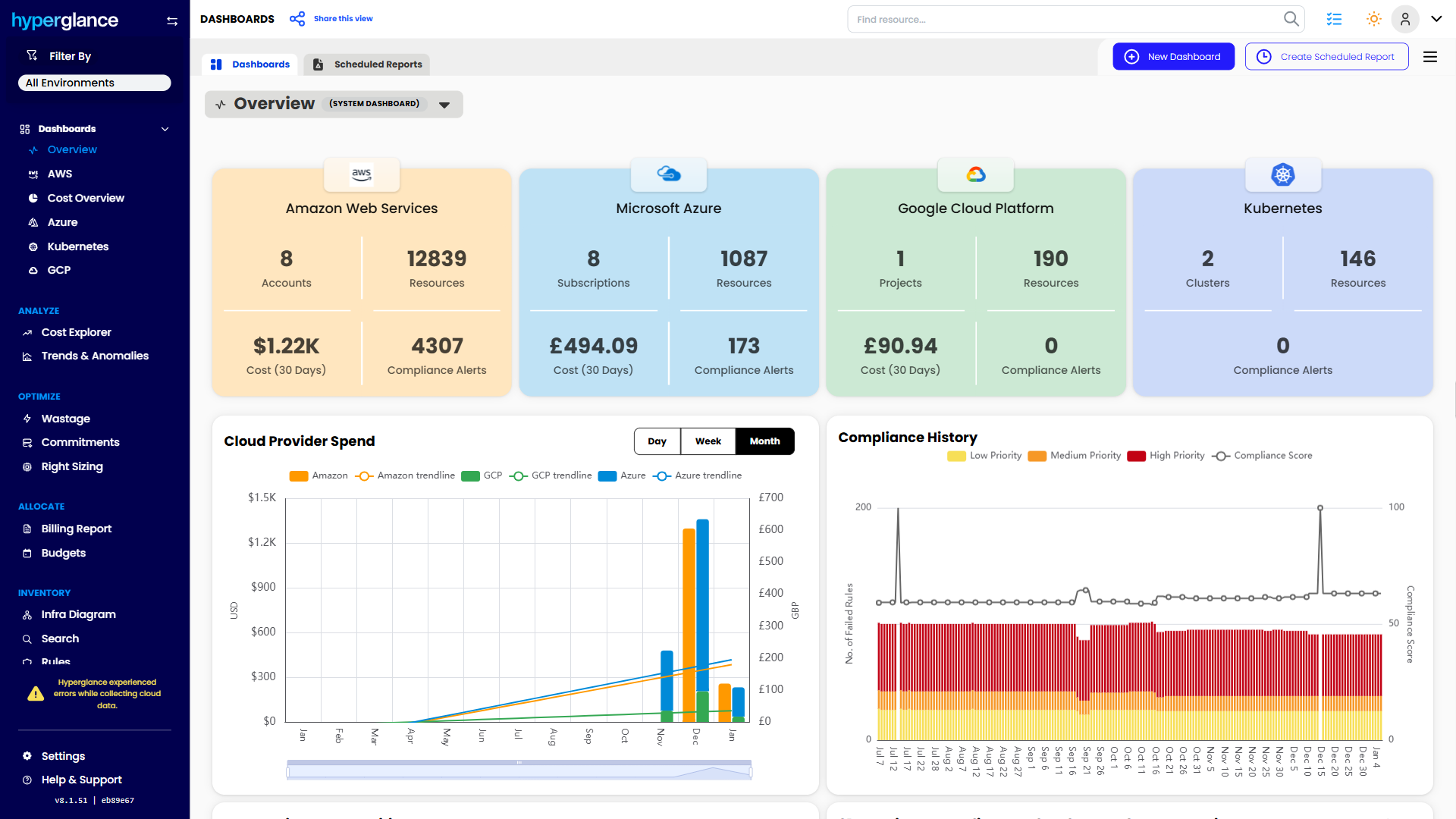
It is self-hosted, supports AWS, Azure, Google Cloud, Kubernetes, AWS GovCloud, and Azure Government, and helps teams connect cost to inventory, architecture, ownership, compliance, and action.
That means teams can look beyond the bill and understand the environment behind it.
You can see what is running, where it lives, what it costs, who may own it, how it connects, and what needs attention. From there, teams can route findings into existing workflows and decide what is safe to change.
For regulated organizations, that combination is vital.
Because cloud cost management is not just about finding savings. It is about making better decisions without losing control.
Why Teams Choose Hyperglance in 2026
Hyperglance is a strong fit when cost data alone doesn’t give your team enough context.
That often happens when teams are asking questions like:
- What is running across our cloud estate?
- Who owns this resource?
- Why did this cost change?
- What else depends on it?
- Is it safe to clean up?
- Which policy, security, or compliance issue needs attention?
- Can we route this to the right owner or trigger an approved action?
We help teams connect cloud cost to infrastructure context across AWS, Azure, Google Cloud, and Kubernetes. That means FinOps, CloudOps, platform, security, and leadership teams can work from the same view.
Hyperglance is especially useful for mid-market, enterprise, MSP, public sector, and regulated teams where ownership, governance, automation, and data control matter.
What You Can Do With Hyperglance
- See cost, resources, relationships, and ownership in one place
- Visualize cloud architecture with interactive diagrams
- Find waste, policy issues, and cost anomalies faster
- Route findings to the right team through existing workflows
- Use no-code automation for approved fixes
- Run Hyperglance in your own environment when data control matters
Want to see where Hyperglance fits in your FinOps stack?
Explore the product, start a free trial, or book a demo with the team.
About The Author: David Gill
As Hyperglance's Chief Technology Officer (CTO), David looks after product development & maintenance, providing strategic direction for all things tech. Having been at the core of the Hyperglance team for over 10 years, cloud optimization is at the heart of everything David does.