In this article
- Why FinOps Is Different In Government
- What FinOps Really Is
- Public Sector FinOps Challenges
- The FinOps Tool Landscape For Public Sector Teams
- Best FinOps Tools For Government And Public Sector Teams
- Quick Comparison Table
- AWS GovCloud And Azure Government Support
- Detailed Supplier Notes
- Tools Researched But Not Included
- FinOps In Action: Public Sector Benefits
- Why Hyperglance Is A Strong Fit
- Ready To Simplify Government Cloud Costs?
- FAQs
Government and public sector cloud teams need more than cloud cost reporting.
They need FinOps tooling that can work inside secure environments, support audit requirements, respect data boundaries, and help engineering teams understand what is safe to change.
That makes the deployment model just as important as the dashboard. A platform may have strong cost allocation features, but it may still be a poor fit if it cannot support AWS GovCloud, Azure Government, private deployment, strict access controls, or the organization’s procurement path.
This guide compares FinOps and cloud cost management tools through a public sector lens. We look at deployment model, government cloud support, cost allocation, governance, security context, and how each tool helps teams move from cloud spend visibility to action.
The Rising Importance Of FinOps In Government
As government cloud estates grow, cost control becomes harder to separate from security, ownership, and accountability. Teams need to know what is running, who owns it, what it costs, and whether it supports the mission.
That’s where FinOps comes in: a strategic, collaborative approach that helps public sector teams find efficiency and stay accountable.
The right tools help teams move from late cost surprises to clearer allocation, stronger governance, and faster engineering action.
Next, we’ll explain why the government needs FinOps solutions and what sets public-sector requirements apart from those in private industry.
Why the Government Needs FinOps Solutions
Managing cloud costs in the public sector isn’t just about keeping expenses in check; it’s about delivering on trust and mission.
Government agencies run on fixed budgets, tight regulations, and a need for total transparency. Unlike private companies driven by profit, government teams must deliver services and ensure security with funds that aren't their own.
A few reasons why FinOps in the government sector matters include:
- Strict compliance and security requirements: Government IT systems must meet stringent regulations, including FedRAMP, DoD SRG, and ITAR. That often limits the services you can use and where you can store data, making cost management even more challenging.
- Multi-year budgeting and long procurement cycles: Government budgeting is a slow and methodical process. Funding is often fixed for the fiscal year, making it difficult to react to the real-time, variable nature of cloud spending. Long procurement cycles also hinder the rapid adoption of the latest cloud technologies and tools.
- Public accountability: Every dollar spent by a government agency is subject to public and legislative scrutiny. Cloud cost overruns aren't just a business problem; they're a matter of public trust. Transparency and audit readiness are paramount.
Without a strong FinOps practice, you risk wasting resources, delayed launches, and perhaps worst of all, a hit to public trust.
What FinOps Really Is (and Why It’s Different)
FinOps is more than a cost-cutting strategy; it's a way to unite finance, tech, and business teams to make cloud spending decisions based on what really matters. According to the FinOps Foundation, it’s a cultural practice focused on maximizing business value from cloud spend through timely, data-driven decisions. Three core principles shape how agencies succeed:
- Collaboration: IT and finance work side by side to make informed choices.
- Ownership: Engineers and developers understand how architecture affects the budget.
- Business value: Spending supports the mission, not just the bottom line.
FinOps Phases
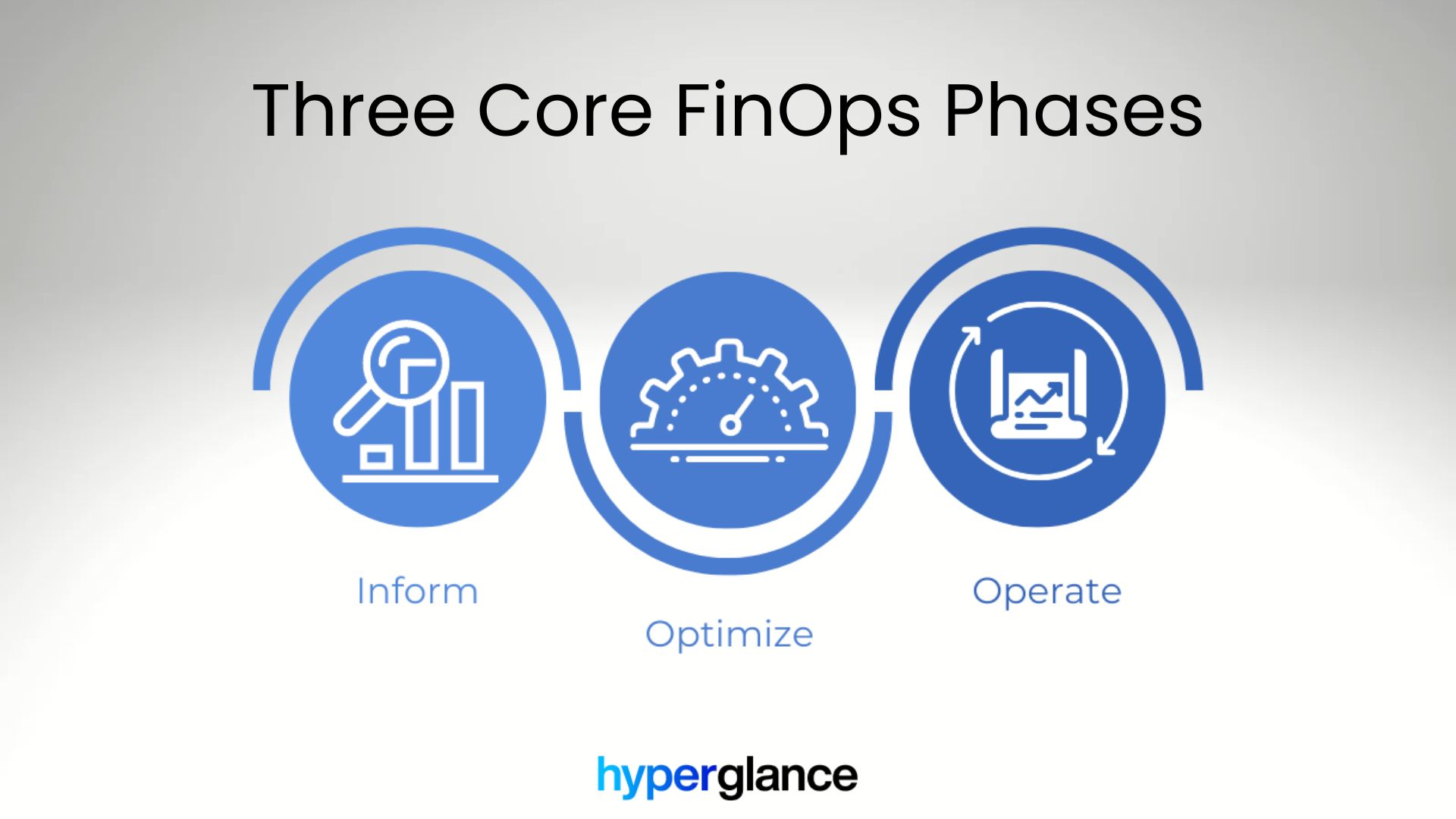
This framework operates in a continuous cycle with three key stages:
- Inform: Gain real visibility, break down cloud spend by team, project, or mission.
- Optimize: Find and eliminate waste by right-sizing and automating environments.
- Operate: Set real-time cost alerts, automate governance, and create feedback loops for ongoing improvement.
For the public sector, this framework is about translating a private-sector mindset of "return on investment" into "delivering mission outcomes with efficiency."
It’s about embedding cost accountability into existing government budgeting and procurement processes, ensuring every dollar is used effectively to serve the public.
Navigating the Unique Challenges of FinOps in Government
While the principles of FinOps are universal, adopting them in a government setting presents distinct hurdles. A clear FinOps public sector playbook is often necessary to navigate these.
Procurement and Acquisition Hurdles
Getting new tools in place is rarely quick or easy. Government procurement is all about thoroughness and transparency, but it’s also famously slow.
Every new SaaS vendor faces a complex landscape of compliance and security checks, which means integrating new FinOps tools can take months, sometimes longer.
Compliance and Data Sovereignty
Data residency and compliance are non-negotiable for public sector teams.
Many government entities are required to host data within specific regions or secure environments, such as AWS GovCloud or Azure Government.
This can limit the range of cloud services and third-party tools they can utilize, making it more challenging to find a solution that aligns with their unique security profile.
Cultural and Organizational Resistance
Old habits die hard. In many agencies, IT, finance, and procurement work in silos, and cloud costs often get pushed into the “IT’s issue” bucket.
Without someone championing shared accountability, introducing FinOps can stall.
It takes clear leadership and a bit of a cultural shift to get everyone rowing in the same direction.
The FinOps Tool Landscape for Public Sector Teams
While the challenges are real, the good news is that the market for FinOps solutions has matured significantly.
When considering the best FinOps tools for government agencies, you’ll find two main groups:
Cloud-Native Cost Tools
Every primary cloud provider offers its own set of cost management tools.
AWS has Cost Explorer, Azure has Cost Management, and GCP has its billing reports.
They’re free and work seamlessly with their parent clouds, which is handy. But the catch: they make it tough to see across multi-cloud estates, require a lot of manual wrangling, and don’t automate much.
For government teams managing large, multi-cloud environments, these tools quickly show their limits.
Third-Party FinOps Platforms
Most agencies are reaching beyond the basics and investing in third-party platforms.
These bring multi-cloud cost tracking, customizable budgets, automated anomaly alerts, and deep reporting.
When public sector teams evaluate platforms, they must closely monitor compliance, integration, and visibility features.
Best FinOps Tools For Government And Public Sector Teams
Not every FinOps platform is a strong fit for government cloud environments.
Some tools are excellent SaaS FinOps products, but have limited public evidence around AWS GovCloud, Azure Government, FedRAMP, private deployment, or data control.
For that reason, this list separates stronger public sector fits from tools that may still be useful, but need more careful procurement and security review.
AWS GovCloud And Azure Government Support
For government buyers, cloud environment support should be checked early. A tool can be strong for commercial AWS or Azure but still fall short if it cannot work with AWS GovCloud, Azure Government, required data boundaries, or internal authorization processes.
Note: Government cloud and FedRAMP coverage can vary by product, package, region, and contract. Confirm scope with each vendor before shortlisting.
Criteria For Choosing A Government FinOps Platform
Selecting a FinOps platform for government cloud environments is not just a feature comparison. The first question is whether the tool can operate inside your security, procurement, and data-control requirements.
Use these criteria when building a shortlist:
- Deployment model: Can the platform run in your own cloud, a private environment, or an approved government cloud boundary?
- Government cloud support: Does it explicitly support AWS GovCloud, Azure Government, or the specific cloud environment your agency uses?
- FedRAMP status: Is the relevant product FedRAMP authorized, in process, inherited through another platform, or not listed?
- Data control: What billing, inventory, metadata, configuration, and ownership data leaves your environment?
- Cost allocation: Can it map spend by account, subscription, tag, owner, project, program, department, or mission?
- Architecture context: Can engineers see what a resource supports before deciding whether to resize, remove, or change it?
- Audit support: Can the platform help teams explain spend, ownership, policy status, and change history?
- Workflow and automation: Can findings be routed to the right owner, or does remediation still happen manually?
Detailed Supplier Notes
1. Hyperglance: Best For Secure, Self-Hosted FinOps And Cloud Governance
Hyperglance is a strong fit for government, defense, public sector, and regulated teams that need cloud cost visibility without giving up control of their deployment boundary.
It runs agentlessly inside your own VPC or VNet, so teams can keep cost, inventory, ownership, security, and compliance context within their own environment. That matters when SaaS-only tooling creates security, procurement, or data residency problems.
Deployment model: Self-hosted inside your own cloud environment.
Government cloud support: Hyperglance supports AWS GovCloud and Azure Government.
Where Hyperglance Fits Best
- Teams that need self-hosted FinOps and cloud governance
- Organizations using AWS GovCloud or Azure Government
- Cloud estates where cost issues need architecture and ownership context
- Public sector, defense, MSP, and regulated environments with strict data-control needs
- Teams that want to route findings, automate approved fixes, and reduce manual cost reviews
Why It Matters
Cost data can show where spend changed. It does not always show what the resource supports, who owns it, whether it is exposed, or whether it is safe to change. Hyperglance connects cost to live infrastructure context, so FinOps, CloudOps, platform, security, and leadership teams can work from the same view.
2. IBM Apptio Cloudability Government: Best For Enterprise FinOps And Public Sector Financial Accountability
IBM Apptio Cloudability is a long-established FinOps platform for allocation, budgeting, forecasting, showback, and chargeback across complex cloud estates.
For public sector teams, its main strength is financial accountability. It can help large organizations map cloud spend to departments, programs, applications, or mission areas, then use that data for planning and forecasting.
Deployment model: SaaS, with a government-focused Cloudability offering.
Where It Fits Best
- Large public sector organizations with mature FinOps practices
- Teams that need budgeting, forecasting, showback, and chargeback
- Finance and technology teams that need shared reporting
- Organizations already aligned with IBM or Apptio procurement paths
What To Check
- Current FedRAMP status for the exact product and package being evaluated
- AWS GovCloud and Azure Government ingestion support
- Data handling, residency, and retention model
- Whether the SaaS deployment model fits your internal authorization process
Suggested Verdict
Strong fit for enterprise public sector FinOps, especially where financial planning and allocation are the main priorities. Less suitable where the buyer needs a self-hosted platform inside its own cloud boundary.
3. CloudCheckr / Flexera: Best For Detailed Cloud Cost Reporting And Governance Checks
CloudCheckr has a long history in cloud cost management, reporting, security checks, and governance. It has often been evaluated by public sector, MSP, and regulated teams that need detailed reporting across cloud environments.
Because CloudCheckr has changed ownership over time, buyers should verify the current product roadmap, packaging, support model, and government cloud coverage before shortlisting it.
Deployment model: SaaS.
Where It Fits Best
- Teams that need detailed reporting and cost optimization checks
- Organizations with existing CloudCheckr history or procurement familiarity
- MSPs and teams managing multiple cloud accounts
- Buyers that want cost, security, and governance reporting in one tool
What To Check
- Current AWS GovCloud support
- Current Azure Government support
- Current FedRAMP or public sector authorization status, if required
- Product roadmap and support following ownership changes
Suggested Verdict
Worth evaluating for reporting-heavy public sector and MSP use cases, but avoid overclaiming current GovCloud, Azure Government, or FedRAMP coverage without vendor confirmation.
4. CloudBolt: Best For Hybrid Cloud Management And Governance
CloudBolt is broader than a pure FinOps platform. It focuses on hybrid cloud management, provisioning, automation, orchestration, and governance across complex environments.
That makes it relevant for public sector teams that need more than cloud cost reporting, especially where cloud management, policy, and automation are part of the same program.
Deployment model: SaaS and hybrid cloud management options. Verify exact deployment model during procurement.
Where It Fits Best
- Hybrid cloud and private cloud environments
- Teams that need provisioning, governance, and automation
- Organizations managing both public cloud and on-premises infrastructure
- Public sector teams that want cloud management and cost governance together
What To Check
- AWS GovCloud support
- Azure Government support
- FedRAMP or public sector authorization status, if required
- Whether the buyer needs broad cloud management or FinOps-first cost depth
Suggested Verdict
Strong candidate where FinOps is part of a wider hybrid cloud governance program. Less direct if the requirement is purely cost allocation, forecasting, or unit economics.
5. Kion: Best For Cloud Governance, Financial Control, And Account Management
Kion is a strong candidate for government and public sector cloud teams because it combines cloud governance, financial management, automation, and account control.
It is especially relevant where the FinOps requirement sits alongside cloud access control, compliance guardrails, account vending, and governance across complex AWS environments.
Deployment model: Cloud governance platform. Verify exact deployment and hosting model during procurement.
Where It Fits Best
- Government teams that need cloud governance and financial management together
- AWS-heavy estates with account control and policy requirements
- Organizations that need guardrails, budgets, and ownership controls
- Teams that want FinOps linked to cloud governance workflows
What To Check
- AWS GovCloud support
- Azure Government support, if Azure is in scope
- FedRAMP status or public sector authorization path
- How deployment, data handling, and customer boundaries work
Suggested Verdict
Likely a better public sector fit than several SaaS-only FinOps tools, especially for AWS-heavy government cloud governance. Include with clear verification notes rather than overclaiming coverage.
6. CloudZero: Best For Engineering-Led Cost Allocation And Unit Economics
CloudZero is an engineering-focused cloud cost platform that helps teams connect spend to services, products, features, teams, and business metrics.
For public sector teams, its strongest fit is where engineering teams need to understand the drivers behind cloud spend and explain cost in terms of services delivered.
Deployment model: SaaS.
Where It Fits Best
- Engineering teams that need cost visibility by product, service, or feature
- Kubernetes-heavy environments where allocation is hard
- Teams that want unit economics rather than only account-level reporting
- Organizations that can use a SaaS FinOps platform within their security model
What To Check
- AWS GovCloud support
- Azure Government support
- FedRAMP status, if required
- Whether sensitive cost, usage, and metadata can leave the environment
Suggested Verdict
Useful for engineering-led FinOps, but public sector buyers should treat it as a SaaS FinOps option and verify government cloud, data residency, and authorization requirements early.
7. Finout: Best For Cost Allocation Across Cloud, Kubernetes, And SaaS Spend
Finout is a SaaS FinOps platform focused on granular cost allocation, virtual tagging, Kubernetes cost visibility, and unit economics.
It can be useful for teams that need to normalize cost data across different systems and allocate spend more flexibly than native billing tools allow.
Deployment model: SaaS.
Where It Fits Best
- Teams with complex tagging and allocation problems
- Organizations that need cost visibility across cloud, Kubernetes, and SaaS
- Engineering and finance teams that need shared cost reporting
- Buyers that are comfortable with a SaaS FinOps model
What To Check
- AWS GovCloud support
- Azure Government support
- FedRAMP status, if required
- Data residency, access, and metadata handling
- Public sector customer evidence
Suggested Verdict
Good modern FinOps platform, but only a partial fit for this article unless the buyer can use SaaS tooling and does not require verified government cloud deployment support.
8. Exivity: Best For Showback, Chargeback, And Billing Automation
Exivity focuses on billing, showback, chargeback, and cost allocation across hybrid and multi-cloud environments.
It may be relevant for public sector organizations, shared service providers, or MSP-style teams that need to produce internal bills, recover costs, or report usage across departments, tenants, or programs.
Deployment model: Private or self-managed deployment options may be available. Verify the exact model during procurement.
Where It Fits Best
- Teams that need billing and chargeback more than cloud governance automation
- Shared service or MSP-style operating models
- Hybrid estates with complex allocation requirements
- Organizations that want flexible cost data ingestion and reporting
What To Check
- AWS GovCloud support
- Azure Government support
- Public sector references
- Security, identity, and deployment controls
- Whether it meets broader FinOps, governance, and automation needs
Suggested Verdict
Worth including as a chargeback and billing-focused option, but caveat that it is not the same type of platform as Hyperglance, Cloudability, or CloudBolt.
Tools Also Worth Checking
Some well-known cloud cost and governance tools may still be relevant, depending on your environment. We have kept them outside the main list because the strongest public sector shortlists should start with deployment model, government cloud support, data control, and current product fit.
VMware CloudHealth
CloudHealth has a long history in enterprise cloud cost management and governance. It may still be worth reviewing if your organization already uses VMware or Broadcom products. Before shortlisting it, check the current product roadmap, packaging, licensing model, support options, and public sector coverage.
OpsCompass
OpsCompass has historically focused on cloud governance, compliance, and risk monitoring. It may be relevant where governance is the main priority. Before adding it to a public sector shortlist, check the current product scope, deployment model, supported cloud environments, and customer support path.
Yotascale
Yotascale was previously known as a cloud cost management platform. For current public sector evaluations, buyers should check whether it is still available, actively supported, and suitable as a standalone option before including it in a shortlist.
FinOps In Action: Real-World Public Sector Benefits
Public sector FinOps usually shows up in a few repeatable scenarios:
- An agency needs clearer showback across departments, programs, or mission areas
- A platform team needs to catch spend anomalies early and route them to the right owners
- A security or audit team needs cost, configuration, and access evidence without stitching together spreadsheets and screenshots
- An engineering team needs to know whether an unused or underused resource is safe to remove
- A cloud center of excellence needs one view of cost, ownership, policy status, and architecture across accounts or subscriptions
That is why deployment model, allocation depth, audit trails, and ownership mapping matter just as much as dashboards.
In government, the best FinOps tool is rarely the one with the most charts. It is the one that fits the organization’s security model and helps teams act with confidence.
Why Hyperglance Is A Strong Fit For Government Cloud Teams
Hyperglance is a strong fit when public sector teams need cost visibility, governance, and action without sending sensitive operational context into a SaaS-only model.
Because Hyperglance is self-hosted, teams can keep deployment and data handling under their own control. That is especially relevant for organizations with data residency requirements, internal security reviews, government cloud environments, or strict procurement rules.
Hyperglance Helps Teams Answer Questions Like:
- What is running across AWS, Azure, Google Cloud, and Kubernetes?
- Who owns this resource, account, subscription, or workload?
- What does it cost?
- Is it tagged correctly?
- Is it exposed, misconfigured, or failing a policy check?
- What does it connect to?
- Is it safe to resize, stop, delete, or route for review?
That connection between cost, ownership, architecture, risk, and action is where Hyperglance differs from tools that focus mainly on financial reporting.
Ready to Simplify Government Cloud Costs?
The right tool depends on your deployment boundary, reporting needs, and FinOps maturity.
If you are evaluating for U.S. government or wider public sector use, start by checking deployment model, cost allocation depth, audit support, and how well the platform fits your procurement and security requirements.
FAQs
▸What should government teams look for in a FinOps tool?
Government teams should look beyond dashboards. The most important checks are deployment model, data control, AWS GovCloud support, Azure Government support, FedRAMP status where required, cost allocation depth, ownership mapping, audit reporting, and workflow support.
▸Do all FinOps tools support AWS GovCloud?
No. Some tools support commercial AWS environments but do not clearly support AWS GovCloud. Public sector buyers should verify AWS GovCloud support directly with each vendor before shortlisting.
▸Do all FinOps tools support Azure Government?
No. Azure Government support should not be assumed from standard Azure support. Buyers should ask vendors to confirm Azure Government coverage, data ingestion, identity model, and any feature gaps.
▸Is FedRAMP required for every FinOps tool?
It depends on the organization, the data being processed, and the deployment model. SaaS tools used by U.S. federal agencies often face FedRAMP requirements. Self-hosted tools may follow a different internal authorization path because the buyer controls the deployment environment.
▸Why does self-hosting matter for public sector FinOps?
Self-hosting can help teams keep cost, inventory, ownership, and configuration context inside their own cloud boundary. That can make security review, data residency, and internal authorization easier for some public sector and regulated teams.
▸Which FinOps tool is best for secure or private deployment?
Hyperglance is the strongest fit in this list for teams that want self-hosted FinOps and cloud governance inside their own cloud environment.
▸Which FinOps tool is best for enterprise budgeting and forecasting?
IBM Apptio Cloudability Government is a strong option for enterprise financial planning, budgeting, forecasting, showback, and chargeback.
▸Can Hyperglance support AWS GovCloud and Azure Government?
Yes. Hyperglance supports AWS GovCloud and Azure Government. It helps teams visualize resources, understand relationships, track cost, identify ownership gaps, review risks, and manage governance across complex cloud environments.
Why Teams Choose Hyperglance in 2026
Hyperglance is a strong fit when cost data alone doesn’t give your team enough context.
That often happens when teams are asking questions like:
- What is running across our cloud estate?
- Who owns this resource?
- Why did this cost change?
- What else depends on it?
- Is it safe to clean up?
- Which policy, security, or compliance issue needs attention?
- Can we route this to the right owner or trigger an approved action?
We help teams connect cloud cost to infrastructure context across AWS, Azure, Google Cloud, and Kubernetes. That means FinOps, CloudOps, platform, security, and leadership teams can work from the same view.
Hyperglance is especially useful for mid-market, enterprise, MSP, public sector, and regulated teams where ownership, governance, automation, and data control matter.
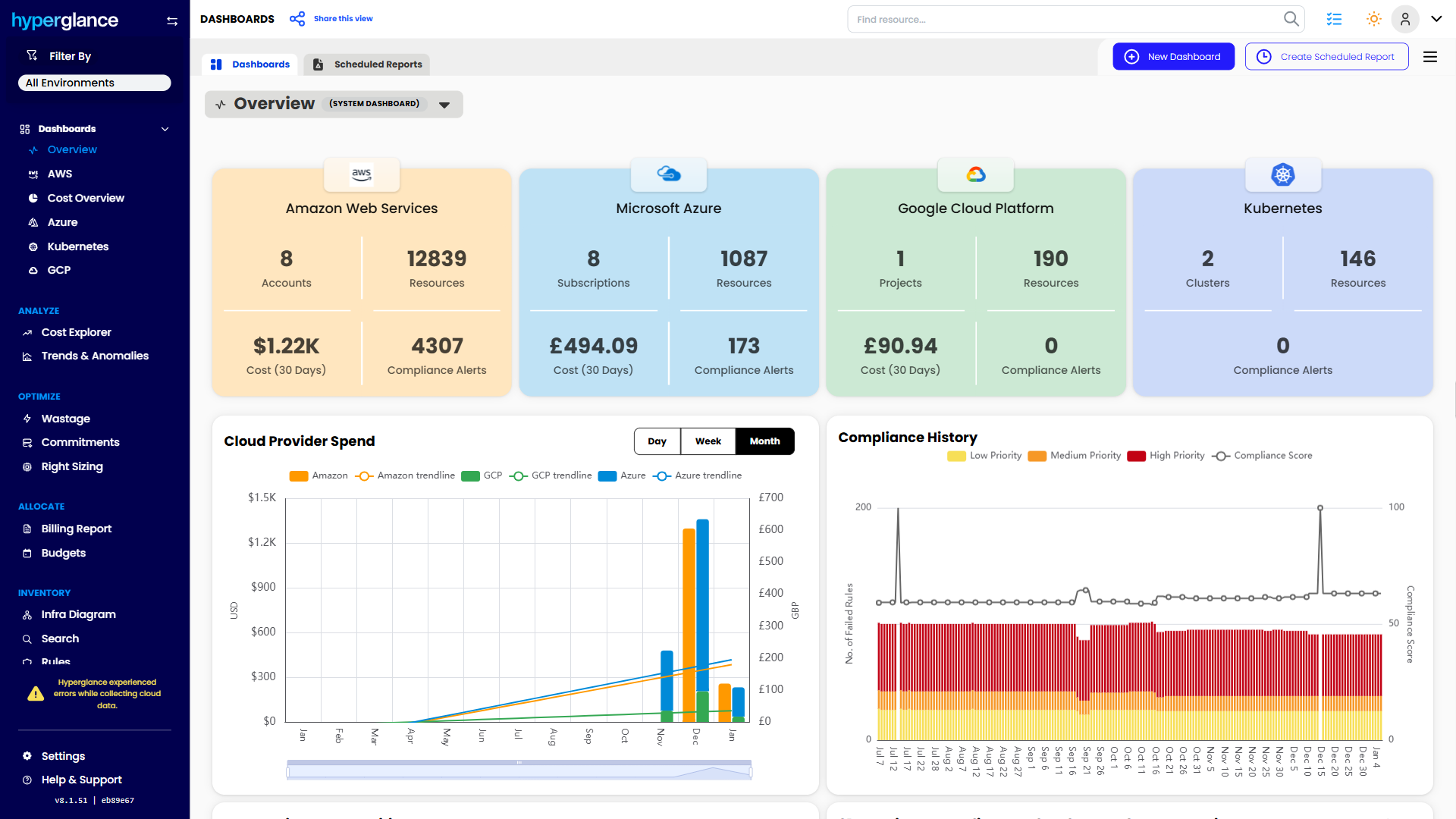
What You Can Do With Hyperglance
- See cost, resources, relationships, and ownership in one place
- Visualize cloud architecture with interactive diagrams
- Find waste, policy issues, and cost anomalies faster
- Route findings to the right team through existing workflows
- Use no-code automation for approved fixes
- Run Hyperglance in your own environment when data control matters
Want to see where Hyperglance fits in your FinOps stack?
Explore the product, start a free trial, or book a demo with the team.

About The Author: Stephen Lucas
As Hyperglance's Chief Product Officer (CPO), Stephen is responsible for the Hyperglance product roadmap. Stephen has over 20 years of experience in product management, project management, and cloud strategy across various industries.