Cloud cost optimization gets messy when it stays in reports.
Finance sees the spend. Engineering owns the resources. Platform teams manage the systems. Leaders want answers fast. But unless those teams share the same view of cost, ownership, architecture, and risk, FinOps can quickly become a cycle of meetings, exports, and one-off cleanup projects.
Good FinOps practice is not just about finding savings. It is about making cost part of everyday cloud operations.
In this guide, we’ll look at practical FinOps best practices that help teams move from visibility to action, including cleaner cost allocation, better tagging, waste detection, anomaly response, rightsizing, and workflow automation.
Turning FinOps Principles Into Everyday Habits

Most teams already speak the FinOps language. They know what Reserved Instances are, they've heard about tagging, and someone on the team has run a cost report at least once. But knowing the language and actually practicing it are two different things.
The goal isn't a big, dramatic cleanup once a quarter. It's building steady, repeatable habits, small actions that compound over time into real savings and real accountability. Automation is what makes that possible at scale.
FinOps Best Practices for Cloud Cost Optimization

1) Establish a FinOps Team and Culture
Before you touch a single resource, you need the right people in the room. A FinOps team, working group, or Cloud Cost Center of Excellence (CCoE) brings engineering, finance, product, and leadership into one shared operating rhythm.
It does not need to start as a large team. But someone needs clear responsibility for cost visibility, ownership, reporting, and follow-up. The FinOps Foundation defines FinOps as an operating model that creates financial accountability through collaboration between engineering, finance, and business teams. That should be the anchor.
With executive sponsorship behind it, the team can set policies, define KPIs, and help engineers and budget holders take real ownership of cloud usage.
2) Share Clear, Trusted Cost Data
FinOps requires finance, engineering, and product teams to work from the same cost data. Different reports and filters make optimization difficult.
In practice, shared data means:
- One common dataset across teams
- Billing exports as the primary source
- Consistent filtering and allocation logic
- Clear ownership for maintaining mappings
When everyone trusts the same data, decisions become faster and less disputed.
3) Allocate Costs So Owners Can Act
Visibility without allocation only gets you so far.
Cost data needs to map back to the teams, products, and environments that actually drive it, and that starts with simple, stable tagging rules that everyone agrees on and actually sticks to. Keep tag keys consistent across environments and enforce them at deployment time, not after the fact.
The harder problem is shared infrastructure: databases, networking, or platform services that don't neatly belong to one team. Define a clear plan upfront, whether that is proportional splits based on usage, direct mapping, or a platform overhead charge, so shared costs never quietly pile up in an "unallocated" bucket that nobody owns.
Finally, don't rely on manual tag audits. Use tooling to continuously surface resources with missing or inconsistent tags, and route those gaps back to the right owner as actionable tickets. When cost gaps become someone's to-do list rather than a static report, they actually get fixed.
4) Define Metrics and Unit Economics
Total cloud spend tells you how much you are paying. Unit economics tells you whether you are getting your money's worth.
The practical approach is simple: pick one or two unit metrics per product, trend them weekly, and treat any big swing as a prompt to investigate rather than a cause for alarm. A sudden spike in the cost per transaction after a deployment indicates that something has changed. A steady unit cost as usage scales tells you the team is doing things right.
Cloud Unit Economics (CUE) breaks total spend down into meaningful units tied directly to business value: cost per active user, cost per transaction, cost per API call. When a new feature ships and your cost per transaction jumps 20%, that is a signal worth acting on. When it holds steady as usage doubles, that is proof that your architecture is scaling efficiently.
Build dashboards that consistently surface these metrics for engineering, finance, and product teams. That shared view is exactly what the FinOps Foundation means by "timely, data-driven decision making," and it is what turns cost reviews from awkward conversations into productive ones.
5) Focus Early Effort on Waste
If you are just getting started with FinOps, do not try to solve everything at once. The highest-return starting point is almost always the same:
- Idle instances
- Oversized VMs
- Unattached volumes
- Storage or backups that have outlived their purpose
These resources are costing you real money right now for zero business value. One audit can surface surprising results. Unattached EBS volumes, for example, have been found sitting unused for months, quietly accumulating hundreds of dollars in unnecessary charges.
The key is to stop treating waste detection as a one-off exercise. Automate the continuous discovery of these patterns, so nothing slips back in through the gaps between manual reviews.
6) Use Commitments Carefully
Commitment discounts can create meaningful savings, but they work best when they are based on stable usage.
For example, AWS Savings Plans advertise savings of up to 72% compared with On-Demand pricing, but the real value depends on how accurately your commitments match actual usage. Buying commitments based on guesses is one of the fastest ways to turn a discount strategy into a sunk cost.
The rule is simple: analyze at least 90 days of actual usage before committing to any purchase, and cover only your predictable, steady-state baseline. Leave the spiky, variable workloads on demand or Spot.
From there, review coverage and utilization regularly. Your workloads will shift over time, and your commitment strategy needs to shift with them. Unused commitments are just as wasteful as idle resources.
7) Use Budgets and Anomalies as Signals
Budgets and anomaly alerts are not gatekeepers. They are signals, and the way you act on them matters more than the fact that they fired.
Set budgets at the right level of granularity: by team, product, or environment, so each owner has a clear picture of what they are responsible for. A single org-wide budget tells you something is wrong, but gives nobody the context to fix it.
When an anomaly alert fires, the instinct is to panic. Resist it. The goal is to investigate first: something changed, and you need to understand what happened before reacting. Hyperglance makes that easier by letting you drill straight from an alert into the exact resources driving the spike, so you spend less time hunting and more time solving.
Finally, define clear ownership for who responds to each signal. Alerts that land in a shared inbox get ignored.
8) Rightsize and Schedule Resources Proactively
Cloud environments get over-provisioned quietly. An instance that was sized for a peak six months ago is often still running at the same size today, well below capacity, burning money around the clock.
Rightsizing means continuously matching resources to what workloads actually need, not what feels safe at the time of provisioning. Scheduling takes it further.
For predictable non-production workloads, scheduling can make a big difference. AWS’ Instance Scheduler documentation gives an example of up to 70% savings when instances only need to run during regular business hours. The exact saving depends on the schedule and workload.
The critical word here is continuous. Workloads change, teams grow, and new services get deployed. Rightsizing is not a quarterly cleanup project. Automate the detection and scheduling, and treat it as an ongoing operational habit rather than a one-off task.
9) Integrate FinOps With Existing Workflows
The biggest reason FinOps recommendations get ignored is that they live in a separate tool that engineers never open. If a cost issue surfaces in a report that nobody reads, it does not get fixed.
The fix is straightforward: bring cost findings into the tools your team already uses every day. Hyperglance can route issues directly into Jira tickets, ServiceNow incidents, Slack messages, or email, so engineers see cost problems in the same place they manage everything else.
Treat recurring cost problems the same way you treat technical debt or incidents. Assign them, track them, and close them. When cost hygiene lives inside your existing workflows, it stops being a FinOps team responsibility and becomes a shared engineering habit.
How Hyperglance Helps Automate Parts of FinOps
Hyperglance helps teams turn FinOps recommendations into practical cloud operations.
Instead of looking at cost data in isolation, teams can connect spend to the resources, relationships, ownership, tags, policy issues, and dependencies behind it. That context matters when you need to decide what is safe to resize, stop, clean up, assign, or escalate.
Because Hyperglance is self-hosted and agentless, it is especially useful for teams that need visibility across AWS, Azure, GCP, Kubernetes, AWS GovCloud, or Azure Government without sending cloud data into a SaaS platform.
Find Waste And Tagging Gaps Quickly
Hyperglance runs rules continuously to identify:
- Underused or orphaned resources
- Missing or inconsistent tags
- Policy alignment issues
This reduces reliance on manual reviews.
Route Findings Into Action
Teams choose how to handle findings:
- Create Jira or ServiceNow tickets
- Send Slack alerts
- Run predefined cleanup or resizing actions
- Require approvals for higher-risk changes
Automation reduces effort while keeping teams in control.
Use Visual Context Before Changes
Optimization can be risky if dependencies are unclear. Hyperglance visualizes resource relationships so teams can:
- Understand dependencies
- Assess impact
- Avoid disrupting production
Automations And Remediation
Rules can trigger automated actions or simply notify owners. Teams automate well-understood fixes while keeping complex decisions manual.
Improve Tagging And Cost Allocation
Hyperglance normalizes inconsistent tagging (e.g., prod vs. Production), improving spend grouping without requiring perfect tagging discipline.
This strengthens showback and reduces unallocated spend.
Next Steps: Automate a Few Small Wins
You do not need to overhaul your entire FinOps practice overnight. The teams that make the most progress start small: they pick two or three practices where the pain is most visible today, add a layer of light automation, and build from there.
That could be automated waste detection feeding directly into a Jira backlog. It could be a scheduling rule that stops dev servers after hours. It could be a tagging policy that flags missing tags before they compound into unallocated spend. Any one of those, done consistently, creates real momentum.
Want to see how this works in practice?
Book a Hyperglance demo, and we’ll show how teams connect cloud diagrams, cost data, ownership, rules, and automation to move from FinOps recommendations to action.
FinOps & Cloud Cost Optimization FAQs
▸What are the most important FinOps best practices?
The most important FinOps best practices are building shared cost ownership, using trusted cost data, allocating spend to teams or products, improving tagging, finding waste continuously, reviewing commitments, tracking anomalies, and routing cost issues into existing workflows. The goal is not just to reduce spend. It is to help teams make better cloud decisions every day.
▸Where should a team start with FinOps?
Start with visibility and ownership. Make sure teams can see what they are spending, which resources are driving that spend, and who owns them. From there, focus on obvious waste, missing tags, budget alerts, and recurring anomalies. These early wins help build trust before you move into deeper optimization or automation.
▸What should I automate first in FinOps?
Start with low-risk, high-confidence actions. Good examples include flagging idle resources, routing missing tags to owners, alerting teams about budget anomalies, and scheduling non-production workloads outside business hours. Avoid fully automated deletion or resizing until you have clear ownership, dependency visibility, and approval steps in place.
▸How do I move from manual cloud cost reporting to automated FinOps?
Begin by automating visibility, not enforcement. Use a trusted billing data source, standardize reporting logic, and create recurring alerts for waste, missing tags, budget changes, and anomalies. Once teams trust the data and ownership model, you can add workflow automation, approvals, and controlled remediation.
▸How does tagging support FinOps?
Tagging helps connect cloud spend to teams, products, environments, and business units. Without consistent tags, costs often end up in shared or unallocated buckets that nobody owns. Good tagging does not need to be complicated. Start with a small set of required tags, enforce them at deployment, and use automation to find missing or inconsistent values.
▸How can teams manage FinOps across multiple cloud providers?
Multi-cloud FinOps works best when each provider’s cost and resource data is brought into a consistent view. Teams need to compare spend across AWS, Azure, GCP, and Kubernetes without losing the context behind each resource. Standardized tagging, shared allocation rules, and common reporting views help teams avoid managing each cloud in isolation.
▸Can automation help allocate shared cloud costs, such as Kubernetes costs?
Yes, but shared costs still need clear rules. Automation can help group resources, enforce tags, track usage signals, and highlight gaps. For Kubernetes, shared infrastructure costs may need to be allocated by namespace, workload owner, usage, or a predefined chargeback model. Automation makes this more consistent, but teams still need to agree how shared costs should be split.
▸What are the risks of automating cloud cost optimization?
The main risk is acting without enough context. Automated actions that resize, stop, or delete resources can affect performance or availability if dependencies are not clear. Many teams start with notification-only automation, then add approvals and controlled actions once they have confidence in ownership, resource relationships, and rollback processes.
▸How does FinOps integrate with Jira or ServiceNow?
FinOps integrates with Jira, ServiceNow, Slack, and similar tools by turning cost findings into operational work. Instead of leaving recommendations in a report, teams can create tickets, assign owners, track progress, and close the loop. This makes cloud cost optimization part of the same workflow teams already use for incidents, changes, and technical debt.
Why Teams Choose Hyperglance in 2026
Hyperglance is a strong fit when cost data alone doesn’t give your team enough context.
That often happens when teams are asking questions like:
- What is running across our cloud estate?
- Who owns this resource?
- Why did this cost change?
- What else depends on it?
- Is it safe to clean up?
- Which policy, security, or compliance issue needs attention?
- Can we route this to the right owner or trigger an approved action?
We help teams connect cloud cost to infrastructure context across AWS, Azure, Google Cloud, and Kubernetes. That means FinOps, CloudOps, platform, security, and leadership teams can work from the same view.
Hyperglance is especially useful for mid-market, enterprise, MSP, public sector, and regulated teams where ownership, governance, automation, and data control matter.
What You Can Do With Hyperglance
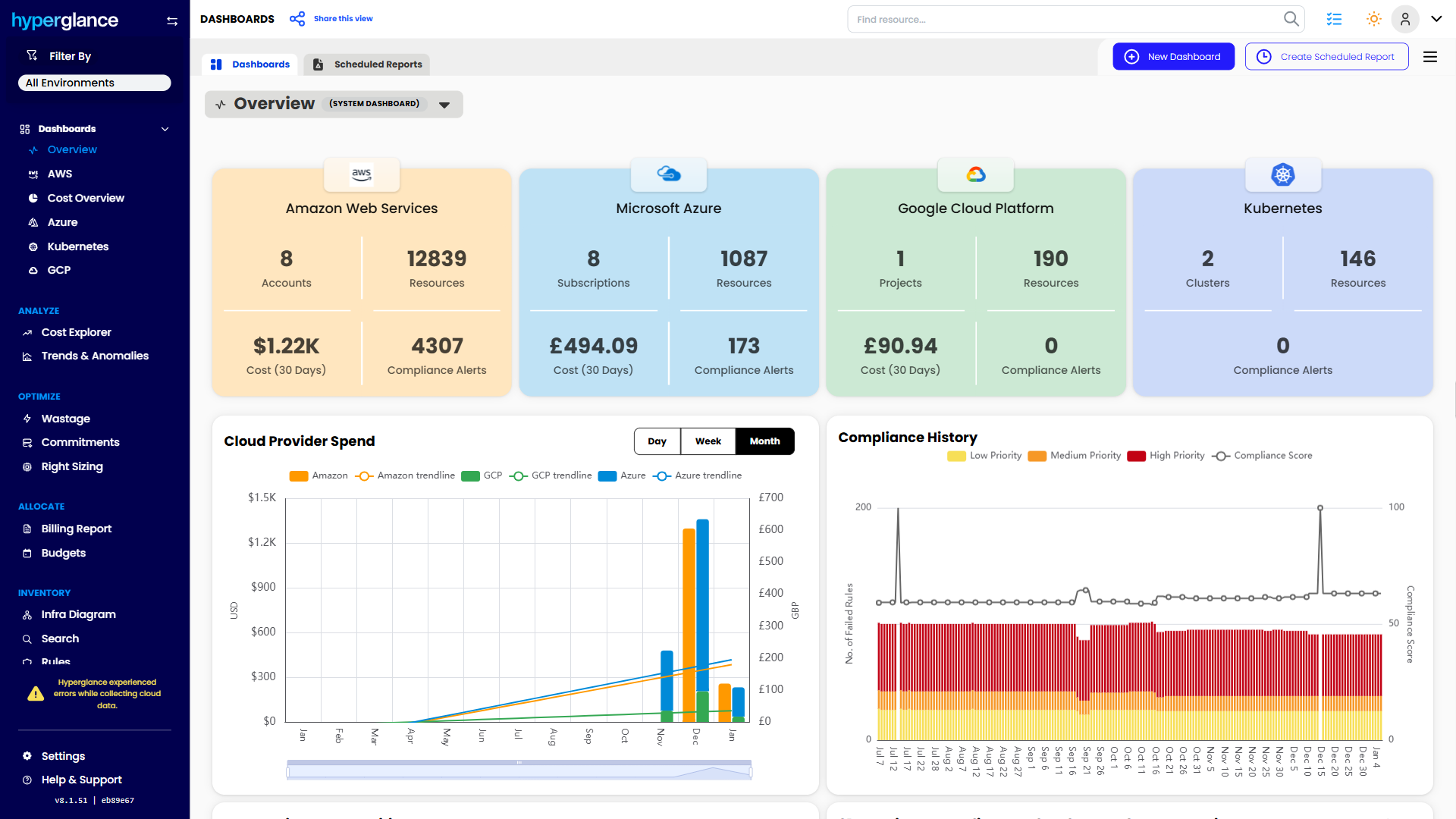
- See cost, resources, relationships, and ownership in one place
- Visualize cloud architecture with interactive diagrams
- Find waste, policy issues, and cost anomalies faster
- Route findings to the right team through existing workflows
- Use no-code automation for approved fixes
- Run Hyperglance in your own environment when data control matters
Want to see where Hyperglance fits in your FinOps stack?
Explore the product, start a free trial, or book a demo with the team.
About The Author: Stephen Lucas
As Hyperglance's Chief Product Officer (CPO), Stephen is responsible for the Hyperglance product roadmap. Stephen has over 20 years of experience in product management, project management, and cloud strategy across various industries.