In this article
- AI Spend Is Becoming A Shared Cloud Problem
- Not All AI Waste Is Infrastructure Waste
- Infrastructure Still Matters Once AI Workloads Hit The Cloud
- GPU-Backed Resources Raise The Cost Of Poor Visibility
- Kubernetes Can Hide AI Cost And Ownership Problems
- FinOps For AI Needs Shared Context
- Where Hyperglance Fits
- What To Review First
- Final Thought
AI spend is becoming a bigger part of the cloud cost conversation.
That is not surprising. AI workloads can use expensive infrastructure, move quickly from experiment to production, and involve teams that may not have worked closely together before.
But the cost challenge is not as simple as “GPUs are expensive.”
Some AI waste starts before infrastructure is even provisioned. A team might use a frontier model for a basic text summarization task. A workflow might run in real time when a batch job would be fine. A workload might use GPU inference when CPU inference would meet the business need at a lower cost.
Those choices matter.
But once AI workloads are running in the cloud, another problem appears.
Cloud teams need to understand the infrastructure behind the spend.
They need to know what is running, where it sits, who owns it, what it costs, whether it is tagged correctly, and whether it is safe to review.
That is where FinOps for AI starts to overlap with cloud architecture, DevOps, platform engineering, Kubernetes operations, and governance.
Not All AI Waste Is Infrastructure Waste
It is worth being clear about one thing.
Not all AI cost optimization happens at the infrastructure layer.
Some of the biggest cost decisions happen earlier, when teams decide what type of AI system they actually need.
For example:
- Does this task need a frontier model?
- Would a smaller model be good enough?
- Does the workload need real-time inference?
- Could the work happen asynchronously?
- Does it need GPU acceleration?
- Could CPU inference meet the requirement?
- Is the use case latency-sensitive, or just being treated that way by default?
A meeting summary, for example, may not need to be generated in real time. A basic classification task may not need the largest available model. A low-priority internal workflow may be able to trade speed for lower cost.
These are important FinOps for AI decisions.
They sit close to product design, model selection, user experience, and engineering trade-offs. A cloud visibility tool will not decide which model your team should use. It will not tell you whether a workload should use GPU or CPU inference based on model quality, latency targets, or business value.
But those decisions still create infrastructure.
Once the workload lands in AWS, Azure, Google Cloud, or Kubernetes, cloud teams need to understand what has been created and how it behaves in the wider environment.
That is where infrastructure context becomes important.
Infrastructure Still Matters Once AI Workloads Hit The Cloud
When AI workloads move into the cloud estate, the questions become more operational.
Cloud teams need to ask:
- What resources are running?
- Are they GPU-backed?
- Which workloads depend on them?
- Where do they sit in the architecture?
- Who owns them?
- Are they tagged properly?
- Which team, product, customer, or business unit should the cost map to?
- Are they covered by budgets and reports?
- Are there policy, security, or compliance concerns?
- Is the infrastructure still needed?
These are not abstract questions. They are the difference between knowing AI spend is rising and knowing what to do next.
A billing report might show increased compute cost. But it will not always explain whether that cost came from a production inference service, a forgotten notebook, a training job, a Kubernetes scheduling issue, or a resource that no one has claimed.
That lack of context slows decisions down.
Teams become cautious, often for good reason. No one wants to shut down a resource if they do not understand what depends on it. No one wants to challenge a cost if they do not know who owns the workload. No one wants to optimize infrastructure in a way that breaks a critical AI service.
So spend keeps running.
Not because everyone agrees it is needed, but because no one has enough context to challenge it safely.
GPU-Backed Resources Raise The Cost Of Poor Visibility
GPU-backed infrastructure can make ordinary cloud hygiene problems more expensive.
Missing tags are always a problem. Missing tags on expensive AI infrastructure are worse.
Idle development environments are always wasteful. Idle GPU-backed environments can become much more costly.
Unclear ownership is always frustrating. Unclear ownership around AI workloads can make it difficult to assign spend, review usage, or decide who has authority to make changes.
Common issues include:
- GPU-backed instances left running after experiments finish
- Temporary AI environments becoming permanent
- Notebooks or development resources staying active when no one is using them
- Expensive hosts being used for workloads that do not need
- GPU capacity
- AI projects missing owner, environment, cost center, or application tags
- Shared platforms where no team has a clear view of cost responsibility
The technical issue is only part of the problem.
The bigger issue is decision confidence.
If a GPU-backed resource is running without a clear owner, weak tags, and no architecture context, teams may know it looks suspicious. But they still may not know whether it is safe to change.
That is why FinOps for AI needs to connect cost with infrastructure, ownership, and architecture.
Kubernetes Can Hide AI Cost And Ownership Problems
Kubernetes adds another layer of complexity.
AI workloads often run alongside other workloads in shared clusters. That can make the infrastructure efficient, but it can also make cost harder to understand.
A team may know that a cluster is expensive. But they still need to understand what is running inside it, how workloads map to nodes, and whether expensive capacity is being used properly.
GPU-backed Kubernetes nodes are a good example.
If GPU nodes are treated like general-purpose capacity, teams can end up with problems such as:
- GPU-backed nodes sitting underused
- Non-AI workloads landing on expensive GPU-backed hosts
- AI and non-AI workloads mixed in ways that make cost allocation difficult
- Poor bin-packing across nodes
- Workloads spread across more expensive infrastructure than needed
- Difficulty connecting pod activity back to cloud resources and billing data
Kubernetes has scheduling tools that can help teams control where workloads run. But teams still need visibility into the relationship between workloads, nodes, cloud infrastructure, and cost.
Without that context, AI spend can become a cluster-level mystery.
FinOps sees the cost. Platform sees the cluster. Engineers see the workload. But no one gets the full picture quickly.
Where Hyperglance Fits
Hyperglance helps with the infrastructure visibility and governance layer behind AI-related cloud spend.
It is not a model selection tool. It will not decide whether you should use a frontier model, a smaller model, GPU inference, CPU inference, real-time processing, or batch processing.
But once AI workloads exist in the cloud estate, Hyperglance can help teams understand the infrastructure they create.
Teams can use Hyperglance to:
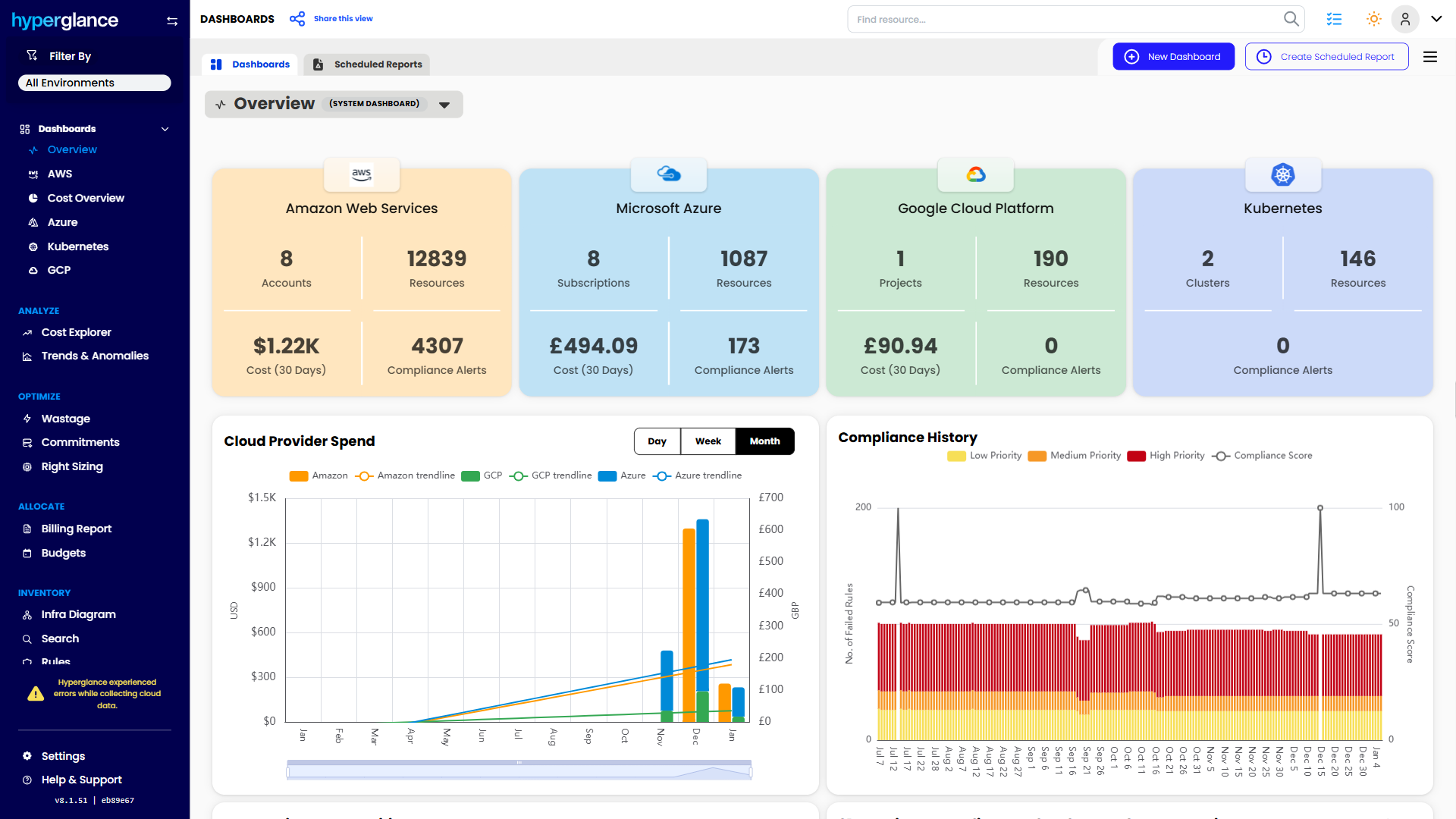
- See cloud resources across AWS, Azure, Google Cloud, and Kubernetes
- Identify GPU-backed infrastructure
- View resources in architecture context
- Understand how cloud resources connect to other parts of the environment
- See Kubernetes workloads alongside supporting cloud infrastructure
- Review tags, ownership, and metadata
- Use rules to flag missing tags, risky patterns, or policy issues
- Track spend through dashboards, budgets, and billing reports
- Support allocation and reporting workflows
- Keep visibility tooling self-hosted where data control matters
This is especially useful when AI spend crosses teams.
A FinOps practitioner can look beyond the bill. A platform engineer can see the cost and ownership context around infrastructure. A cloud architect can review dependencies before action is taken. A security or compliance lead can understand where AI-related infrastructure sits in the wider environment.
That shared view helps teams move from “AI spend is rising” to better questions:
- Which workloads are driving the increase?
- Which resources support them?
- Who owns them?
- Are they tagged properly?
- Are they running in the right place?
- Are they covered by budget controls?
- Are there resources we should review?
- What can be changed safely?
That is a better starting point than trying to optimize from cost data alone.
What To Review First
If your team is starting to review AI-related cloud spend, begin with the areas where infrastructure context can make decisions easier.
1. Find GPU-Backed Resources
Start by locating GPU-backed instances, nodes, and related infrastructure across your cloud estate.
Do not assume every team has an accurate list. AI infrastructure may sit across accounts, projects, subscriptions, clusters, and environments.
2. Check Ownership And Tags
Expensive resources should have clear ownership.
Look for missing owner tags, vague project names, shared accounts, and resources that do not map cleanly to a team, application, product, customer, or business unit.
If no one owns the cost, no one is likely to manage it well.
3. Review Development And Experiment Environments
AI work often starts with experimentation. That is fine.
The risk is that temporary infrastructure quietly becomes permanent.
Look for notebooks, test resources, training environments, and development systems that keep running after the original work is complete.
4. Review Kubernetes Workloads On Expensive Hosts
If you run AI workloads on Kubernetes, check whether workloads are landing on the right infrastructure.
GPU-backed nodes should not become a dumping ground for general workloads. Teams should understand which pods are using expensive capacity and whether that use makes sense.
5. Connect Spend To Budgets And Reports
AI spend needs to be visible in normal financial workflows.
That means budgets, dashboards, billing reports, and allocation views that help teams track spend by project, owner, environment, team, customer, or business unit.
If AI cost is treated as a vague shared platform cost, it will be harder to manage.
Final Thought
FinOps for AI should not start with blunt cuts.
AI workloads can be valuable. They can also be complex, fast-moving, and expensive. Some cost decisions belong at the model and workload design layer. Others belong at the cloud infrastructure layer.
The mistake is trying to manage AI spend with only one view.
Cost data tells you what changed. It does not always tell you why it changed, who owns it, what depends on it, or what can safely happen next.
That is why infrastructure context matters.
When teams can connect AI spend to cloud resources, Kubernetes workloads, ownership, architecture, rules, budgets, and reports, they can make better decisions.
Not just cheaper decisions. Better ones.
Why Teams Choose Hyperglance in 2026
Hyperglance is a strong fit when cost data alone doesn’t give your team enough context.
That often happens when teams are asking questions like:
- What is running across our cloud estate?
- Who owns this resource?
- Why did this cost change?
- What else depends on it?
- Is this safe to clean up?
- Which policy, security, or compliance issue needs attention?
- Can we route this to the right owner or trigger an approved action?
We help teams connect cloud cost to infrastructure context across AWS, Azure, Google Cloud, and Kubernetes. That means FinOps, CloudOps, platform, security, and leadership teams can work from the same view.
Hyperglance is especially useful for mid-market, enterprise, MSP, public sector, and regulated teams where ownership, governance, automation, and data control matter.
What You Can Do With Hyperglance
- See cost, resources, relationships, and ownership in one place
- Visualize cloud architecture with interactive diagrams
- Find waste, policy issues, and cost anomalies faster
- Route findings to the right team through existing workflows
- Use no-code automation for approved fixes
- Run Hyperglance in your own environment when data control matters
Want to see where Hyperglance fits in your FinOps stack?
Explore the product, start a free trial, or book a demo with the team.

About The Author: David Gill
As Hyperglance's Chief Technology Officer (CTO), David looks after product development & maintenance, providing strategic direction for all things tech. Having been at the core of the Hyperglance team for over 10 years, cloud optimization is at the heart of everything David does.