In this article
- What Is AWS GovCloud?
- Who Can Use AWS GovCloud?
- AWS GovCloud Regions
- AWS GovCloud Compliance
- AWS GovCloud Services
- AWS GovCloud Pricing
- AWS GovCloud vs Standard AWS Regions
- AWS GovCloud vs Azure Government
- Governance, Cost, And Visibility Challenges In AWS GovCloud
- How Hyperglance Helps With AWS GovCloud Management
- Final Thoughts: AWS GovCloud Is Only Part Of The Operating Model
- AWS GovCloud FAQs
AWS GovCloud (US) is built for organizations that need to run sensitive workloads in isolated AWS regions designed around strict U.S. regulatory and compliance requirements.
For government agencies, defense contractors, public sector suppliers, regulated industries, and organizations handling controlled data, GovCloud can make AWS a viable option where standard commercial regions may not be enough.
But GovCloud is not just a hosting decision.
Once workloads move into AWS GovCloud, teams still need to answer practical questions:
- What resources are running?
- Who owns them?
- What do they cost?
- Which accounts, services, and regions are involved?
- Where are the compliance, security, or governance gaps?
- What can be changed safely?
That visibility matters because regulated cloud environments often become harder to manage over time. More accounts, more teams, more services, and more controls can quickly make cloud governance harder than expected.
In this guide, we’ll explain what AWS GovCloud is, who can use it, how its regions work, what compliance standards it supports, how pricing and services differ from standard AWS regions, and what to think about before moving sensitive workloads into GovCloud.
What Is AWS GovCloud?
AWS GovCloud (US) is a set of isolated AWS regions designed to help eligible organizations run sensitive workloads in the cloud while meeting specific U.S. regulatory and compliance requirements.
It is mainly used by U.S. government agencies, contractors, educational institutions, regulated businesses, and other organizations that need tighter control over where data is stored, who can access the underlying infrastructure, and how cloud services are operated.
The main difference is isolation. AWS GovCloud regions are physically and logically separate from standard AWS regions. They are located in the United States, operated by U.S. citizens, and designed to support workloads involving regulated data such as Controlled Unclassified Information (CUI), export-controlled data, and other sensitive information.
That does not mean AWS GovCloud is automatically the right choice for every public sector or regulated workload. Some workloads can run in standard AWS regions, depending on the data, compliance requirements, internal policies, and risk profile involved.
The important point is this: AWS GovCloud gives eligible organizations a cloud environment designed for stricter operating requirements, but customers still remain responsible for configuring, monitoring, governing, and managing their own workloads correctly.
Who Can Use AWS GovCloud?
AWS GovCloud is not open to every AWS customer. Organizations need to meet AWS eligibility requirements before they can create and use GovCloud accounts.
In practice, AWS GovCloud is usually relevant for organizations that need to handle sensitive U.S. government, regulated, or controlled data. That can include:
- Federal, state, and local government agencies
- Government contractors and subcontractors
- Defense and aerospace organizations
- Healthcare and life sciences organizations
- Financial services companies
- Educational and research institutions
- Organizations handling regulated or export-controlled data
Eligibility matters because GovCloud is designed for workloads that need stronger controls around data residency, access, compliance, and operations. AWS requires account holders to confirm that they meet the relevant criteria before using these regions.
That said, being eligible does not automatically mean every workload should move into GovCloud. Some organizations use a mix of standard AWS regions and GovCloud regions, depending on the workload, data type, risk level, and compliance requirements.
A practical starting point is to classify your workloads before choosing where they should run. For example, a public website, internal reporting tool, and system containing controlled data may each need a different hosting decision.
This is where cloud visibility becomes important. If teams cannot clearly see which resources belong to which workload, where they are running, and who owns them, it becomes much harder to make confident decisions about GovCloud adoption.
AWS GovCloud Regions
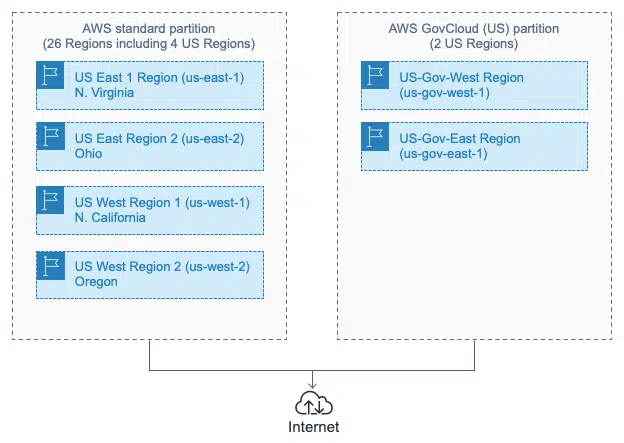
AWS GovCloud is available through 2 dedicated U.S. regions:
- AWS GovCloud (US-East)
- AWS GovCloud (US-West)
These regions are separate from standard AWS commercial regions, such as US East (N. Virginia) or US West (Oregon). An AWS GovCloud account gives eligible customers access to the GovCloud regions rather than the standard commercial region set.
This separation is one of the main reasons organizations choose GovCloud. It helps support workloads that need tighter controls around data residency, access, and compliance.
Choosing between AWS GovCloud (US-East) and AWS GovCloud (US-West) is usually a practical architecture decision. Teams may need to think about:
- Where users, systems, and dependent services are located
- Latency requirements
- Disaster recovery design
- Service availability in each region
- Internal policies around regional deployment
- Cost and data transfer patterns
For some organizations, one GovCloud region may be enough. Others may use both regions for resilience, recovery, or workload separation.
The key is to treat region choice as part of the wider operating model. A workload may be allowed to run in GovCloud, but teams still need to understand how it connects to other systems, how data moves, who owns each part of the environment, and what happens if a region or service becomes unavailable.
AWS GovCloud Compliance
AWS GovCloud is commonly used by organizations with strict compliance, security, and data handling requirements.
According to AWS, GovCloud can support workloads that need to meet compliance regimes including:
- FedRAMP High
- Department of Justice Criminal Justice Information Services (CJIS) Security Policy
- International Traffic in Arms Regulations (ITAR)
- Export Administration Regulations (EAR)
- Department of Defense Cloud Computing Security Requirements Guide (DoD SRG) Impact Levels 2, 4 & 5
- FIPS 140-3
- IRS-1075
This is one of the main reasons public sector teams, government suppliers, defense contractors, and regulated organizations consider AWS GovCloud.
However, it is important to separate platform capability from workload compliance. Using AWS GovCloud does not make an application compliant by default. Your team still needs to configure accounts, permissions, networks, encryption, logging, monitoring, backups, policies, and controls in the right way.
That creates a practical governance challenge. The more sensitive the workload, the more important it becomes to see how resources are configured, where data may move, which services are exposed, and who owns each part of the environment.
For example, a storage bucket, database, virtual machine, or Kubernetes cluster might be running in an approved GovCloud region, but still need review if it has missing tags, unclear ownership, public exposure, weak access controls, or no clear cost center.
GovCloud can give teams the right foundation for regulated workloads. Good governance is what helps them keep those workloads controlled over time.
AWS GovCloud Services
AWS GovCloud supports many familiar AWS services, including services for compute, storage, networking, databases, security, monitoring, identity, analytics, and management.
However, service availability is not always identical to standard AWS regions. Some services, features, integrations, endpoints, or third-party options may work differently in GovCloud. In some cases, a service may be available in one GovCloud region before the other, or may have different restrictions around how data and metadata are handled.
This matters because a workload that runs cleanly in a standard AWS region may need changes before it can move into GovCloud.
Before migrating or deploying a workload, teams should check:
- Whether each required AWS service is available in GovCloud
- Whether the specific features they use are supported
- Whether the service is available in AWS GovCloud (US-East), AWS GovCloud (US-West), or both
- Whether endpoints, Amazon Resource Names (ARNs), or SDK/CLI configuration need to change
- Whether connected systems need to remain outside GovCloud
- Whether metadata, logs, support data, or configuration fields have export-controlled data restrictions
These checks are especially important for complex environments. A single application may depend on compute, storage, identity, monitoring, container services, network connectivity, backup tooling, security services, and external integrations.
If teams only check the main service, they may miss a dependency that affects migration, compliance, cost, or operations later.
A better approach is to map the workload before making the move. That means understanding the resources involved, how they connect, which accounts they sit in, what regions they use, and what dependencies exist across the wider estate.
That context helps teams avoid surprises, especially when GovCloud is part of a larger AWS, Azure, Google Cloud, or Kubernetes environment.
AWS GovCloud Pricing
AWS GovCloud pricing works in a similar way to standard AWS pricing. Costs are based on the services you use, how much you use them, and the payment model you choose.
That means the final cost will depend on the details of your architecture, including compute, storage, databases, networking, monitoring, backup, data transfer, and any reserved or committed usage.
There are 2 important points to understand before using AWS GovCloud.
First, GovCloud usage is managed through an associated standard AWS account for billing and payment. AWS notes that if you use services in other AWS regions with the same standard account, activity and usage reports are combined. If you need to separate billing and usage, you may need a dedicated standard AWS account linked to the GovCloud account.
Second, GovCloud should not be treated as a like-for-like cost copy of your existing AWS estate. Some services, regions, data transfer patterns, compliance requirements, architecture choices, and operational controls may affect the total cost.
When planning GovCloud costs, teams should review:
- Which services the workload needs
- Which GovCloud region the workload will use
- Whether reserved pricing, Savings Plans, or other commitment models are suitable
- How much data will move between systems, regions, accounts, or partitions
- Whether logs, backups, snapshots, and security tooling will add meaningful cost
- How costs will be allocated across teams, contracts, departments, or programs
- Whether tags and account structures are strong enough for showback or chargeback
This is where many teams get caught out. The initial migration estimate may focus on the main application resources, but real cloud costs often grow through supporting services, duplicated environments, retained storage, idle resources, or unclear ownership.
For GovCloud environments, cost management should be designed early. Waiting until spend has already spread across accounts, teams, and services makes it harder to explain, allocate, and reduce.
AWS GovCloud vs Standard AWS Regions
AWS GovCloud and standard AWS regions both give teams access to AWS cloud services, but they are designed for different operating requirements.
Standard AWS regions are suitable for many commercial, public, internal, and customer-facing workloads. AWS GovCloud is designed for eligible organizations that need additional controls for sensitive, regulated, or controlled data.
The main differences usually come down to isolation, eligibility, compliance, operations, and service availability.
| Area | Standard AWS Regions | AWS GovCloud |
|---|---|---|
| Access | Available to standard AWS customers | Limited to eligible customers |
| Regions | Commercial AWS regions around the world | Dedicated U.S. GovCloud regions |
| Isolation | Part of the standard AWS commercial partition | Physically and logically isolated from standard AWS regions |
| Compliance Fit | Suitable for many regulated workloads, depending on requirements | Designed for stricter U.S. public sector and controlled data requirements |
| Service Availability | Broad service and feature availability | Many AWS services are available, but some features may differ |
| Operations | Standard AWS operational model | Different endpoints, account relationships, and operational considerations |
The choice is not always “commercial AWS or GovCloud.” Many organizations use both.
For example, a contractor might run public marketing sites, general business systems, or low-risk internal tools in standard AWS regions, while using GovCloud for workloads that handle controlled data or support specific government programs.
This mixed model can work well, but it also adds complexity. Teams need to understand which resources sit in which environment, how systems connect, where data moves, and whether each workload is in the right place.
That is especially important when cost, compliance, and ownership reporting need to be separated across accounts, teams, contracts, or business units.
AWS GovCloud vs Azure Government
AWS GovCloud and Azure Government are both designed for organizations with strict public sector, regulated, and controlled data requirements.
The right choice usually depends on your existing cloud footprint, compliance needs, identity model, technical skills, and operating requirements.
For many teams, the decision is not just about which platform has the right compliance credentials. It is about which platform fits the way the organization already works.
| Area | AWS GovCloud | Azure Government |
|---|---|---|
| Best Fit | Organizations already invested in AWS, or teams that need AWS-native services in an isolated U.S. government cloud environment | Organizations already invested in Microsoft, Azure, Microsoft Entra ID, Microsoft 365, or wider Microsoft security and compliance tooling |
| Access | Available to eligible customers that meet AWS GovCloud requirements | Available to eligible U.S. federal, state, local, tribal, and regulated industry customers and partners |
| Regions | 2 dedicated U.S. GovCloud regions | Dedicated U.S. government cloud regions |
| Compliance | Supports a wide range of U.S. government and regulated workload requirements, including FedRAMP High, DoD SRG, CJIS, ITAR, EAR, and IRS-1075 use cases | Supports a wide range of U.S. government and regulated workload requirements, including FedRAMP High, DoD IL2, IL4, IL5, CJIS, IRS 1075, ITAR, EAR, and NIST-related use cases |
| Operations | Uses AWS GovCloud-specific regions, endpoints, account relationships, and service considerations | Uses Azure Government-specific regions, endpoints, identity, subscriptions, and service considerations |
| Common Decision Driver | AWS-first architecture, AWS engineering skills, existing AWS workloads, or AWS-native service requirements | Microsoft-first architecture, Azure skills, Microsoft identity, Microsoft security tooling, or existing Azure workloads |
In practice, many organizations do not choose between AWS GovCloud and Azure Government in isolation. They may already have workloads in both AWS and Azure, or they may need to support different programs, teams, contracts, and compliance requirements across more than one cloud.
That is where the operational challenge grows. Each platform has its own account or subscription model, region structure, service limits, pricing model, access controls, and reporting tools.
If you are choosing between AWS GovCloud and Azure Government, ask these questions early:
- Which cloud does the team already know best?
- Where do the connected systems already run?
- Which platform supports the required services and compliance needs?
- How will identity, access, logging, and monitoring work?
- How will costs be reported across teams, contracts, and programs?
- Will you need to govern both government cloud and commercial cloud environments?
- Will your visibility and cost tools work inside the required environment?
The last point is easy to miss. In sensitive environments, some teams cannot use tools that send cloud data to a third-party SaaS platform. If self-hosting, data control, or restricted outbound connectivity matters, tool selection becomes part of the architecture decision.
For that reason, the best choice is not simply the platform with the longest compliance list. It is the platform, operating model, and tooling stack your team can manage safely over time.
If you'd like a more detailed comparison, have a read of our guide.
Governance, Cost, And Visibility Challenges In AWS GovCloud
AWS GovCloud can help organizations meet stricter requirements for sensitive workloads, but it does not remove the everyday work of cloud management.
In many ways, GovCloud makes good governance more important. Teams often have tighter rules, more reporting pressure, higher security expectations, and more people involved in approvals, audits, and operational decisions.
The challenge is that GovCloud environments can still suffer from the same problems as any other cloud estate:
- Resources with no clear owner
- Inconsistent or missing tags
- Idle or underused infrastructure
- Unexplained cost increases
- Overprovisioned compute, storage, or databases
- Security groups, routes, or access policies that need review
- Resources spread across accounts, regions, teams, and projects
- Manual reporting for cost, compliance, and ownership
These issues are frustrating in a commercial cloud environment. In GovCloud, they can become more serious because teams may need to prove control, explain spend, and show how resources map back to contracts, programs, departments, or mission-critical workloads.
For example, an engineering team might know an instance supports a sensitive application, but the finance team may only see a rising bill. A security team might see a risky configuration, but not know who owns the resource. A platform team might find unused infrastructure, but not know whether it is safe to remove.
This is why visibility needs to connect more than cost data. Teams need to see resources, relationships, ownership, tags, risk, and spend together.
That context helps answer better questions:
- Which GovCloud resources are costing the most?
- Which resources have missing owner or cost center tags?
- Which accounts, applications, or teams are driving cost changes?
- Which resources are idle, exposed, or misconfigured?
- Which changes could reduce waste without increasing risk?
- Which workloads need attention before an audit, review, or renewal?
GovCloud gives eligible teams a controlled environment for sensitive workloads. Strong cloud governance helps keep that environment understandable, accountable, and cost-aware as it grows.
How Hyperglance Helps With AWS GovCloud Management
Running workloads in AWS GovCloud can help with data control and compliance requirements, but teams still need a clear way to manage what is happening inside the environment.
Hyperglance helps cloud, FinOps, platform, and security teams see their AWS GovCloud resources in context. Instead of looking at cost, inventory, security, and ownership as separate problems, teams can connect them in one place.
With Hyperglance, teams can:
- Visualize AWS GovCloud resources and relationships
- Search across cloud resources, accounts, tags, and metadata
- Find resources with missing ownership or cost allocation tags
- Identify idle, underused, or overprovisioned resources
- Review cost trends, budgets, and anomalies
- Connect cloud spend to teams, services, projects, or cost centers
- Spot security and compliance issues that need review
- Use automation rules to flag or act on known governance issues
This is especially useful when GovCloud is part of a wider cloud estate. Many organizations need to manage AWS GovCloud alongside standard AWS regions, Azure, Azure Government, Google Cloud, and Kubernetes. Native tools can help within one platform, but they often do not give teams the same cross-environment context.
Hyperglance is also self-hosted. That matters for organizations that have strict requirements around data handling, outbound connectivity, third-party SaaS tooling, or where cloud management data is allowed to go.
For regulated and public sector environments, that control can be just as important as the reporting itself.
The goal is simple: help teams understand what is running, what it costs, who owns it, where the risks are, and what can safely change.
Final Thoughts: AWS GovCloud Is Only Part Of The Operating Model
AWS GovCloud can be a strong fit for eligible organizations that need to run sensitive workloads in isolated U.S. AWS regions. It can help support stricter requirements around data residency, compliance, access, and control.
But choosing GovCloud is not the finish line.
Teams still need to manage cloud cost, security, ownership, architecture, and change across the environment. That means knowing what is running, how resources connect, who owns them, what they cost, and where action is needed.
This becomes even more important as cloud estates grow across multiple accounts, regions, teams, and platforms.
Before adopting or expanding AWS GovCloud, it is worth asking:
- Which workloads genuinely need GovCloud?
- Which services and regions are required?
- How will costs be allocated and explained?
- How will ownership be tracked?
- How will security and compliance issues be reviewed?
- How will teams spot waste without adding operational risk?
- Will your cloud management tooling meet your data control requirements?
The organizations that get the most value from GovCloud are usually the ones that plan the operating model as carefully as the architecture.
If your team needs better visibility across AWS GovCloud, standard AWS regions, Azure, Azure Government, Google Cloud, or Kubernetes, Hyperglance can help you see resources, cost, ownership, risk, and relationships in one place.
Request a demo to see how Hyperglance can help your team manage complex cloud environments with more control.
AWS GovCloud FAQs
▸What is AWS GovCloud used for?
AWS GovCloud is used for sensitive workloads that need stricter controls around data residency, compliance, access, and operations. It is commonly used by U.S. government agencies, government contractors, defense organizations, regulated industries, and other eligible organizations handling controlled or sensitive data.
▸Who is eligible for AWS GovCloud?
AWS GovCloud is available to eligible organizations that meet AWS requirements. This can include U.S. government agencies, contractors, regulated businesses, educational institutions, and organizations that need to manage sensitive or controlled data in an isolated U.S. cloud environment.
▸Where are AWS GovCloud regions located?
AWS GovCloud has 2 dedicated U.S. regions: AWS GovCloud (US-East) and AWS GovCloud (US-West). These regions are separate from standard commercial AWS regions.
▸Is AWS GovCloud more secure than standard AWS?
AWS GovCloud is designed for workloads with stricter compliance and data control requirements, but security still depends on how each environment is configured and managed. Customers remain responsible for their own workload configuration, access controls, monitoring, encryption, logging, and governance.
▸Does AWS GovCloud automatically make workloads compliant?
No. AWS GovCloud can support specific compliance requirements, but using it does not make an application compliant by default. Teams still need to design, configure, monitor, and document their workloads correctly.
▸Is AWS GovCloud more expensive?
AWS GovCloud pricing depends on the services used, usage levels, region, architecture, data transfer, and payment model. Teams should review pricing carefully because a GovCloud environment may not have the same cost profile as a standard AWS deployment.
▸What is the difference between AWS GovCloud and Azure Government?
AWS GovCloud is Amazon’s isolated cloud environment for eligible government and regulated workloads. Azure Government is Microsoft’s equivalent government cloud environment. The better fit usually depends on existing cloud usage, compliance needs, service availability, identity model, internal skills, and operating requirements.
▸Can Hyperglance support AWS GovCloud?
Yes. Hyperglance supports AWS GovCloud and helps teams visualize resources, understand relationships, track cost, identify ownership gaps, review risks, and manage governance across complex cloud environments.
Why Teams Choose Hyperglance in 2026
Hyperglance is a strong fit when cost data alone doesn’t give your team enough context.
That often happens when teams are asking questions like:
- What is running across our cloud estate?
- Who owns this resource?
- Why did this cost change?
- What else depends on it?
- Is it safe to clean up?
- Which policy, security, or compliance issue needs attention?
- Can we route this to the right owner or trigger an approved action?
We help teams connect cloud cost to infrastructure context across AWS, Azure, Google Cloud, and Kubernetes. That means FinOps, CloudOps, platform, security, and leadership teams can work from the same view.
Hyperglance is especially useful for mid-market, enterprise, MSP, public sector, and regulated teams where ownership, governance, automation, and data control matter.
What You Can Do With Hyperglance
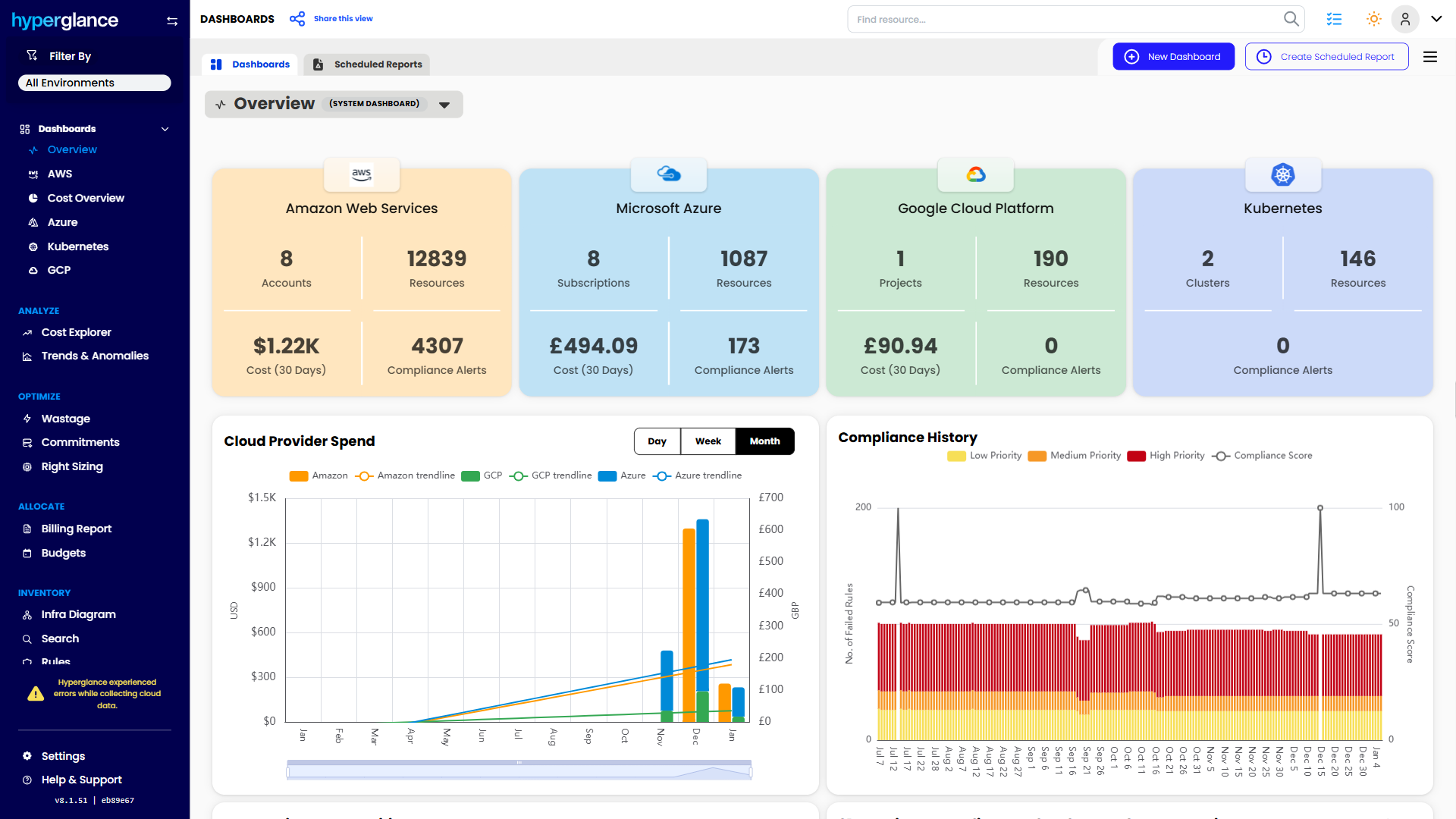
- See cost, resources, relationships, and ownership in one place
- Visualize cloud architecture with interactive diagrams
- Find waste, policy issues, and cost anomalies faster
- Route findings to the right team through existing workflows
- Use no-code automation for approved fixes
- Run Hyperglance in your own environment when data control matters
Want to see where Hyperglance fits in your FinOps stack?
Explore the product, start a free trial, or book a demo with the team.

About The Author: Stephen Lucas
As Hyperglance's Chief Product Officer (CPO), Stephen is responsible for the Hyperglance product roadmap. Stephen has over 20 years of experience in product management, project management, and cloud strategy across various industries.