🆕 This guide includes AWS' most recent updates (Nov 2024)
The AWS Well-Architected Framework has long guided cloud professionals in building reliable, secure, and efficient workloads. It offers a foundational approach for serious cloud practitioners.
However, as new technologies like generative AI emerge and the global regulatory landscape shifts, the framework itself must evolve. Keeping up with these changes is crucial for maintaining a healthy and optimized cloud environment.
To help you navigate this evolution, this guide is updated regularly, reflecting the latest AWS WA Framework changes, the newest best practices, and real-world implementation insights. We'll walk you through the key pillars and explore emerging lenses, highlighting how visual tools like Hyperglance support AWS GovCloud Diagrams and cloud management.
What is the AWS Well-Architected Framework?
The AWS Well-Architected Framework enables cloud architects to build secure, high-performing, resilient, and efficient infrastructure for a range of applications and workloads.
It provides a consistent approach for customers and partners to evaluate architectures and implement scalable designs. The framework includes key concepts, design principles, and best practices for designing and running workloads in the cloud.
General Design Principles
The framework is built on a set of general design principles that apply across all pillars. These principles are not just for the design phase; they are a mindset for continuous improvement throughout the entire lifecycle of a workload. Key principles include:
- Stop guessing capacity: Use the cloud to provision the exact amount of resources you need.
- Test systems at a production scale: Run realistic load tests to understand how your system behaves under real-world conditions.
- Automate to make architectural experimentation easier: Use infrastructure as code to deploy, test, and iterate on different architectures quickly.
- Allow for evolutionary architectures: design with loosely coupled components to adapt to changing requirements easily.
- Drive architectures using data: Utilize data from monitoring and metrics to inform decisions about your architecture.

The AWS WA Framework Checklist
The checklist is a structured review process built around the Framework’s 6 pillars, ensuring your workload complies with AWS’s best practices across every critical area.
Rather than being just a high-level guide, it acts as a hands-on tool for teams to evaluate architectures, pinpoint risks, and prioritize improvements.
The process involves defining your workload, reviewing it against the 6 pillars, and developing an actionable remediation plan.
This approach transforms your architecture from simply “working” to being truly “well-architected.”
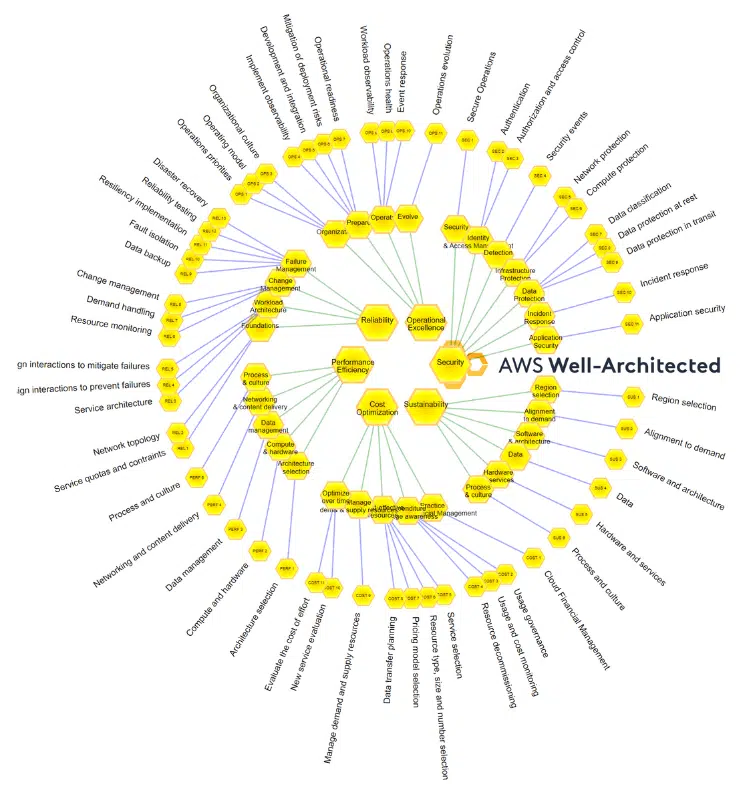
A map of the AWS Well-Architected Framework (source: AWS)
The 6 Pillars of the AWS Well-Architected Framework
The AWS Well-Architected Framework is a living document, and the 6 pillars continue to be the foundation of a solid cloud architecture.
While some pillars remain a steady reference point, others have received essential updates you need to know about to ensure your architecture is not just "good," but truly "well-architected."
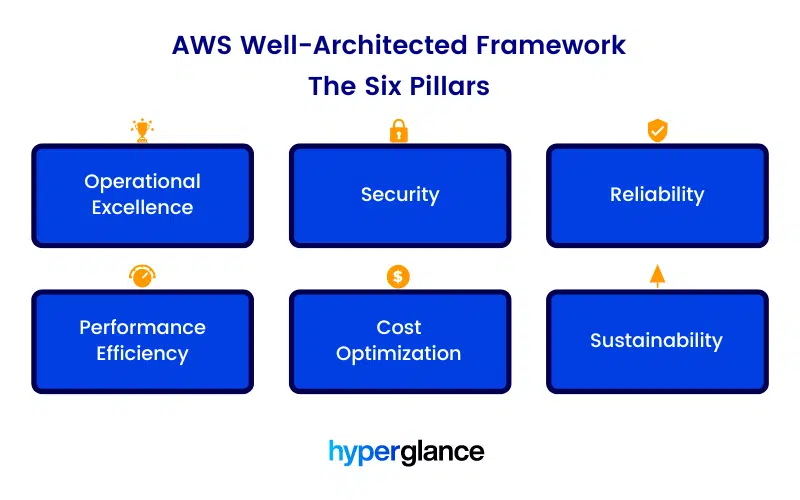
The AWS Well-Architected Framework Pillars
1. Operational Excellence: A New Focus on the External Customer
The Operational Excellence pillar focuses on running and monitoring systems to deliver business value and continuously improve processes.
A notable change in this pillar is the subtle but significant title update to OPS01-BP01. It has been renamed from “Evaluate customer needs” to “Evaluate external customer needs.”
This isn't just a simple word change. It reinforces a critical strategic principle: your operational processes should be defined by the needs of your end-users. It forces you to look outside your internal team and consider the impact of every decision on the people who actually use your services.
This shift makes the framework more outcome-focused, helping you build a feedback loop that drives genuine improvement, not just internal efficiency.
In practice, this means:
- Moving beyond internal metrics and embracing data from your users
- Setting up robust monitoring to track user interaction
- Implementing A/B testing to evaluate changes
- Building feedback mechanisms directly into your applications
By focusing on the external customer, you’re ensuring that your operational efforts are always aligned with the business's ultimate goal: providing value to your users.
How to Continuously Improve Operational Processes
Pain Point: Continuous improvement initiatives often stall because teams lack visibility into how small changes in operations impact the overall cloud environment. Manual reviews and disconnected tools make it challenging to measure progress effectively.
Solution: Use Hyperglance to create a single source of truth for your cloud environment. Its visual topology, combined with customizable reporting, enables teams to run "what-if" analyses, track changes over time, and connect operational changes to customer-facing outcomes. This allows continuous improvement to be measured, actionable, and transparent.
2. Security: Embracing Modern, Continuous Practices
The Security pillar is all about protecting information, systems, and assets while delivering business value through risk assessments and mitigation strategies.
The most prominent update here is the renaming of SEC11-BP04, which has been changed from “Manual code reviews” to the more inclusive and outcome-focused “Conduct code reviews.”
This change reflects a modern approach to security in the age of automation and DevOps. It recognizes that code security isn't limited to human review. It now includes:
- Automated static and dynamic analysis tools
- Automated vulnerability scanning
- Other programmatic checks are integrated directly into your CI/CD pipelines
This highlights a shift towards a security posture that is integrated and continuous, rather than a single, manual step.
For a security professional, this means prioritizing a "shift-left" strategy, where security is a consideration from the very beginning of the development lifecycle, not just before deployment. It’s about building a culture where automated security checks run constantly, enabling you to identify and resolve vulnerabilities early and frequently.
AWS also emphasizes integrating services like Amazon Inspector, GuardDuty, and Security Hub to continuously detect vulnerabilities, monitor workloads, and centralize findings for rapid remediation.
How to Automate Shift-Left Security
Security professionals and cloud architects often struggle to strike a balance between speed and rigor. The updated framework provides direction for tackling these challenges head-on:
Pain Point: Teams often struggle to integrate security tools seamlessly into their existing development workflows without causing friction or slowing down the delivery process.
Solution: Implement security as code by integrating tools like static application security testing (SAST) and dynamic application security testing (DAST) directly into CI/CD pipelines. This ensures that every code commit is automatically scanned for vulnerabilities, providing developers with immediate feedback on potential security issues.
⭐ Working in regulated environments? Explore how Hyperglance supports Azure Government with secure, compliant cloud optimization.
3. Reliability: Heightened Awareness and Responsibility
The Reliability pillar ensures your workload performs its intended function correctly and consistently when you need it to. Two key changes signal a heightened sense of urgency around reliability.
- AWS recently merged REL12-BP03 (Test and Validate Recovery Procedures) into REL08-BP02 (Test Disaster Recovery Solutions), streamlining the guidance on validation.
- More critically, the risk associated with best practice REL13-BP04 (Implement fault-isolated workloads) has been increased from Medium to High.
This change signals that AWS is placing an even greater emphasis on mitigating this specific reliability risk, as the potential impact of failures on shared resources has become a bigger concern. AWS’s updated guidance also reflects a stronger emphasis on automated disaster recovery testing and reliability automation, helping teams validate resilience at scale with less manual overhead.
It’s a direct message to architects to prioritize redundancy and isolation, ensuring workloads can recover from failure. This is often achieved through cell-based architectures, where each "cell" is a self-contained unit with its own resources, or by using dedicated accounts for critical services.
How To Implement Cell-Based Reliability
Pain Point: Ensuring the reliability of a distributed system can be complex, as a failure in one component can cascade and affect the entire application.
Solution: Use a cell-based architecture, where the application is divided into independent, isolated units ("cells"). A failure in one cell doesn't affect others, limiting the blast radius of any incident and improving overall system reliability and resilience.
4. Cost Optimization: Mastering Efficiency and Value
The Cost Optimization pillar is a testament to the framework’s maturity. It indicates that cost optimization practices are well-established, consistently effective, and provide a stable foundation for achieving maximum impact.
Recent AWS updates also highlight tools like the AWS Cost Optimization Hub, which centralizes cost-saving opportunities across services, making it easier for teams to identify and address inefficiencies in real-time.
The stability in this pillar doesn't mean there's nothing to do. In fact, it means the low-hanging fruit has been picked, and now is the time to focus on deep, continuous optimization. This includes strategies like:
- Rightsizing: Continuously analyzing your workload and scaling resources up or down to meet demand without over-provisioning.
- Elasticity: Designing your architecture to scale out and in automatically, so you only pay for the resources you're actually using.
- Purchasing Strategies: Leveraging Reserved Instances, Savings Plans, and Spot Instances to reduce costs for predictable workloads.
- Data Tiering: Moving data to lower-cost storage classes (like Amazon S3 Glacier) as it ages and becomes less frequently accessed.
These practices are at the heart of the AWS architecture framework, and mastering them is key to success.
How to Balance Cost Savings with Performance Needs
Pain Point: Technical teams are hesitant to aggressively right-size or move workloads to lower-cost options out of fear of performance degradation. This creates a “better safe than sorry” mindset that leads to overspending.
Solution: Combine AWS Trusted Advisor and Hyperglance insights to identify safe optimization opportunities. Hyperglance’s rules engine can flag oversized resources without impacting business-critical workloads, giving teams confidence that cost savings won’t compromise customer experience.
🤓 What's the FinOps Framework? Find out in our guide to FinOps.
5. Performance Efficiency: Achieving Maximum Output
Like Cost Optimization, the Performance Efficiency pillar remains a stable and mature part of the framework. It focuses on using IT and computing resources efficiently to meet system requirements and maintain that efficiency as demand changes.
Achieving high performance requires a deep, continuous focus on optimization. This includes:
- Selecting appropriate resources: Choosing the right instance types, storage options, and database services for your specific workload.
- Monitoring and analysis: Continuously monitoring performance metrics to identify bottlenecks and areas for improvement.
- Adopting advanced technologies: Leveraging services like serverless computing, caching, and edge networking to improve responsiveness and reduce latency.
- Using a data-driven approach: Making architectural decisions based on performance metrics rather than assumptions.
These practices are at the heart of the AWS architecture framework pillars, and mastering them is key to success.
How to Continuously Monitor and Improve Performance at Scale
Pain Point: Monitoring tools generate a flood of performance metrics, but teams struggle to connect those metrics back to architectural design. This makes it challenging to identify the root cause of latency, bottlenecks, or inefficiencies.
Solution: Leverage Hyperglance’s end-to-end visualization to connect performance metrics with resource relationships. By overlaying AWS CloudWatch data, teams can see not just what is performing poorly, but why, whether it’s a database, network path, or misconfigured instance.
6. Sustainability: A Growing Priority
The Sustainability pillar focuses on understanding and managing the environmental impacts of your workloads. While the pillar itself is not new, AWS has added a new best practice, SUS06-BP01.
As part of this guidance, AWS now also encourages customers to utilize the Customer Carbon Footprint Tool (CCFT) to track and mitigate emissions associated with their cloud usage. This practical addition enables organizations to more easily measure their impact and align their workloads with sustainability goals.
This illustrates the ongoing refinement of guidance on sustainability and responsible resource use. As more businesses commit to carbon neutrality and environmental responsibility, this pillar is gaining increasing importance. It’s a crucial component of a forward-thinking AWS cloud architecture.
This best practice likely encourages practices such as optimizing resource utilization, selecting regions powered by renewable energy, and designing architectures that can be easily shut down when not in use. It’s a direct response to a growing market demand for greener IT solutions.
Using Hyperglance for Advanced Sustainability Monitoring
Pain Point: It can be challenging to visualize and manage cloud resource usage effectively, thereby optimizing for both sustainability and cost.
Solution: Utilize tools like Hyperglance for advanced monitoring and waste reduction. Hyperglance offers a graphical, interactive view of cloud infrastructure, enabling teams to identify underutilized resources, optimize configurations, and minimize their environmental footprint by making informed decisions about resource allocation and management.
The Well-Architected Review Process
The AWS Well-Architected Framework is not a one-time activity but a continuous process. A Well-Architected review is a structured process to evaluate a workload against the framework's best practices. The review typically involves:
- Preparation and team assembly: Gathering the right people, including architects, developers, and operations teams.
- Review meeting: Answering a series of questions for each of the 6 pillars to identify areas of improvement.
- Analyzing findings: Prioritizing the identified risks and creating an action plan.
- Implementing recommendations: Applying the recommended changes to your architecture.
- Refining and repeating: Continuously refining your processes and repeating the review at regular intervals to maintain a well-architected environment.
The WAF Ecosystem and New Lenses
AWS has shifted the framework from a static set of rules to a dynamic ecosystem of best practices. This is most evident in the introduction of new Lenses, which extend the core framework to specific technology domains. Think of Lenses as a way to apply the fundamental principles to specialized use cases.
The Generative AI Lens
The Generative AI Lens helps you apply the core WAF principles to the full lifecycle of developing and operating generative AI workloads in the cloud, from scoping and training to deployment and iteration. This is a game-changer for anyone building with AI. It provides guidance on everything from making cost-optimized model selections to balancing performance and cost.
The lens breaks down the generative AI lifecycle into 6 phases, offering best practices for each:
- Scoping: Define the business problem and establish a business case.
- Data preparation: Ensure your data is clean, secure, and ready for model training. The lens guides the management of data governance, privacy, and security during this critical phase.
- Model training and fine-tuning: This is where costs escalate. The lens provides guidance on optimizing compute and storage for training models. This is a significant cost driver, and the lens guides the management of trade-offs.
- Deployment and inference: Focus on optimizing model performance and cost for real-time use. This involves selecting the appropriate instance types and utilizing serverless functions where applicable.
- Iteration: Continuously improve your model and operational processes. This is an ongoing feedback loop to ensure your GenAI solution remains relevant and efficient.
- Operations: Establish monitoring, logging, and incident response for your AI workloads, just as you would for any other mission-critical application.
This lens provides a direct connection to the central concepts of AWS architecture in cloud computing, offering a significant opportunity to leverage Hyperglance’s strengths, particularly in cost visibility and optimization. For a complex, high-cost workload like GenAI, having a clear visual of your spend is not a luxury; it's a necessity.
The Data Residency With the Hybrid Cloud Services Lens
This lens addresses the critical issues of data sovereignty and compliance. It focuses on utilizing services like AWS Outposts and Local Zones to ensure data remains within specific geographic regions. This lens is essential for companies operating in regulated industries or multiple jurisdictions where data must remain within national borders.
The lens guides on:
- Disaster recovery: How to design for failover and recovery while maintaining data residency. This often involves creating a separate, compliant DR site in the same legal jurisdiction.
- Network connectivity: Ensuring secure and reliable connections between on-premises and cloud environments. This is crucial for hybrid cloud models where data flows between your data center and the AWS cloud.
- Governance and compliance: Maintaining traceability and auditing data to prove compliance. This section also links back to the Sustainability pillar through resource utilization monitoring, showing how efficient resource use can also reduce your physical footprint.
It's a key addition for any company operating across multiple jurisdictions, aligning perfectly with our expertise in governance and compliance.
Implementing the AWS Well-Architected Framework with Hyperglance
Understanding the updates is one thing; implementing them is another. This is where we come in. We built Hyperglance to simplify the implementation of AWS well-architected best practices and turn them into actionable insights.
With Hyperglance, you don't just get a report; you get a real-time, actionable view of your environment.
Actionable Insights for Your Cloud Architecture
FinOps & Cost Optimization: To achieve usage awareness and meet best practices for cost management in the AWS cloud, you need real-time visibility and a clear understanding of your spending. Hyperglance provides customizable cost dashboards that let you instantly see where your spending is going.
We take it a step further with unit economics, which helps you tie your cloud spend directly to business metrics, enabling you to make informed, strategic decisions. Our platform also simplifies tagging by helping you identify untagged resources and enforce consistent policies.
Security: Maintaining traceability is a core best practice for WAFs. With Hyperglance, your AWS well-architected framework diagram is auto-updated in real-time. This ensures you always have an accurate visual snapshot of your environment, which is crucial for maintaining VPC Security.
Our built-in security & compliance monitoring overlays security-related rules onto your resources, enabling you to quickly identify compliance issues and potential vulnerabilities. This is a crucial tool for ongoing security monitoring and governance.
Reliability: Testing recovery is essential to ensure your systems can bounce back from failure. We help you with visual snapshots for recovery, making it easy to create and compare different architectural states. This allows you to visually test your disaster recovery plans and quickly identify any potential points of failure before a real incident occurs.
Operational Excellence: Automating best practices is a key part of operational maturity. Our centralized policy engine enables you to enforce governance policies for tasks such as tagging and compliance, serving as a powerful tool for AWS cloud management & optimization.
This helps you standardize your operational processes and ensure every new resource or workload adheres to your established guidelines.
How Hyperglance Complements AWS Native Solutions
Hyperglance is designed to enhance, not replace, the powerful tools AWS already provides. For example:
- AWS Trusted Advisor highlights best practice gaps; Hyperglance gives you real-time visibility and policy enforcement to close those gaps faster.
- Amazon GuardDuty & AWS Security Hub provide alerts on threats and compliance issues; Hyperglance overlays this data onto your architecture diagrams for instant context and remediation planning.
- The Customer Carbon Footprint Tool (CCFT) provides insights into sustainability metrics; Hyperglance adds actionable monitoring and policy automation to help you actively reduce cloud waste and align with your ESG goals.
Together, AWS native tools and Hyperglance create a stronger, more actionable Well-Architected Review process, one where insight leads directly to remediation.
By using Hyperglance, you can implement the AWS Well-Architected Framework best practices and go beyond a simple review. You can embed the framework directly into your day-to-day operations and build a continuously optimized cloud environment.
Frequently Asked Questions (FAQs)
What is a Well-Architected Framework in AWS?
The AWS Well-Architected Framework is a set of best practices and guiding principles for building secure, high-performing, resilient, and efficient cloud infrastructure. It’s organized across 6 pillars: Operational Excellence, Security, Reliability, Performance Efficiency, Cost Optimization, and Sustainability. The framework helps you design and operate your workloads to maximize their effectiveness and efficiency.
How to use the AWS Well-Architected Tool?
The AWS Well-Architected Tool is a free service in the AWS Management Console that helps you review your workloads against the framework's best practices. You can define your workload, answer a series of questions for each pillar, and receive a report with recommendations for improvement. While the tool provides a solid starting point, many professionals use it in conjunction with a tool like Hyperglance for continuous, automated monitoring.
What is the AWS Well-Architected Sustainability pillar?
The Sustainability pillar guides how to minimize the environmental impact of your cloud workloads. It focuses on best practices for efficient use of resources and reducing power consumption in the cloud.
Which of the Following Deployments Involves the Reliability Pillar of the AWS Well-Architected Framework?
A deployment that involves the Reliability pillar would be any strategy designed to improve the resilience and availability of a workload. A classic example would be deploying your application across multiple Availability Zones to prevent a single point of failure. This directly addresses the Reliability pillar’s guidance on designing for high availability.
Closing Thoughts
The AWS Well-Architected Framework continues to set the standard for secure, efficient, and resilient cloud architectures.
By understanding the latest updates across all 6 pillars, evolving best practices, and new specialized lenses, cloud professionals can address today’s challenges and prepare for future demands.
Tools like Hyperglance make it easier to put these principles into practice, offering the visibility and control needed to build cloud environments that are not just functional but truly well-architected.
This approach ensures technology teams are always aligned with business goals, regulatory expectations, and the pace of cloud innovation.
Why Teams Choose Hyperglance
Hyperglance gives FinOps teams, architects, and engineers real-time visibility across AWS, Azure, and GCP. See cost, security, and performance in one view.
Spot waste, route findings to owners, and trigger automated actions where configured with no-code automation.
- Visual clarity: Interactive diagrams show every relationship and cost driver.
- Actionable automation: Detect and fix cost and security issues automatically.
- Built for FinOps: Hundreds of optimization rules and analytics, out of the box.
- Agentless & Secure: Self-hosted, so sensitive data never leaves your cloud.
- Multi-cloud ready: Unified visibility across AWS, Azure, and GCP.
Book a demo today, or find out how Hyperglance helps you cut waste and complexity.

About The Author: David Gill
As Hyperglance's Chief Technology Officer (CTO), David looks after product development & maintenance, providing strategic direction for all things tech. Having been at the core of the Hyperglance team for over 10 years, cloud optimization is at the heart of everything David does.