Contents
- The Hidden Cost Challenges in Multi-Cloud Architecture
- Essential #1: Real-time Visibility Across Clouds
- Essential #2: Tagging Consistency & Ownership
- Essential #3: Automation for Cloud Waste Reduction
- Essential #4: Compliance as Part of Cost Control
- Essential #5: Mapping Spend to Architecture
- What Multi-Cloud Architecture Really Needs
- FAQs
Architects love the freedom of multi-cloud architecture, but no one welcomes the surprise invoices that often come with it.
Each provider prices, reports, and labels resources differently. That fragmentation shows up quickly in cost reviews, usually after the money has already been spent.
Controlling cloud costs is not just about reducing spend. It is about building systems that are scalable, predictable, and sustainable. It is about giving teams confidence that they are not only moving fast, but also building responsibly.
This guide covers five essentials every cloud architect should know to manage costs in multi-cloud environments. Each section highlights common pitfalls, why they occur, and practical steps to prevent waste while maintaining efficiency and accountability.
☁️ Learn how Hyperglance helps you control cloud budgets and prevent overspend with real-time cost alerts
Essential #1: Real-time Visibility Across Clouds
You can’t control what you can’t see. Without a shared view of resources and spend, architects end up reacting to invoices instead of preventing waste.
Why Native Dashboards Fall Short
AWS Cost Explorer, Azure Cost Management, and Google Cloud Billing all have their place. They’re solid tools, but they’re designed for single-cloud use. If you’re running workloads across multiple providers, these dashboards quickly turn into isolated data silos.
That means:
- You end up exporting CSVs and stitching reports together
- Slightly different metrics and terminology
- Time spent aligning data instead of fixing problems
The result is always lagging insight.
Why Unified Inventory Matters
Good visibility answers simple questions quickly:
- What is running?
- Who owns it?
- Why does it exist?
A unified inventory lets architects spot unused or duplicated resources early, see sprawl from self-service deployments, and connect workloads directly to cost.
Example: Catching Idle Resources Before They Cost You
A single forgotten VM might cost little. Dozens across environments cost a lot. When visibility updates automatically, idle resources are easy to spot before they become permanent line items.
Continuous Optimization with Hyperglance
Hyperglance focuses on cross-cloud visibility and architecture context:
- A consolidated inventory across AWS, Azure, and supported GCP services
- Spend and utilization signals that highlight unusual changes
- Architecture views that show where cost is coming from, not just totals
⚡️Discover Hyperglance’s cloud cost optimization and FinOps capabilities to reduce multi-cloud spend
Essential #2: Tagging Consistency & Ownership
Cost attribution breaks the moment tagging breaks. In multi-cloud environments, inconsistency is the default unless architects actively design against it.
Why Tagging (and labels) Drift
Each provider handles metadata differently:
-
Azure supports up to 50 tags per resource (resource groups and subscriptions also support up to 50).
-
Many AWS services support up to 50 tags per resource, but limits vary by service.
-
GCP resources can have up to 64 labels (service-dependent).
Without enforcement, teams use different keys, skip required fields, or forget them entirely. Over time, you spend with no clear owner.
Why Consistent Tagging Matters
A disciplined tagging consistency creates transparency across all environments. With consistent tags, architects can:
- Attribute costs directly to workloads, teams, or business units
- Separate production from non-production spend
- Support chargeback or showback models for financial accountability
- Link spend data to compliance, security, and governance processes
Example: Untracked Test Environments
Test and development environments are often spun up quickly and forgotten just as quickly. Without proper tags, they blend into production costs, making it hard to see how much budget is being burned on non-critical workloads. Over time, this leads to significant waste that undermines the efficiency of multicloud architecture.
👉 Not sure how to compare cloud platforms? Cloud Cost Optimization Tools: How to Choose the Right Platform explains what architects should look for
Essential #3: Automation for Cloud Waste Reduction
Manual reviews don’t scale. Waste accumulates between reports. Automation is what turns cost control into a continuous process.
Why Reactive Reporting Isn’t Enough
Cloud environments are dynamic. Resources spin up and down in seconds, and usage patterns shift constantly. Relying on static, periodic reports creates gaps where waste builds unnoticed.
This leads to:
- Idle instances left running after test cycles or migrations
- Orphaned storage volumes consume capacity without a purpose
- Over-provisioned workloads are sized for peak demand but rarely used fully
- Delayed responses to anomalies because humans can’t react in real time
Without automation, these inefficiencies accumulate silently, draining budgets and undermining optimization efforts.
Where Automation Delivers Value
Automation reduces waste by handling repetitive, high-impact tasks instantly and reliably. For cloud architects, the most common opportunities include:
- Stopping idle instances: Shutting down unused VMs outside of business hours or when activity falls below thresholds
- Cleaning up orphaned storage: Identifying and deleting unattached volumes, snapshots, or buckets to reduce cloud waste
- Rightsizing workloads: Monitoring utilization metrics and automatically resizing resources to match demand
- Policy-as-code: Embedding cost control into infrastructure governance, ensuring continuous enforcement rather than periodic clean-up
Example: Orphaned Storage Accumulation
One unattached disk is cheap. Hundreds are not. Automated detection stops this from becoming background noise.
Reducing Infrastructure Waste in the Cloud with Automation
Hyperglance supports policy-driven cleanup where it’s safest:
- Rules to detect idle or orphaned resources
- Alerts or automated remediation for supported actions
- Spend and utilization trends to identify right-sizing candidates—resized through normal change processes
⚡️Explore proven strategies in AWS EC2 Cost Optimization: Complete Guide for managing AWS workloads efficiently
Essential #4: Compliance as Part of Cost Control
Compliance is often viewed solely as a security or regulatory requirement, but it has a direct, measurable impact on cloud costs. In a multi-cloud architecture, lapses in compliance can create unnecessary overhead, force rework, or even lead to costly fines. Embedding compliance into cost management ensures that resources are not only secure but also efficient and aligned with organizational standards.
How Compliance Lapses Create Hidden Costs
When guardrails are weak:
- Resources are over-provisioned “just in case.”
- Shadow IT creates duplicate services
- Misconfigurations lead to rework, incidents, or data movement costs
These don’t always show up as security problems, but they do show up on the bill.
Continuous vs. Periodic Audits
Waiting for quarterly audits means paying for mistakes longer than necessary. Continuous checks catch problems earlier, when they first start costing money.
Example: Noncompliant Storage Configurations
Incorrect retention or replication settings can quietly multiply storage costs. Catching it early avoids both risk and waste.
This isn’t about claiming full compliance automation everywhere. It’s about using guardrails to reduce unnecessary spend, especially in AWS and Azure, where support is strongest today.
Essential #5: Mapping Spend to Architecture
Raw cost data doesn’t explain anything. Architects need to see where money is being spent inside the architecture.
Why Context Changes Decisions
Without architectural context:
- Cost spikes are hard to trace
- Shared services hide real usage
- Optimization turns into guesswork
When spend is mapped to workloads and dependencies, decisions get clearer.
Example: Microservices Cost Visibility
Individually cheap services can become collectively expensive. Mapping spend to architecture shows which services pull their weight, and which don’t.
How Hyperglance Enables Architectural Cost Mapping
Hyperglance goes beyond raw billing data by providing a live architectural map tied directly to spend:
- Architecture diagrams with cost overlays
- Dependency views that explain shared spend
- Filters by project, region, or tag/label
By mapping spend directly to architecture, Hyperglance eliminates the guesswork and empowers architects to connect financial accountability with technical design. This not only reduces costs but also builds a culture where every architectural decision is informed by both performance and financial impact.
🔥Get practical guidance from the 5 Pillars of Cloud Cost Efficiency for Large-Scale Environments to make cost control systematic
What Multi-Cloud Architecture Really Needs
Cloud architects are now responsible for efficiency as much as reliability. In multi-cloud environments, that means shared visibility, clear ownership, and automation that removes waste before it compounds.
A cloud-based inventory system that connects architecture to spend helps teams move fast without losing control and keeps costs from becoming a surprise instead of a signal.
Frequently Asked Questions (FAQs)
How do you reduce cloud costs?
By combining cross-cloud visibility, consistent tagging/labels, and automated cleanup. Focus on idle resources, orphaned storage, and enforcing ownership early.
What is the main cause of cloud wastage?
Lack of visibility and governance. Small issues, like unused resources, misconfigurations, and missing ownership add up quickly when left unchecked.
What solution helps to optimize cloud expenditures?
Tools that combine cross-cloud visibility, policy checks, and workflow automation can help teams reduce waste faster.
Platforms like Hyperglance add architecture context, so teams can trace spend to dependencies and trigger approved remediation where configured.
How to reduce cloud waste in a multicloud environment?
Standardize tagging and labels, centralise visibility, and apply policy-driven detection across AWS, Azure, and GCP, treating GCP primarily as a visibility-first platform with lighter optimization depth today.
What are you actually managing in a multicloud environment?
Not just infrastructure. Cloud architects manage trade-offs between cost, performance, governance, and speed across providers that behave very differently.
Why Teams Choose Hyperglance in 2026
Hyperglance is a strong fit when cost data alone doesn’t give your team enough context.
That often happens when teams are asking questions like:
- What is running across our cloud estate?
- Who owns this resource?
- Why did this cost change?
- What else depends on it?
- Is it safe to clean up?
- Which policy, security, or compliance issue needs attention?
- Can we route this to the right owner or trigger an approved action?
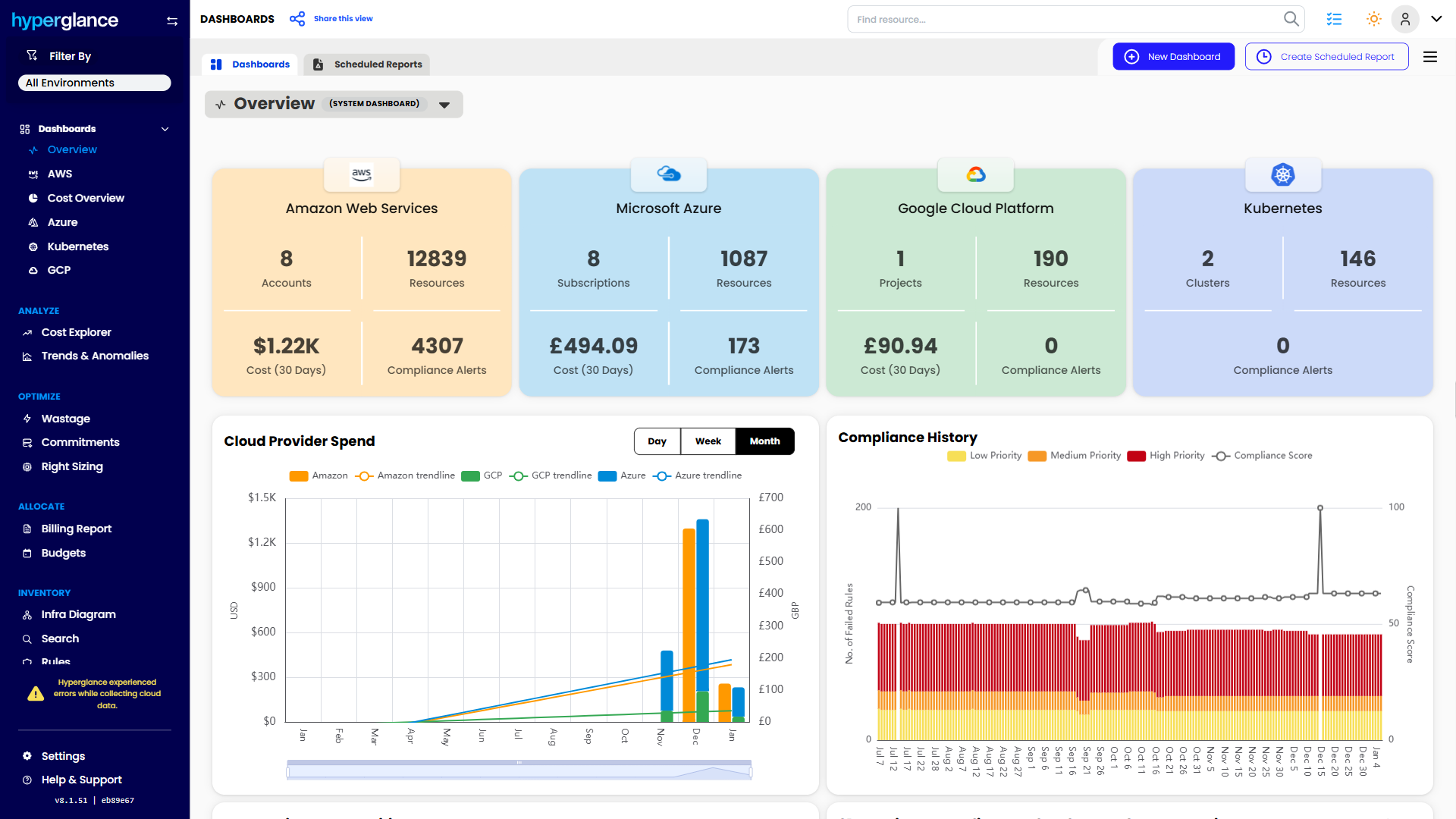
We help teams connect cloud cost to infrastructure context across AWS, Azure, Google Cloud, and Kubernetes. That means FinOps, CloudOps, platform, security, and leadership teams can work from the same view.
Hyperglance is especially useful for mid-market, enterprise, MSP, public sector, and regulated teams where ownership, governance, automation, and data control matter.
What You Can Do With Hyperglance
- See cost, resources, relationships, and ownership in one place
- Visualize cloud architecture with interactive diagrams
- Find waste, policy issues, and cost anomalies faster
- Route findings to the right team through existing workflows
- Use no-code automation for approved fixes
- Run Hyperglance in your own environment when data control matters
Want to see where Hyperglance fits in your FinOps stack?
Explore the product, start a free trial, or book a demo with the team.

About The Author: Stephen Lucas
As Hyperglance's Chief Product Officer (CPO), Stephen is responsible for the Hyperglance product roadmap. Stephen has over 20 years of experience in product management, project management, and cloud strategy across various industries.