Contents
- Core Concepts: Advanced Commitment Planning in AWS
- Deep Dive: AWS Savings Plans (Specifics & Best Practices)
- Deep Dive: AWS Reserved Instances
- Key Similarities: Savings Plans Vs Reserved Instances
- Key Differences: AWS Savings Plans vs Reserved Instances
- When to Use Each: Strategic Recommendations
- Best Practices & FinOps Tips for Commitment Planning
- Recent Changes & 2025 Updates
- How Hyperglance Supports Commitment Purchases
- Frequently Asked Questions (FAQ)
- Commit Intelligently, Not Blindly
🆕 Fully updated with AWS’ 2025 Savings Plans vs RI data
Cloud bills have become one of the fastest-growing lines on IT budgets. Variable workloads, seasonal traffic, and misaligned resources can turn even a well-planned forecast into a surprise invoice. To restore predictability, most organizations turn to committed-use discounts, long-term commitments that trade flexibility for lower unit costs.
These commitments take two primary forms: AWS Savings Plans and AWS Reserved Instances (RIs). Each delivers significant cost savings, but with different degrees of flexibility, coverage, and risk. We'll explore the key concepts to help you answer the core question: AWS Savings Plans vs. Reserved Instances.
Choosing between them isn’t just about the headline discount. It’s about aligning your financial commitments with real-world usage and ensuring your visibility tools, such as Hyperglance, provide you with sufficient insight to commit safely.
Let’s break down what makes each model unique, their trade-offs, and how to build a balanced strategy that protects your budget without locking you into waste.
Core Concepts: Advanced Commitment Planning in AWS
Before we dive into the specific mechanics, we need a shared foundation. Both commitment models are designed to reduce your effective hourly rate by guaranteeing a minimum usage level over a set term.
The difference lies in what you commit to. The commitment model enables companies to forecast their steady-state usage and secure substantial discounts.
What is a Savings Plan (or Committed Spend Discount)?
A Savings Plan (SP) is a commitment to spend a fixed dollar amount per hour on eligible compute usage over one or three years. In exchange, AWS offers significant discounts compared to on-demand rates.
Within that committed envelope, usage is billed at discounted rates. Any usage beyond the commitment reverts to on-demand pricing, but this flexibility is the SP’s greatest strength.
The benefit of the AWS savings plans model is its inherent flexibility, making it a low-friction choice for modern, dynamic cloud environments.
How a Savings Plan Works
When you commit to a spend amount (e.g., $10/hour), AWS applies that discount to any usage that falls within the eligible category, regardless of the region, instance family, or Operating System (OS).
This flexibility model allows you to change your underlying infrastructure, transitioning from an M5 to a C6 instance without losing your discounted rate. The core tradeoff is flexibility versus risk. You’re committing to spend, so the risk is financial overcommitment, not just resource overcommitment.
Once purchased, Savings Plans can’t be modified or canceled after a short refund window. Only plans with an hourly commitment of up to $100, purchased within the last seven days and in the same calendar month, are eligible for return.
In practice, that means only small SP purchases can be refunded, and larger commitments can’t be “changed later” once that window closes.
What is a Reserved Instance (RI)?
A Reserved Instance (RI) is a commitment to reserve a specific resource configuration for a specified term, at a rate lower than the on-demand rate.
This configuration is specific: you reserve a t3.large in us-east-1 running Linux with default tenancy. The discount is applied only when usage exactly matches those reserved resource attributes.
To understand the model, you need to grasp what reserved instances are in terms of their fixed nature. They’re like renting a specific piece of hardware in advance.
Reserved Instance Types and Options
The discount applied by AWS reserved instances works by matching usage to the reserved resource attributes. There are two leading AWS reserved instance types:
- Standard RIs: Offer the highest discount (up to 75%). However, they are the most restrictive; they cannot be changed or exchanged. They can be resold on the AWS RI Marketplace.
- Convertible RIs: Offer a slightly lower discount (31–54%). Crucially, they can be exchanged for a different instance family or region, provided the exchange is of equal or greater value, offering greater flexibility.
Additionally, RIs can be Regional (discount only, applicable across an entire region) or Zonal (which reserves actual capacity in a specific Availability Zone (AZ)vital for mission-critical apps).
💥 Ready to explore new AWS RI recommendations? AWS RI Recommendations
Deep Dive: AWS Savings Plans (Specifics & Best Practices)
AWS savings plans were introduced to address the administrative complexity and lack of flexibility inherent in managing RIs. They quickly became the preferred starting point for many FinOps practitioners.
The flexibility gained with SPs often outweighs the slight discount reduction compared to Standard RIs, significantly simplifying commitment planning in the AWS process.
AWS Savings Plans Overview
An AWS Savings Plan is a cost-reduction mechanism in which you commit to a fixed hourly spend for 1–3 years. The discount is automatically applied to eligible usage.
Covered Services: The primary benefit is their broad coverage. Compute SPs cover EC2, Lambda, Fargate, and SageMaker usage.
Types of AWS Savings Plans
There are two primary flavors of AWS Savings Plans you’ll encounter:
- Compute Savings Plans: These are the most flexible. They apply to any EC2 instance family/size, any region, all OS/tenancy, and also cover Fargate and Lambda. They offer savings up to 66%.
- EC2 Instance Savings Plans: These offer a deeper discount (up to 72%) but are restricted to a single instance family and region (e.g., C5 instances in the eu-central-1 region). Within that family/region, you can still change the instance size or OS. This broad scope addresses many questions about EC2 savings plans vs. reserved instances, with a clear preference for flexibility.
- AWS SageMaker Savings Plans: These are designed specifically for machine learning workloads running on Amazon SageMaker. AWS SageMaker Savings Plan provides savings of up to 64% on SageMaker’s managed services, including training, inference, and processing instances. Like other Savings Plans, you commit to a consistent hourly spend. In return, AWS automatically applies discounted rates to eligible SageMaker usage, helping teams optimize ML costs without losing agility.
Payment Options
Just like RIs, AWS savings plans offer three payment options, which affect the magnitude of your discount:
- All Upfront: You pay the entire commitment upfront, yielding the deepest discount.
- Partial Upfront: You pay a portion upfront, with the remainder billed monthly, offering a balanced discount.
- No Upfront: You pay the entire commitment monthly, offering the lowest discount but the best cash-flow flexibility.
How AWS Applies SP Discounts
Discounts are applied first to your highest-discount usage, then to eligible usage, before any on-demand charges are applied. This cross-instance and cross-region coverage is a massive operational win.
A key point of difference in AWS Savings Plans vs Reserved Instances is the post-purchase experience: SPs cannot be modified, resold, or exchanged after the initial 7-day refund window.
This immutability means careful analysis before purchase is non-negotiable, and the AWS savings plan recommendations provided by your FinOps tooling must be accurate.
Benefits & Tradeoffs of AWS Savings Plans
| Benefits | Tradeoffs |
| High Flexibility: Cross-family, cross-region, OS/tenancy coverage (Compute SPs). | Immutability: Cannot be resold or exchanged after 7 days. |
| Lower Operational Overhead: No need to manage RI exchanges or resales. | Discount Cap: Slightly lower max discount than Standard RIs (72% vs. 75%). |
| Broad Service Coverage: Covers EC2, Lambda, and Fargate. | No Capacity Guarantee: Does not reserve specific AZ capacity. |
AWS SP Use Cases & Strategy
AWS Savings Plans are best suited for dynamic workloads, particularly those utilizing a mix of instance types or serverless offerings, such as Lambda and Fargate.
They are ideal for covering the flexible, floating compute usage that is often too variable for a fixed RI. You can use a 3-year term for maximum savings on your predictable baseline and a 1-year term for coverage on more variable workloads.
Tools like Hyperglance are essential for ongoing monitoring, ensuring renewal alignment, and tracking utilization across all your AWS savings plans.
Deep Dive: AWS Reserved Instances
Even with the rise of SPs, AWS Reserved Instances still hold a vital place in a comprehensive cloud financial strategy. They offer unique benefits that SPs can’t match.
Understanding how AWS Reserved Instances work is crucial, as they require a more meticulous and hands-on management approach than Savings Plans.
AWS Reserved Instances Basics
An RI is a commitment to specific EC2 instance configurations for 1–3 years. The discount is applied only to matching on-demand instances.
This model offers the highest possible discount, but it comes with significant operational overhead.
If you have a core, steady-state application that won't change its underlying infrastructure for three years, a Standard RI offers unmatched savings.
The Role of Capacity Reservation
A key factor when contrasting savings plans vs reserved instances is capacity. While Savings Plans offer only a cost discount, AWS reserved instances can offer a capacity guarantee.
A Zonal RI reserves actual capacity in a specific AZ. This is incredibly valuable for mission-critical workloads that must scale instantly during peak demand in that AZ.
A Regional RI, in contrast, offers the discount across the region but does not reserve capacity.
FinOps Tip: If you need guaranteed capacity without locking into a specific configuration, pair On-Demand Capacity Reservations with Savings Plans. This combination provides flexibility while ensuring your critical workloads always have available capacity. (AWS Documentation).
Offering Classes: Standard vs. Convertible
We mentioned the two classes earlier, but their strategic importance is worth emphasizing when discussing AWS reserved instance types:
Standard RIs: Offer the maximum discount (up to 75%). They are inflexible, meaning they must match the instance attributes exactly. However, they are resellable on the AWS RI Marketplace, providing an exit strategy if the commitment is no longer needed.
Convertible RIs: Offer moderate discounts (31–54%). The main benefit is that they are exchangeable for different instance families of equal or greater value, providing excellent protection against technology refresh cycles.
This option to resell Standard RIs and exchange Convertible RIs offers a significant flexibility advantage compared to the immutability of AWS Savings Plans.
Payment & Term Flexibility
Both Standard and Convertible RIs offer three payment options that directly correlate with the depth of the discount:
All Upfront (AURI): Provides the highest possible discount (up to 75% for 3-year Standard RIs). You pay the entire cost of the reservation term in one single payment. This maximizes savings but requires the most significant initial capital outlay and is the least financially flexible option.
Partial Upfront (PURI): A middle ground. You pay a portion upfront and are billed a significantly discounted hourly rate for the remainder of the term. This balances capital preservation with deep savings.
No Upfront (NURI): Offers the lowest effective discount of the three while preserving cash flow, as the customer is billed only a discounted hourly rate for the duration of the term.
Benefits & Limitations
Benefits:
- Best for stable, long-term workloads (e.g., production databases, steady application tiers).
- Zonal RIs ensure capacity in critical regions.
- Can be resold if underutilized.
Limitations:
- Less flexibility if workloads shift.
- Manual tracking is required to avoid wasted capacity.
- Exchange/resale processes add admin overhead.
Hyperglance reduces that overhead drastically. Its visual inventory maps show where RIs exist, which instances they cover, and where commitments are going unused across all linked AWS accounts.
This eliminates spreadsheet-driven RI tracking, a significant cause of missed savings in large environments.
RI Use Cases & Strategy
AWS reserved instances should be used to cover your most stable, predictable baseline compute usage. If you'll need 50 m5, large instances in a specific region for three years, a Standard RI is likely the best cost-saving choice.
- Standard RIs are perfect for fixed, foundational workloads.
- Convertible RIs are excellent for applications that require technology upgrades (e.g., moving from M5 to M6 generations) within the 3-year term.
A comprehensive commitment planning in AWS strategy almost always involves mixing RIs with SPs and leveraging Spot Instances for elastic peaks.
Key Similarities: Savings Plans Vs Reserved Instances
Here are the key similarities between AWS Savings Plans and Reserved Instances
- Convertible RI vs Compute Savings Plans: Convertible Reserved Instances provide savings similar to Compute Savings Plans, allowing flexibility to modify instance attributes while retaining discounts.
- Standard RI vs EC2 Instance Savings Plans: Standard Reserved Instances offer discounts comparable to EC2 Instance Savings Plans, with deeper savings but more restrictions on instance family and region.
- Commitment-Based Discounts: Both require a commitment (either to a specific instance or to an hourly spend) in exchange for lower rates than on-demand pricing.
- Term & Payment Options: Both provide flexible term lengths, typically 1-year or 3-year commitments. Both support different payment models: All Upfront, Partial Upfront, or No Upfront.
- Encourage Long-Term Planning: Both are designed to reward predictable usage and help organizations plan cloud budgets more efficiently.
Key Differences: AWS Savings Plans vs Reserved Instances
Savings Plans and Reserved Instances differ in terms of flexibility, purchase options, potential savings for specific AWS services, and how their discounts can be applied. Reserved Instances require a commitment to run a particular instance type at a set price for a defined period. In contrast, Savings Plans are based on committing to a fixed hourly spend over a set term, offering more flexibility in how the discount is applied.
Understanding these key differences is vital for any FinOps professional looking to optimize their spending. This table consolidates the major decision points between AWS Savings Plans and Reserved Instances.
| Aspect | Savings Plans (SP) | Reserved Instances (RI) |
| Commitment Metric | Fixed $/hour spent on eligible compute. | Specific instance type/configuration (e.g., m5.large, Linux). |
| Service Coverage |
|
EC2, plus separate RIs for RDS, Redshift, etc. |
| Maximum Discount | Up to 72% (EC2 SP). | Up to 75% (Standard RI). |
| Capacity Guarantee | No capacity guarantee. | Zonal RIs can reserve specific AZ capacity. |
| Flexibility & Scope | High (cross-family, region, OS/tenancy). | Low (fixed instance type/region). Convertible RIs add moderate flexibility. |
| Selling / Exchanging | Not allowed (after the 7-day refund period). | Standard: Resellable on Marketplace. Convertible: Exchangeable. |
| Best For | Dynamic Workloads | Predictable, Steady Workloads |
When to Use Each: Strategic Recommendations
The decision should be driven by the volatility and criticality of your workload, not just the discount percentage. We often advise clients to adopt a blended strategy for optimal coverage and savings.
Strategy for AWS Savings Plans
Dynamic, Multi-Service Workloads: If your infrastructure is rapidly changing, or if you use a mix of EC2, Lambda, and Fargate, the broad coverage of a Compute SP is ideal.
- Future Flexibility: If you anticipate server upgrades or regional migration, SPs guarantee that your discount will follow the usage.
- Lower Overhead: If your team has limited bandwidth for manual commitment management (exchanges, resales), SPs are the lower operational lift.
Strategy for AWS Reserved Instances
RIs, especially Standard RIs, still offer a superior value proposition for specific use cases:
- Steady, Predictable Workloads: Use Standard RIs to cover your absolute, unchanging baseline (e.g., databases, core application servers).
- Mission-Critical, Capacity-Sensitive Apps: Use Zonal RIs when you must have capacity guaranteed for key components in a specific Availability Zone.
- Moderate Flexibility: Use Convertible RIs if you need high savings while also hedging against technology churn over the next few years.
The Blended Strategy
The most mature FinOps teams leverage both. Utilize AWS Reserved Instances to cover 100% of your known, fixed baseline, thereby maximizing the discount. Use AWS Savings Plans to cover the remaining flexible, floating compute usage.
Finally, layer in Spot Instances for highly elastic, fault-tolerant workloads that peak above your committed base. This blended strategy provides the lowest possible effective hourly rate while minimizing risk.
Best Practices & FinOps Tips for Commitment Planning
Successfully managing an extensive portfolio of commitments requires discipline, data, and continuous monitoring. These tips help de-risk your strategy.
1. Measure First, Commit Second
Use tools like AWS Cost Explorer and CloudWatch, or a unified visibility platform like Hyperglance, to identify your actual steady-state usage.
You should always cover usage patterns, not peak usage. Start commitments conservatively, covering only the 70–80% baseline that runs 24/7. This ensures elasticity for growth while protecting you from overcommitment.
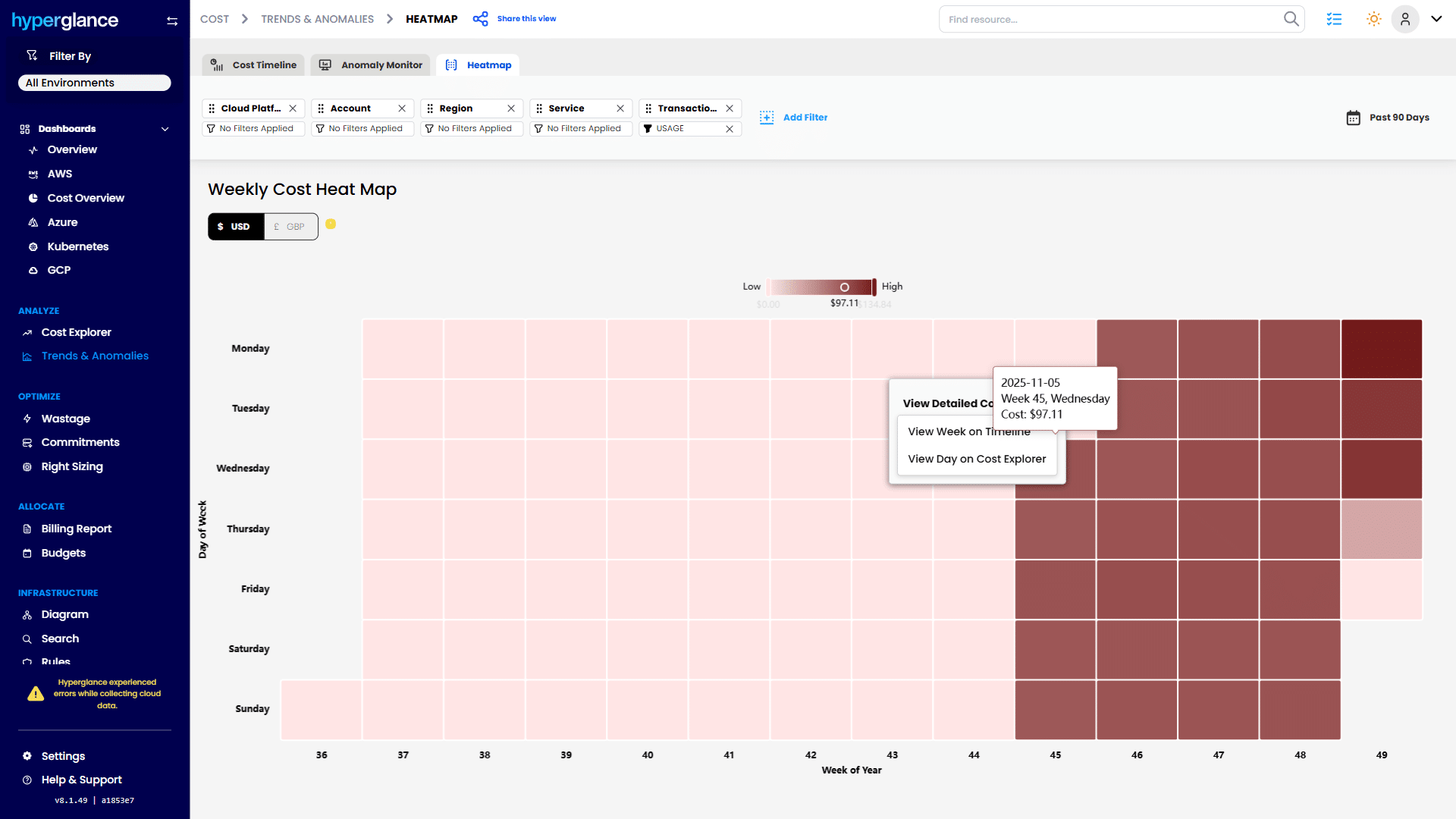
Weekly cost spikes visualization
2. Leverage Size Flexibility and Pooling
Remember that Regional RIs and EC2 Savings Plans offer size flexibility within a family (e.g., two m5.mediums can be covered by one m5.large commitment).
Note: Instance-size flexibility for RIs applies only to Regional, Linux/UNIX, default-tenancy reservations. Windows/dedicated or Zonal RIs don’t have cross-size flexibility.
Additionally, utilize AWS Organizations to consolidate usage across all your accounts. Consolidated billing maximizes utilization, ensuring that a commitment purchased in one account benefits matching usage across any linked accounts.
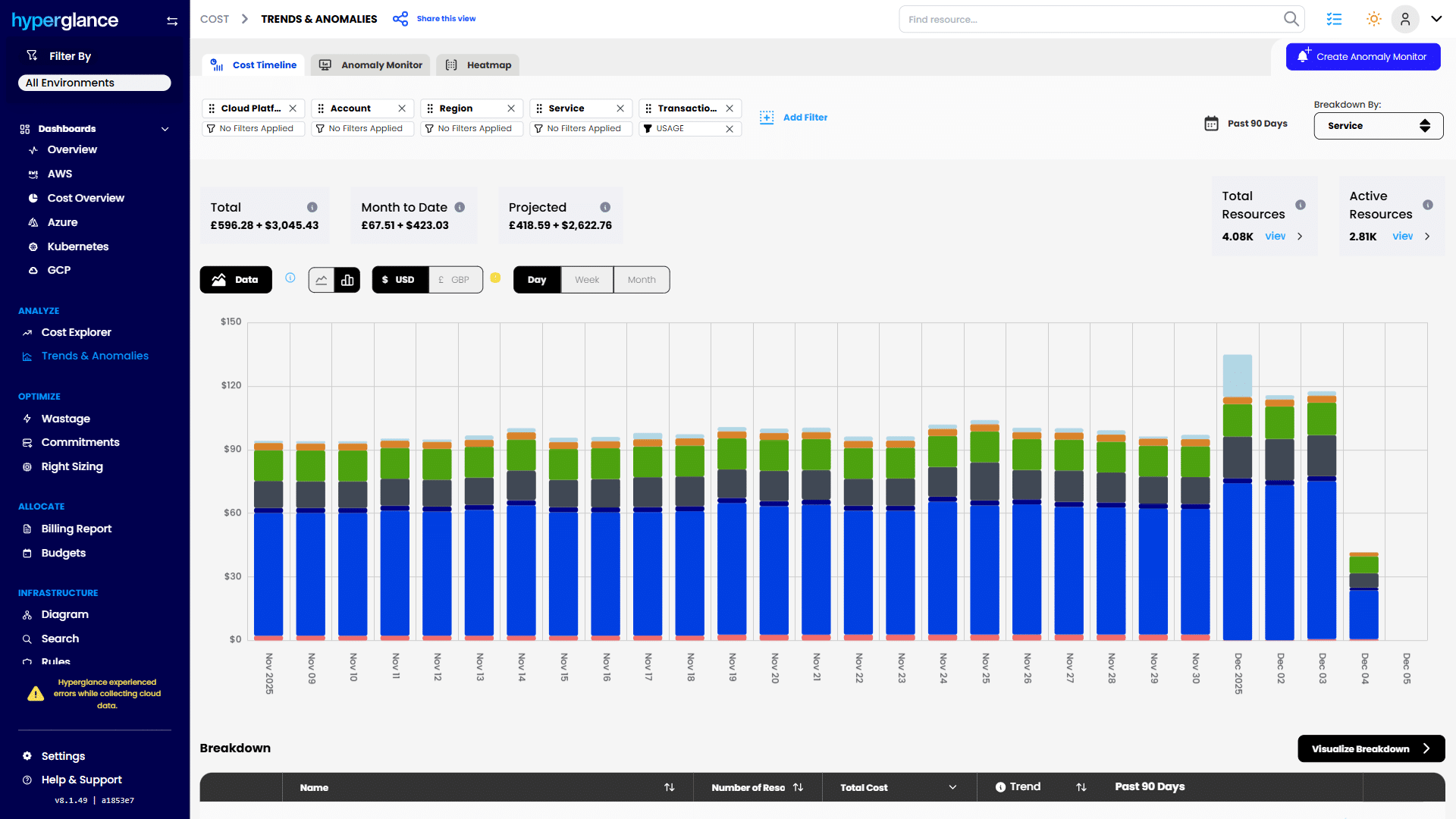
Daily spending and cost projections
3. Monitor Utilization Relentlessly
Unused commitments are expensive. Check for idle or underused commitments using your Cost and Usage Report (CUR) or, more easily, through tools like Hyperglance.
Hyperglance provides FinOps Dashboards that track RI/SP coverage, expirations, and savings in real time, helping you flag underutilized assets before they become a costly drain.
Also, monitor hourly utilization, not just monthly averages. AWS applies commitments on an hourly basis so that short-term fluctuations can result in unexpected over- or under-commitments.
Daily spending and cost projections
4. Tag and Govern
Enforce tagging policies across your organization. Consistent and accurate tagging for ownership, environment, and cost center is crucial for allocating commitment costs accurately.
If you can’t attribute the cost of an unused RI to a specific team, you can’t hold them accountable. Hyperglance normalizes tags and detects policy breaches, significantly improving commitment planning in AWS governance.
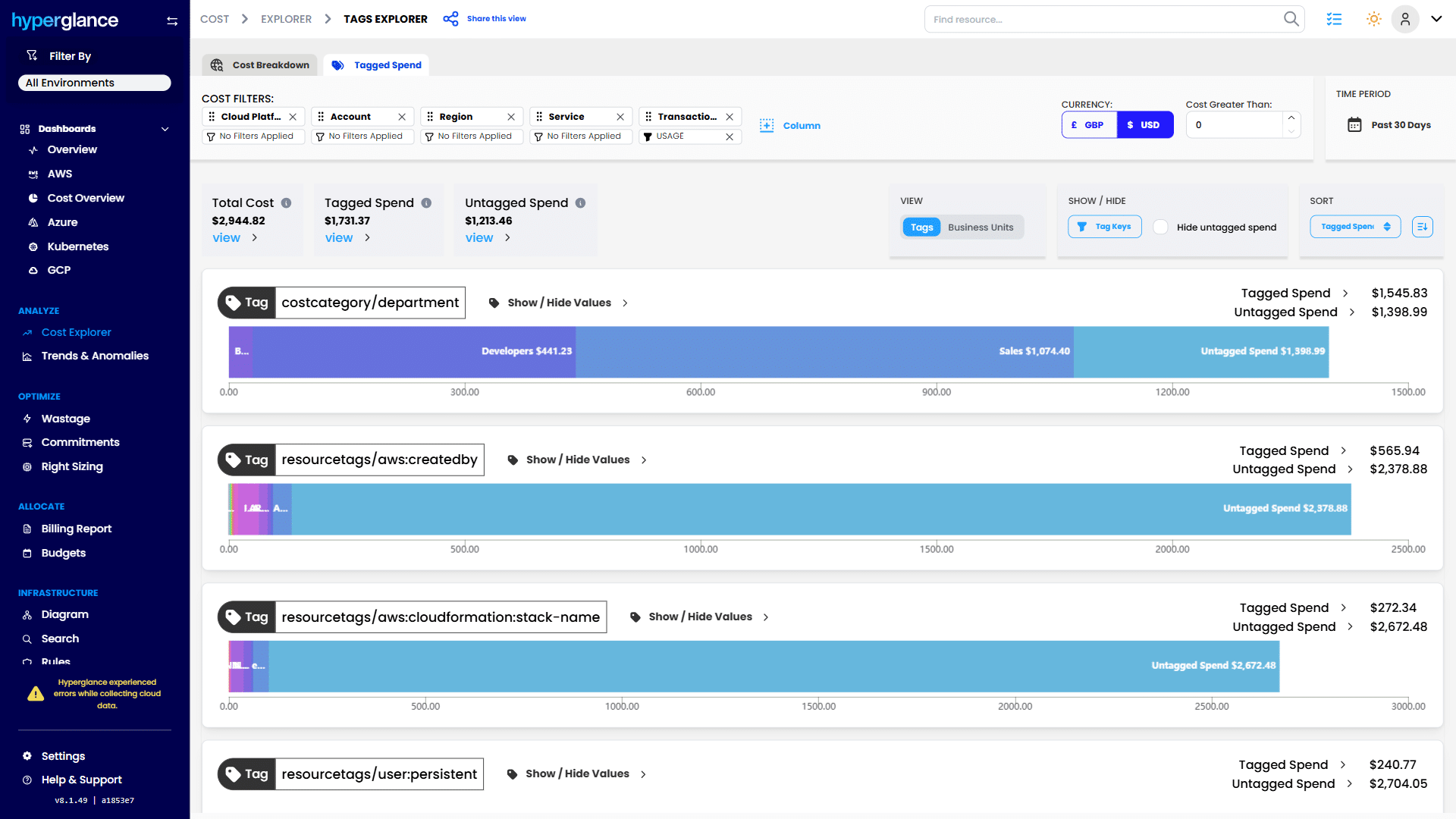
Tagging coverage and cost allocation audit.
5. Review and Renew Regularly
Your commitment strategy shouldn’t be “set and forget.” Review your coverage quarterly or semi-annually to align with changing workloads.
Plan renewals early to model overlap between expiring and new commitments, preventing temporary gaps that default to on-demand pricing.
Set calendar reminders for refund and exchange windows: AWS allows SP refunds only within 7 days, and RIs can be exchanged or resold only under specific conditions. Missing these deadlines can unnecessarily lock up capital.
6. Verify Cross-Account Behavior
AWS is continuously updating how commitments can be applied across linked and separate accounts. Recent 2025 policy changes increasingly restrict cross-account sharing between unrelated organizations. That said, Savings Plans and Reserved Instances can still be applied across accounts within the same consolidated billing family, provided the settings allow it. AWS’s enforcement primarily targets scenarios where MSPs or resellers attempt to pool commitments across unrelated customer accounts.
Within an AWS Organization, you can still turn on or off discount sharing for RIs and SPs between linked accounts (the payer and members). That setting controls where discounts float.
If you operate as a reseller or MSP, be aware that AWS has tightened rules that prevent pooling RI/SP discounts across different customers under a single payer; keep discounts within each customer’s Organization. Confirm specifics with your AWS partner or AWS account team.
Ensure your account structure, billing strategy, and FinOps tools (like Hyperglance) are aligned with the latest AWS commitment-sharing rules to avoid unexpected coverage gaps or stranded discounts.
7. Include Non-Compute Commitments
Commitments don’t stop at EC2. If you’re using RDS, Redshift, or ElastiCache RIs, manage them separately, as not all visibility tools yet capture non-compute workloads.
Building a holistic commitment portfolio ensures savings across all service categories, not just compute.
8. FinOps Tip: Automate for Continuous Optimization
Manual tracking doesn’t scale. Leverage automated governance and alerting to stay ahead of coverage drifts, renewal deadlines, or policy changes.
Platforms like Hyperglance provide a unified view of all commitments across accounts, integrating tagging, coverage, and utilization data to help FinOps teams drive consistent, measurable savings across the enterprise.
Recent Changes & 2025 Updates
The cloud cost landscape is constantly shifting, and the rules around AWS Reserved Instances and AWS Savings Plans are no exception. We’re tracking a few key updates:
- Post-2025 AWS Policy: New restrictions apply to the cross-customer sharing of RIs and SPs. Resellers and Managed Service Providers (MSPs) must end shared pools, meaning commitments must be used within a single AWS account or linked consolidated billing group.
- Queued Savings Plans: Since 2019, you can schedule new SPs in advance. This is a crucial feature that lets you plan purchases up to 3 years in advance and avoid missing a renewal date.
- Service Coverage Extensions: The Compute SP now includes SageMaker, further enhancing the appeal of AWS savings plans for flexible, AI/ML-driven environments. AWS continues to guide customers towards SPs as the default commitment model gently.
How Hyperglance Supports Commitment Purchases
At Hyperglance, we help FinOps and cloud professionals simplify complex cloud cost challenges. We act as a trusted colleague, providing the clarity and insight needed to make confident commitment decisions.
Our approach is designed to minimize the risk of overcommitment while ensuring you never miss an opportunity for savings. We provide several key features to support your commitment planning in AWS:
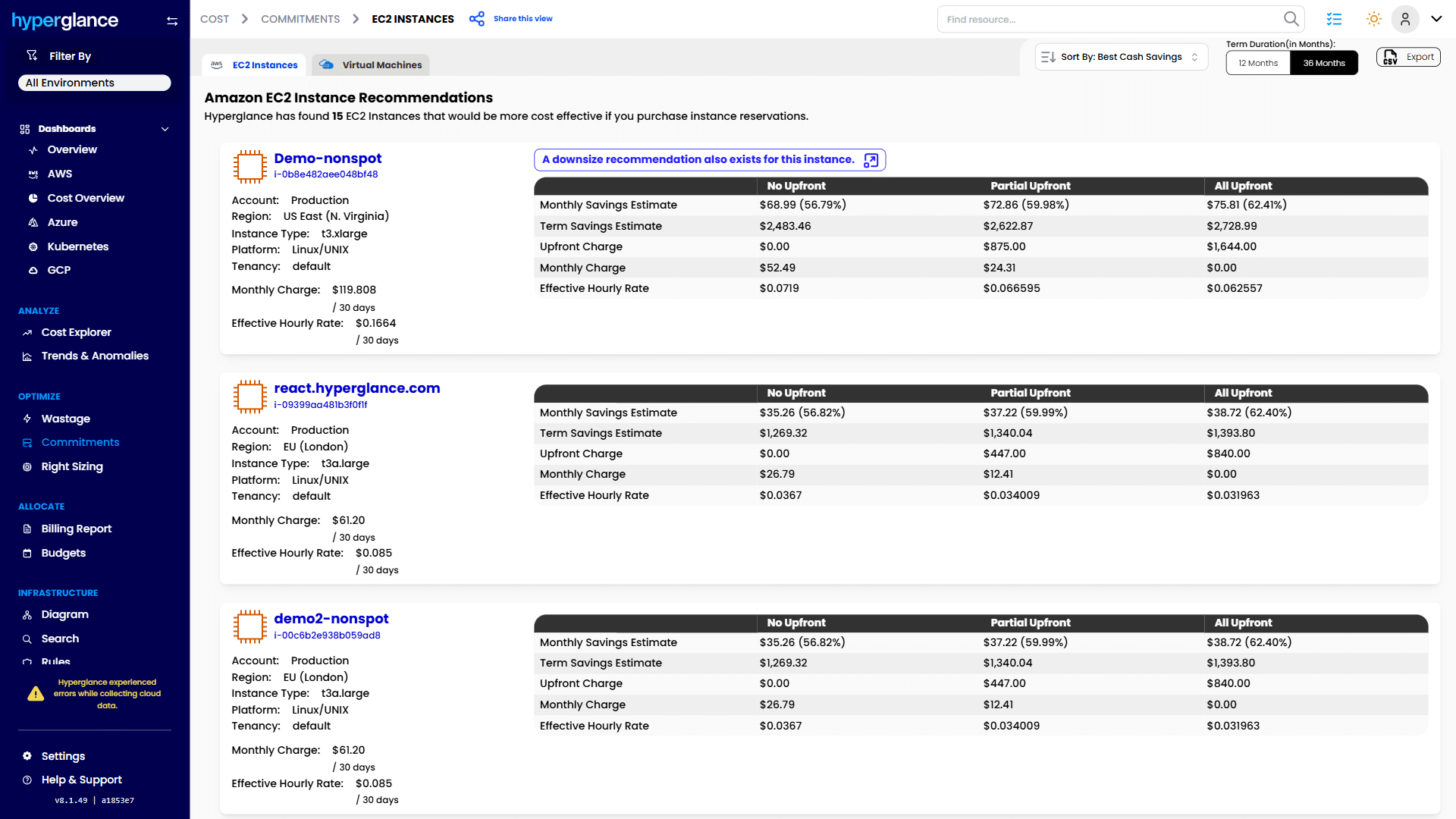
- Automatic Recommendations: We analyze your historical EC2 spend and immediately suggest optimal 1- or 3-year RI/SP purchases. We display potential savings and the correct purchase mix, mitigating the need for manual, complex calculations.
- Interactive Diagrams & Inventory: We provide real-time architecture maps that let you drill into instance details, tags, and dependencies. You can instantly see which resources are covered by a plan and which are running on demand.
- Cross-Account Visibility: For multi-account strategies, we offer a unified view across your entire AWS Organization. This prevents duplicate commitments and ensures your consolidated billing maximizes the utilization of every AWS Reserved Instance and AWS Savings Plans purchase.
- Commitment Planning Tools: Our platform focuses on pre-purchase optimization, ensuring you right-size instances, enforce tagging normalization, and detect idle resources before you commit budget.
By providing you with clear, visual, and actionable data, Hyperglance eliminates the guesswork from commitment planning, enabling you to move with steady confidence.
💥 Ready to overcome FinOps challenges? Explore our blog today.
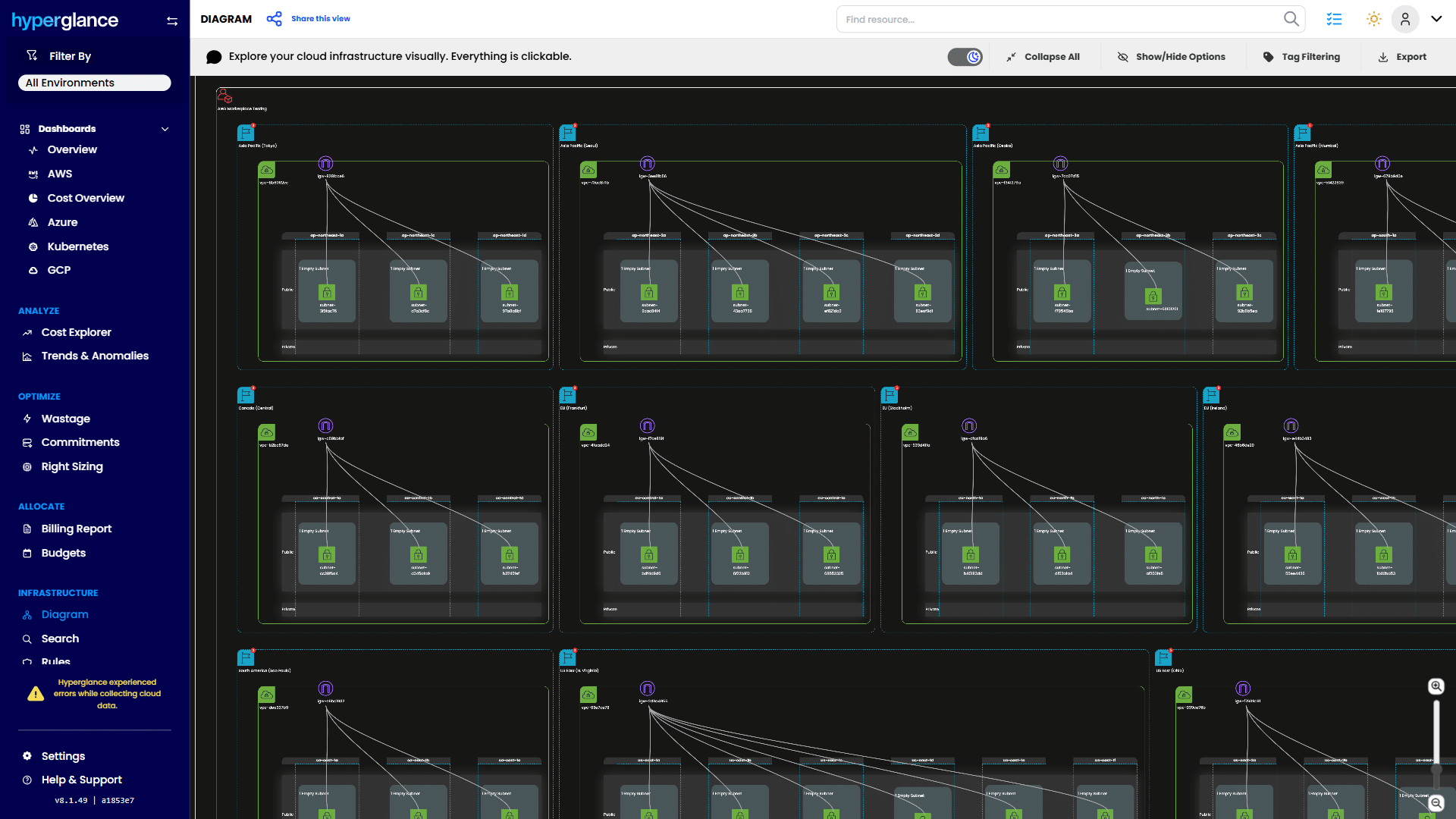
Interactive cloud infrastructure topology
Frequently Asked Questions (FAQ)
What are the benefits of using Reserved Instances?
Reserved Instances offer up to 75% savings compared to on-demand pricing and allow you to reserve capacity in a specific Availability Zone, making them ideal for stable workloads with consistent resource needs.
What is the difference between AWS Savings Plans and Reserved Instances?
AWS Savings Plans are a commitment to a fixed hourly spend (e.g., $5 per hour) and offer high flexibility across regions, instance families, and services (EC2, Fargate, Lambda). AWS Reserved Instances are a commitment to a specific resource configuration (e.g., t3.large in us-east-1) and offer a higher discount but much less flexibility.
Do Savings Plans replace Reserved Instances?
No, Savings Plans do not entirely replace Reserved Instances. While AWS often recommends SPs for general flexibility, Standard RIs still offer the maximum possible discount (up to 75%) and, if purchased as Zonal RIs, provide a crucial capacity reservation guarantee that SPs cannot offer.
Can I use both Savings Plans and Reserved Instances together?
Yes, and adopting a hybrid approach is considered a best practice for advanced commitment planning in AWS. Use Standard RIs for your non-negotiable, steady-state baseline compute needs. Use Compute Savings Plans to cover the remaining flexible, cross-service usage, ensuring high coverage without sacrificing agility.
Do Savings Plans automatically apply to all AWS services?
No, AWS Savings Plans do not automatically apply to all AWS services. They primarily cover compute usage for services such as EC2, Fargate, and Lambda, depending on the plan type.
Commit Intelligently, Not Blindly
Both AWS Savings Plans and AWS Reserved Instances are proven cost levers, but the right choice depends entirely on your workload predictability, flexibility needs, and organizational maturity in FinOps.
Use AWS Savings Plans when workloads evolve quickly or span multiple services. Use AWS Reserved Instances for steady, capacity-sensitive workloads. Blend the two for balanced coverage, and layer in Spot Instances for elastic scaling during peak demand.
We believe that commitments should save money, not trap it. With the right mix of automation and awareness, you can confidently lock in savings while maintaining flexibility. Tools like Hyperglance eliminate much of the guesswork from commitment planning, automating discovery, governance, and AWS savings plan recommendations.
Ready to see how much you can save with the right mix of Savings Plans and RIs?
Leverage Hyperglance to track your cloud spend, identify idle resources, and make informed, data-driven commitment decisions for a more brilliant cloud cost-control strategy in 2025 and beyond.
Why Teams Choose Hyperglance
Hyperglance gives FinOps teams, architects, and engineers real-time visibility across AWS, Azure, and GCP. See cost, security, and performance in one view.
Spot waste, route findings to owners, and trigger automated actions where configured with no-code automation.
- Visual clarity: Interactive diagrams show every relationship and cost driver.
- Actionable automation: Detect and fix cost and security issues automatically.
- Built for FinOps: Hundreds of optimization rules and analytics, out of the box.
- Agentless & Secure: Self-hosted, so sensitive data never leaves your cloud.
- Multi-cloud ready: Unified visibility across AWS, Azure, and GCP.
Book a demo today, or find out how Hyperglance helps you cut waste and complexity.

About The Author: Stephen Lucas
As Hyperglance's Chief Product Officer (CPO), Stephen is responsible for the Hyperglance product roadmap. Stephen has over 20 years of experience in product management, project management, and cloud strategy across various industries.