🆕 This blog explores how to choose a Cloud FinOps platform in 2026 that teams actually use.
Cloud bills rarely move in a straight line. One month, they spike, the next, they plateau, and every team scrambles to explain why. That tension is exactly why FinOps tools exist. But buying a platform is easy. Getting engineers, finance, and product teams to actually use it is the hard part.
A FinOps tool only creates value when it becomes part of daily conversations and decisions, not a dashboard that gets opened during quarterly reviews.
This guide explains what a FinOps platform needs to deliver beyond basic cost visibility, how tools map to the FinOps Framework, and how to choose one that teams will stick with.
Why Many FinOps Tools End Up Underused
Most companies invest in FinOps software, only to find their teams still exporting data to spreadsheets or firing off ad hoc CLI queries. It is not because the tool is bad. More often, it’s because:
- Setup takes longer than expected
- Dashboards don’t match how teams actually work
- Insights don’t translate cleanly into action
FinOps only succeeds when engineers, finance partners, and product owners all share the exact source of truth. If the platform is difficult to adopt or does not fit naturally into daily work, it quickly becomes another forgotten subscription.
What A FinOps Tool Should Do
The FinOps Framework defines three iterative phases: Inform, Optimize, and Operate. A practical FinOps platform should support all three, as outlined by the FinOps Foundation.
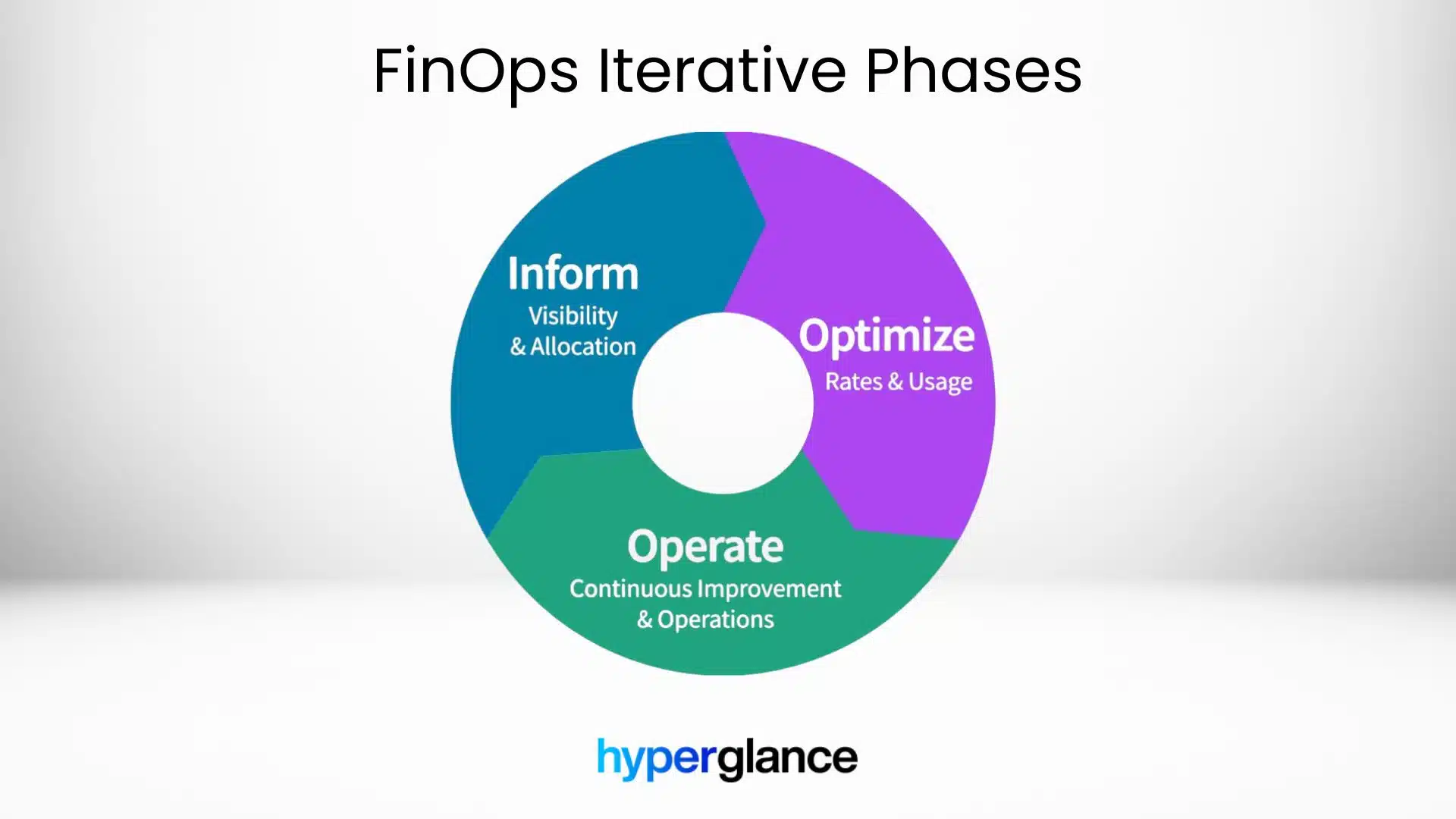
FinOps Lifecycle Iterative Phases
Inform
Provide a unified view of costs, usage patterns, and trends across all cloud providers so every stakeholder works from the same information.
Optimize
Identify wastage, rightsizing opportunities, and potential savings through commitments, along with the context required to act on them.
Operate
Support ongoing financial processes such as budgeting, alerting, policy validation, and regular cost reviews so teams can maintain control over time.
Key Capabilities To Check Before You Buy
Not all FinOps platforms are built the same. Before committing to one, it’s essential to evaluate the features that will determine whether it truly meets your team’s needs. Look for capabilities that ensure visibility, accuracy, and flexibility across your entire cloud environment.
Multi-Cloud Coverage And Scale
Support for AWS, Azure, GCP, and Kubernetes is table stakes. The platform should handle multiple accounts and regions and scale as environments grow. Cost and usage data should be available as soon as cloud billing data is published (near real-time, where supported).
Allocation And Tagging Views
Look for flexible cost allocation by team, product, or service. The platform should highlight untagged or mis-tagged resources and make gaps visible, rather than hiding them.
Reliable, Transparent Data
Trust matters. The tool should clearly show how costs are calculated, including amortisation, commitments, and discounts, with traceability back to native billing data.
Automation And Policy Enforcement
Dashboards alone don’t change behaviour. The platform should identify issues such as idle or oversized resources and route them to tickets or chat tools. Optional, safe actions should be supported where teams approve automation.
Integration With Existing Workflows
Adoption improves when FinOps fits existing tools. Look for integrations with Jira, ServiceNow, Slack, email, or webhooks, along with role-based access for different stakeholders.
Mapping FinOps Tools To The FinOps Framework
Mapping FinOps Tools To The FinOps Framework
Instead of comparing long feature lists, evaluate how tools support core FinOps practices in practice.
- Allocation: How does it handle shared services, ownership changes, and unallocated spend?
- Measurement: Are reports consistent and auditable across clouds and accounts?
- Optimization: Are recommendations actionable, or just informational?
How to Evaluate Tools in Practice
Vendor demos rarely reflect messy, real environments. Ground evaluations in scenarios you actually face.
For example, ask questions like:
- How are underutilized resources identified across multiple accounts?
- What happens when ownership or budgets change mid-month?
- How does the platform handle incomplete tagging?
- Can shared infrastructure costs be fairly distributed?
- How quickly can teams act once cost data updates?
- What does an engineer see, and what actions can they take without finance involvement?
Testing real scenarios reveals whether a tool fits your workflows or just looks good in theory.
How Hyperglance Supports FinOps Work
Hyperglance transforms raw billing data and cloud APIs into a single, actionable platform. It combines interactive diagrams, cost views, and rule-based checks into a single place.
Examples:
- Engineers see live architecture diagrams with cost and usage overlays.
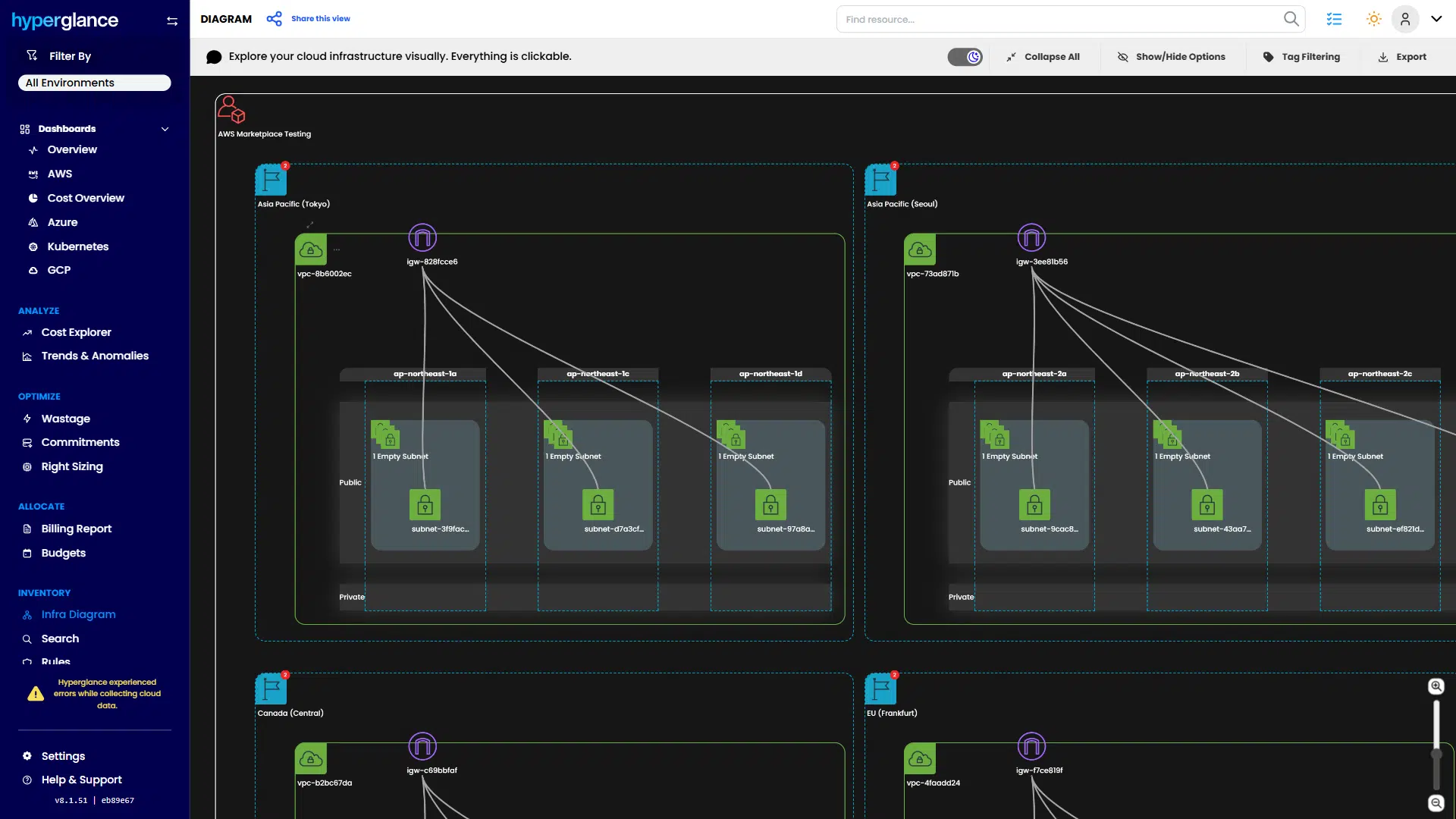
Architecture Diagram with Cost & Usage Overlays
- Finance tracks budgets and allocations across business units without manual consolidation.
📈 Struggling with unit cost tracking? Head over to our cloud unit economics breakdown for metric-driven insights.
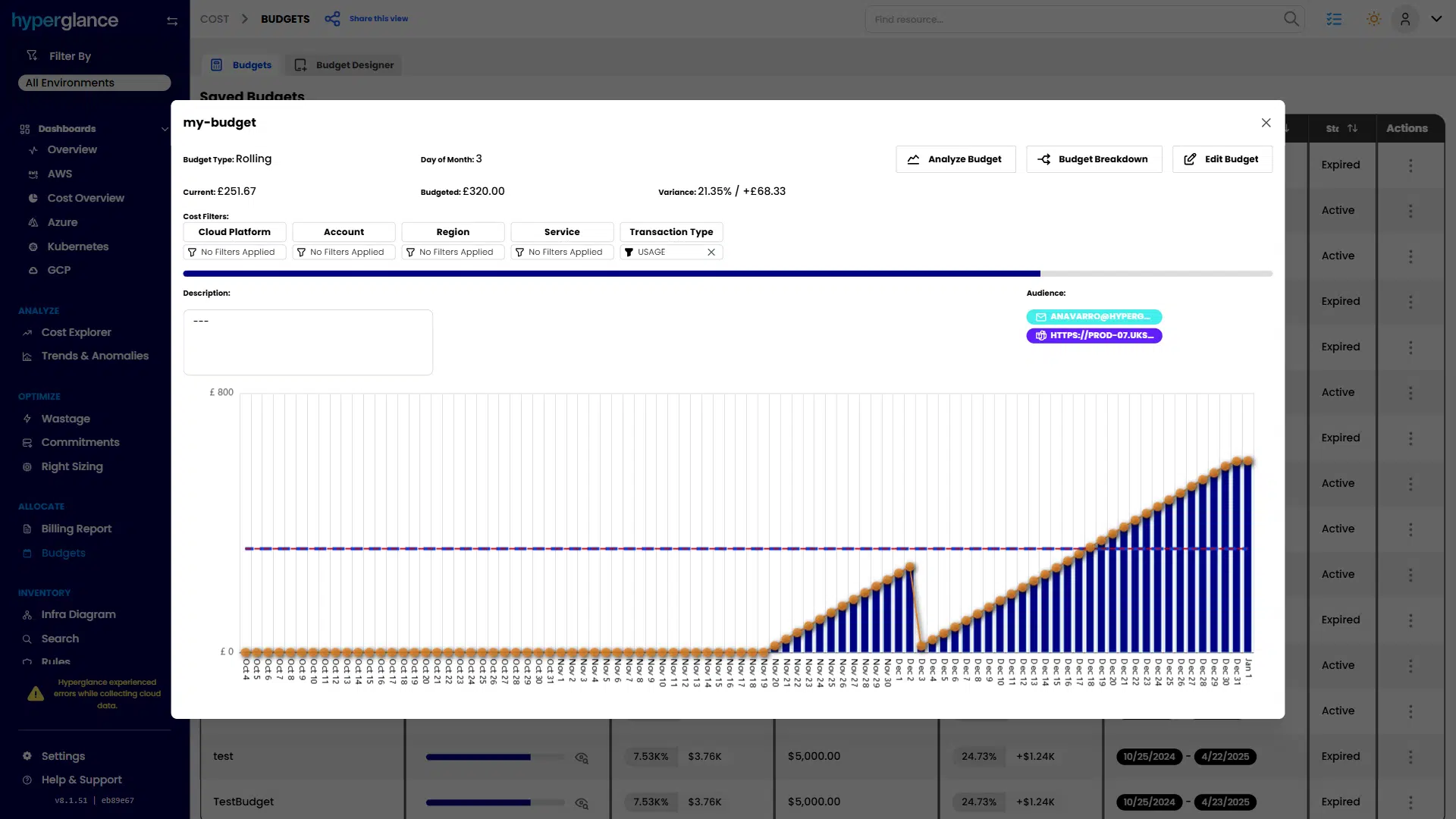
Budget & Allocation
- Policy checks and automated alerts catch unused or oversized resources early.
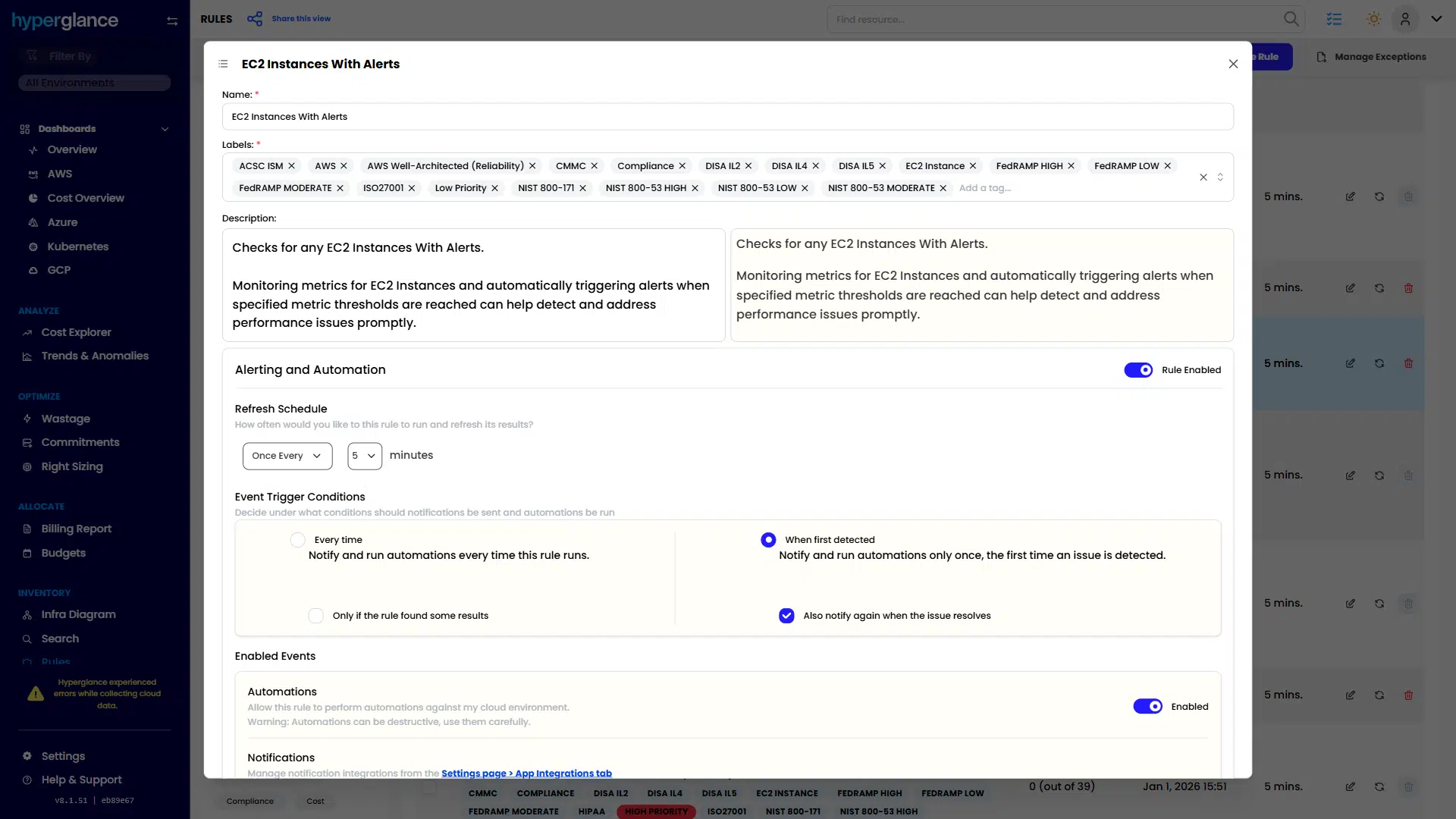
Policy Checks And Automated Alerts
Hyperglance works alongside native cloud tools, so teams can continue using AWS, Azure, GCP, or Kubernetes consoles while gaining cross-cloud visibility.
This makes FinOps adoption seamless and sustainable.
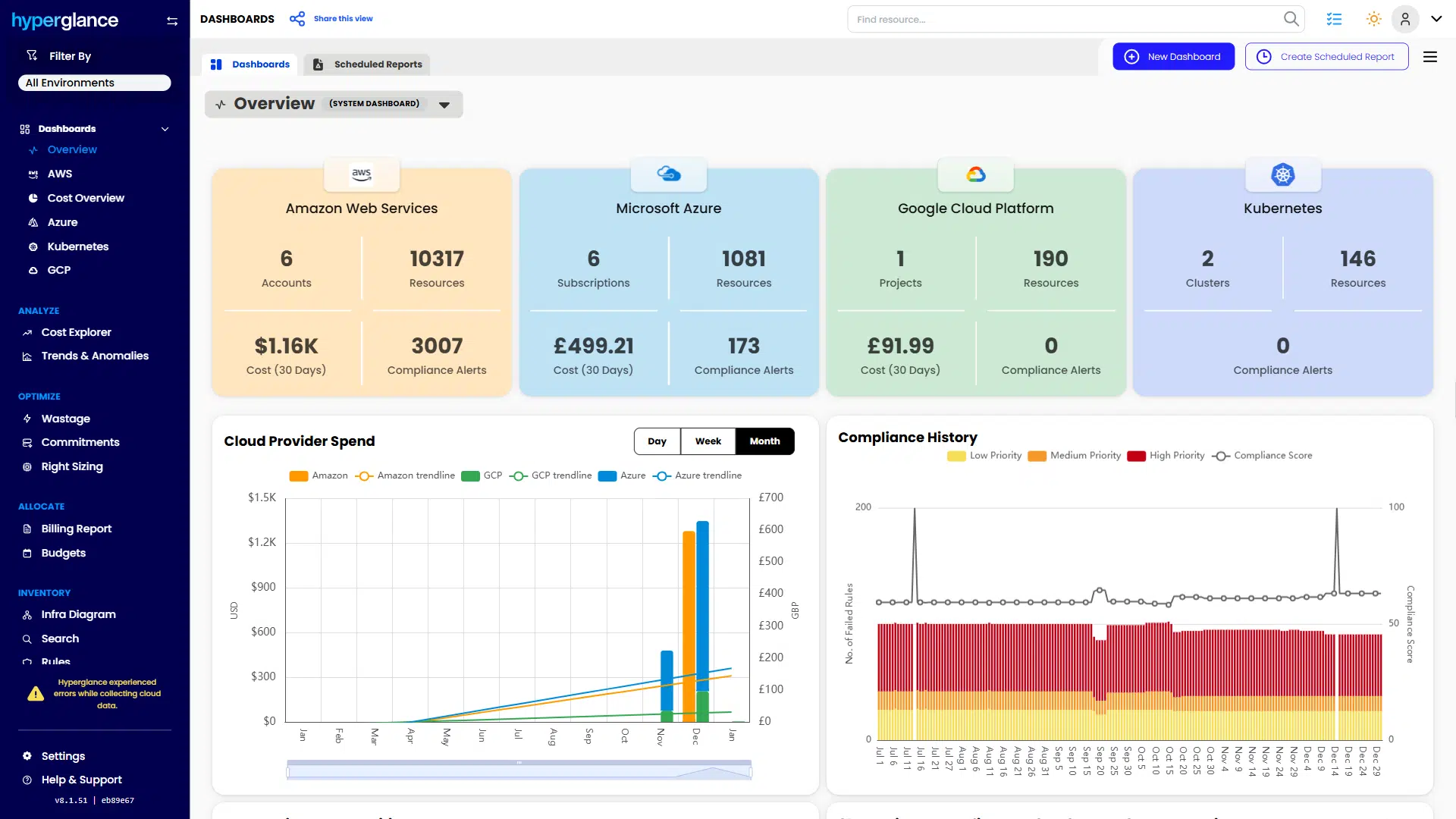
Hyperglance Overview Dashboard
Run A Focused FinOps Tool Pilot
The most reliable way to assess a FinOps platform is a short, outcome-driven pilot. Define two or three measurable goals, such as:
- Reducing idle or underutilized resources
- Improving tagging coverage for accurate cost allocation
- Automating recurring budget or policy checks
A narrow pilot limits disruption and makes it easier to see whether the platform fits naturally into engineering and finance workflows.
FinOps tools that succeed are the ones teams return to regularly. Platforms that support collaboration, integrate into daily decisions, and turn visibility into action are far more likely to deliver lasting cost control.
If you’re evaluating FinOps platforms, a focused pilot with Hyperglance can help you measure real-world impact before scaling further.
🎓 Looking to upskill your team? Dive into our FinOps certification guide to build expertise that sticks.
Why Teams Choose Hyperglance in 2026
Hyperglance is a strong fit when cost data alone doesn’t give your team enough context.
That often happens when teams are asking questions like:
- What is running across our cloud estate?
- Who owns this resource?
- Why did this cost change?
- What else depends on it?
- Is it safe to clean up?
- Which policy, security, or compliance issue needs attention?
- Can we route this to the right owner or trigger an approved action?
We help teams connect cloud cost to infrastructure context across AWS, Azure, Google Cloud, and Kubernetes. That means FinOps, CloudOps, platform, security, and leadership teams can work from the same view.
Hyperglance is especially useful for mid-market, enterprise, MSP, public sector, and regulated teams where ownership, governance, automation, and data control matter.
What You Can Do With Hyperglance
- See cost, resources, relationships, and ownership in one place
- Visualize cloud architecture with interactive diagrams
- Find waste, policy issues, and cost anomalies faster
- Route findings to the right team through existing workflows
- Use no-code automation for approved fixes
- Run Hyperglance in your own environment when data control matters
Want to see where Hyperglance fits in your FinOps stack?
Explore the product, start a free trial, or book a demo with the team.
About The Author: Stephen Lucas
As Hyperglance's Chief Product Officer (CPO), Stephen is responsible for the Hyperglance product roadmap. Stephen has over 20 years of experience in product management, project management, and cloud strategy across various industries.