Contents
- What We Mean by Scaling in the Cloud
- Vertical Scaling: When Making One Instance Bigger Makes Sense
- Horizontal Scaling: When Adding More Instances Wins
- Cost and Performance Trade-Offs To Consider
- How To Choose Between Horizontal and Vertical Scaling
- Common Scaling Mistakes We See in Real Environments
- How FinOps and Engineering Should Decide Together
- How Hyperglance Helps You See and Control Scaling
- FAQs
Cloud scalability is often sold as effortless, until a sudden traffic spike crashes your application or your cloud bill doubles overnight.
At that point, one architectural choice matters more than most: should you focus on horizontal vs vertical scaling?
While both approaches are designed to handle growth, they impact cost, performance, and reliability in very different ways.
Vertical scaling makes one resource bigger. Horizontal scaling adds more resources and spreads the load.
Choose the wrong approach, and you risk bottlenecks, outages, or unnecessary cloud spend.
This guide explains when each scaling strategy makes sense in modern cloud environments, and how to choose the right balance for your workloads.
What We Mean by Scaling in the Cloud
Cloud scaling adjusts compute capacity to match demand without hurting performance or increasing costs.
This demand can be short-term, like traffic spikes, or long-term, like steady user growth, forming the basis of most scaling strategies.
Scaling isn’t just technical: architects focus on reliability, engineers on state and behavior, and FinOps on utilization and waste. Misaligned horizontal vs. vertical scaling can increase costs or risk.
Cloud platforms make scaling fast: resources can be added or removed in minutes, manually or via automation, across virtual machines, containers, databases, or managed services.
The goal is deliberate scaling that balances reliability and financial efficiency.
What Vertical Scaling Actually Is
Vertical scaling is the process of increasing the performance of a single cloud resource by increasing its CPU, memory, or storage. In practice, this usually means resizing a virtual machine or switching to a larger instance type when an application needs more capacity.
Teams often rely on vertical scaling when they need fast results or when an application is designed to run on a single node. For example, vertical scaling can be applied to AWS EC2 instances to quickly add CPU or memory to relieve pressure.
The trade-off is that vertical scaling has clear limits. Every platform and instance family has practical size limits, and some resize operations may require a restart or other disruption. These vertical scaling limitations in cloud environments often force teams to rethink their approach as workloads grow.
What Horizontal Scaling Actually Is
Horizontal scaling increases capacity by adding more instances, containers, or nodes instead of making a single resource bigger. Workloads are distributed, so no one machine handles all demand.
In cloud environments, this often means auto scaling groups, container replicas, or application servers behind load balancers. This approach is central to many horizontal vs vertical scaling cloud strategies because it boosts fault tolerance and resilience.
By spreading traffic and processing, horizontal scaling reduces single points of failure. If one instance fails, others continue handling requests. The trade-off is added complexity, as applications must run across multiple nodes and manage state carefully.
⚡️Resource visibility is critical—see how real-time cloud visualization and dependency mapping help plan scaling

Vertical Scaling: When Making One Instance Bigger Makes Sense
Vertical scaling works best when you need additional capacity quickly and cannot easily change how an application is built. For many stateful or legacy workloads, scaling up a single instance is often the most practical option.
This pattern is typical in databases and monolithic applications, where redesigning for horizontal scaling is risky or time-consuming. Vertical scaling often buys time while longer-term changes are planned.
Vertical scaling is also helpful during short-term demand spikes or transitional periods, such as preparing for a significant release or buying time before a larger redesign.
While it is not always a long-term solution, it can be an effective way to stabilize performance when speed and simplicity matter more than flexibility.
Advantages of Vertical Scaling
Vertical scaling is often the first option teams reach for because it is straightforward and fast.
When a service starts hitting resource limits, scaling up a single instance can relieve pressure with minimal disruption.
The advantages below explain why this approach is still widely used in cloud environments.
Simple to implement
Usually, just resize the instance or change the node size. No need to redesign the application or traffic flow.
Easy to reason about
Running on a single instance makes performance behavior predictable, easier to monitor, and troubleshoot.
Fast way to add capacity
Provides immediate headroom when a service is under pressure or approaching limits.
Works well for stateful workloads
Applications relying on local state (e.g., databases, legacy systems) are often more stable when scaled vertically.
Limitations and Risks of Vertical Scaling
While vertical scaling can quickly solve capacity issues, it comes with trade-offs that become more apparent as systems grow.
These limitations affect not just performance, but also cost, resilience, and long-term scalability.
Hard size limits
Every instance type has a max CPU, memory, and storage. Beyond that, scaling further requires architecture changes.
Higher cost per unit
Larger instances often cost more overall, and they can become less cost-efficient if utilisation stays low.
Single point of failure
If the instance goes down, the entire service is affected, increasing downtime risk.
Limited fault tolerance
Vertical scaling does not add redundancy; failures impact the service more than in distributed systems.
Horizontal Scaling: When Adding More Instances Wins
Horizontal scaling is the preferred approach when resilience and flexibility matter more than simplicity in cloud architectures.
Instead of relying on a single, larger machine, capacity is added by running multiple instances that work together.
This model aligns closely with cloud-native design. Applications can scale up during demand spikes and scale down when traffic drops, helping teams balance performance and cost.
Because workloads are spread across multiple instances, horizontal scaling also reduces the impact of individual failures and improves overall system reliability.
This approach works best for stateless services, containerized workloads, and systems designed to distribute load.
In many environments, vertical vs. horizontal auto-scaling decisions come down to whether the application can scale out safely.
Advantages of Horizontal Scaling
Horizontal scaling shines when systems need to stay available under unpredictable demand. By spreading work across multiple instances, teams can scale capacity up or down while reducing risk.
Improved availability
If one instance fails, others continue handling traffic, reducing downtime.
Better fault tolerance
Workloads are distributed, so failures affect only part of the system instead of the entire service.
Elastic scaling
Capacity grows and shrinks with real demand, helping avoid overprovisioning.
Can improve cost efficiency at scale
Matching capacity to demand keeps costs aligned, though additional infrastructure (load balancers, networking) may be required.
Complexity and Design Trade-Offs
The flexibility of horizontal scaling comes with additional design and operational requirements. Applications must be built to run across multiple instances without relying on a single node.
Stateless or partitioned workloads
Horizontal scaling is simplest when state is externalised or partitioned, though some platforms and workloads can also scale stateful components.
Load balancing
Traffic needs to be distributed evenly to prevent hotspots and wasted capacity.
More moving parts
Additional instances, networks, and services increase operational complexity.
Scaling policy ownership
Teams must define when and how scaling occurs to avoid instability or unexpected cost spikes.
🔥Avoid overspending during scaling by applying cloud budgets and proactive cost alerts
Cost and Performance Trade-Offs To Consider
Scaling decisions work best when performance, cost, and reliability are considered together.
Simply moving to larger instances can relieve pressure in the short term, but it often increases cost and leaves systems fragile.
Vertical scaling runs into hard performance limits and usually costs more per unit of compute as instances get bigger. It also concentrates risk, since a single failure can take the service down.
Horizontal scaling adds complexity, but it allows capacity to grow in smaller steps and better match real demand.
The right approach depends on how predictable your workload is and how much failure your system can tolerate.
Teams that evaluate cost and performance together are less likely to overspend or hit avoidable limits.
How Vertical Scaling Affects Cost and Performance
Vertical scaling often feels like the fastest fix when performance starts to slip.
It works, but it comes with trade-offs that show up over time.
- Boosts performance quickly by adding CPU or memory to a single instance
- Increases cost per unit of compute as instance sizes grow
- Can hide inefficient code, slow queries, or poor caching
- Creates large, hard-to-downsize infrastructure footprints
How Horizontal Scaling Affects Cost and Performance
Horizontal scaling is designed to better follow demand, especially when paired with autoscaling.
The benefits depend heavily on how well it is configured.
- Scales out during traffic spikes and scales back in when demand drops
- Helps control costs when autoscaling rules are well-tuned
- Can trigger surprise bills if thresholds or metrics are poorly chosen
- Adds operational noise when systems scale too often or unpredictably
What Blocks Scale-Out?
Before choosing horizontal scaling, check for workload characteristics that can prevent safe scale-out:
- Sessions stored on the instance – user sessions tied to a single node make horizontal scaling tricky.
- Shared filesystem assumptions – if multiple instances expect local storage consistency, scaling out can break behavior.
- Single-writer services – databases or services that only allow one writer at a time may need vertical scaling first.
- Caches tied to a node – in-memory caches that aren’t shared can cause inconsistencies across nodes.
- Coordination or leader election dependencies – workloads relying on a single leader or coordinator may block horizontal growth.
Tip: If any of these apply, consider vertical scaling temporarily while refactoring to remove state coupling.
How To Choose Between Horizontal and Vertical Scaling
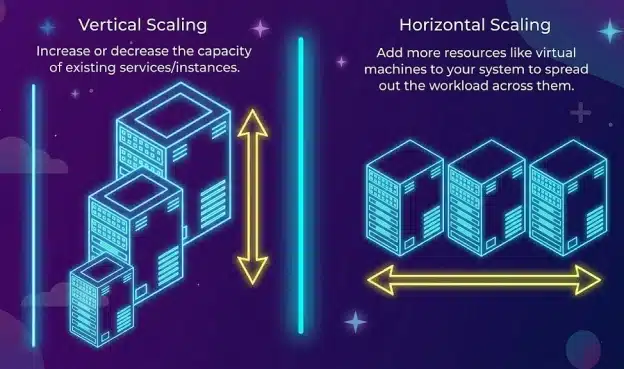
Understanding the difference between horizontal scaling and vertical scaling in cloud infrastructure.
There is no single correct answer.
The key differences between horizontal and vertical scaling in cloud computing lie in workload behavior, business risk, and architectural maturity.
Most real-world systems use a mix of both approaches.
A Simple Decision Path for Scaling Choices
If you need a quick way to choose between scaling approaches, walk through the questions below in order. This helps teams move from abstract advice to a practical decision.
1) Is the workload stateful?
For example: databases, applications storing session data locally, or systems with single-writer constraints.
- If yes, start with vertical scaling for immediate relief while planning how to reduce or externalize state over time.
- If not, horizontal scaling becomes easier to adopt.
2) Do you require higher availability or failover?
If the downtime of a single node affects users or revenue:
- Move toward horizontal scaling or multi-node redundancy, even if vertical scaling is used temporarily.
3) Can the service become stateless within your roadmap?
If upcoming changes allow session data or state to move to shared services:
- Plan a transition to horizontal scaling with autoscaling to enable flexible growth and resilience.
4) What is the blast radius if one node fails?
Ask what happens if a single instance goes down.
- If the impact is high, distributed or multi-node designs reduce risk.
- If the impact is low, vertical scaling may still be acceptable for now.
5) Do you have a safe scale-in plan?
Scaling out is easy; scaling back in without disruption is harder.
- If you cannot safely scale in, autoscaling can quietly inflate costs.
- Ensure instances can be removed without breaking workloads before relying on horizontal scaling.
In practice, most environments use vertical scaling for short-term relief and horizontal scaling for long-term resilience and cost control.
Revisiting these questions regularly helps teams avoid locking into scaling patterns that no longer fit workload behavior.
A Simple Decision Checklist for Common Workloads
Use this checklist to decide so you can choose between horizontal vs. vertical scaling for each service.
Lean toward vertical scaling if:
- The workload is stateful or depends on local disk or memory.
- Refactoring or redesign is high risk or not currently feasible.
- The service runs on a single node by design.
- Short-term performance relief is the primary goal.
Lean toward horizontal scaling if:
- High availability and fault tolerance are required.
- The workload is stateless, or its state can be externalized.
- Traffic patterns are unpredictable or highly variable.
- Autoscaling policies can be clearly defined and monitored.
Revisit your choice if:
- Instance sizes keep growing without performance gains.
- Costs increase faster than traffic or usage.
- SLOs are being missed during failures or traffic spikes.
What This Looks Like in Real Environments
To make these choices more concrete, here are common real-world patterns teams encounter.
Web or API tier behind a load balancer
Most modern web and API services scale horizontally. New instances are added behind a load balancer during traffic spikes and removed when demand drops. Because requests are stateless, scaling out improves availability while keeping costs aligned with traffic.
Legacy single-node applications
Older or tightly coupled applications often cannot run across multiple nodes safely. Teams typically scale these vertically to maintain performance while planning longer-term refactoring to reduce single-node dependency.
Databases and data services
Many traditional databases scale vertically first, although managed and distributed databases may also support read replicas, sharding, or other scale-out patterns. As demand grows, teams introduce read replicas, partitioning, or sharding to distribute load while keeping core data operations reliable.
Mixed Approach: Scale Up, Then Scale Out
Most real-world systems use both approaches strategically:
- Step 1: Scale up to relieve immediate pressure or handle stateful constraints.
- Step 2: Refactor or externalize state (e.g., move sessions to Redis, split caches, enable read replicas).
- Step 3: Scale out with horizontal autoscaling for elasticity, redundancy, and cost efficiency.
⭐For AWS-specific scaling decisions, cross-reference with AWS EC2 Cost Optimization: Complete Guide
Common Scaling Mistakes We See in Real Environments
Scaling problems usually stem from habit, not from a lack of tools.
In horizontal vs vertical scaling cloud environments, teams often reach for familiar fixes under pressure and end up locking in patterns that are expensive or fragile over time.
- Scaling up instead of fixing bottlenecks
Adding larger instances can hide slow queries, inefficient code, or missing caching until costs spiral out of control. - Forgetting to scale back down
Capacity added for peak traffic often stays in place long after demand drops, quietly inflating cloud bills. - Treating autoscaling as set-and-forget
Autoscaling policies need tuning. Without regular review, they can overreact to noise or miss the real load. - Using the same strategy for every workload
Not all services have identical availability requirements or traffic patterns, but many are still scaled the same way. - Ignoring failure scenarios
Scaling for traffic without planning, for instance, can lead to brittle systems.
Patterns That Waste Money or Add Risk
These patterns are most common in fast-growing environments where scaling decisions are made under pressure. Over time, they quietly increase costs and introduce risk that is hard to unwind.
- Oversized instances left in place lock in higher costs long after peak demand has passed.
- Unbounded autoscaling expands capacity without limits, leading to unpredictable spend.
- Manual fire-drill scaling creates inconsistent environments that are rarely cleaned up.
- Scaling without ownership allows policies to drift and risk to grow unnoticed.
How FinOps and Engineering Should Decide Together
Scaling decisions work best when cost, reliability, and performance are evaluated together.
In horizontal vs vertical scaling cloud environments, silos between FinOps, SREs, and architects often lead teams to optimize for one goal while creating problems elsewhere.
A shared view of usage, cost, and risk helps ensure scaling changes support both service reliability and budget constraints.
Using Shared Data To Align Cost and Reliability
Alignment starts with using the same data to make decisions.
Teams should agree on a small set of metrics that reflect real system behavior and cost impact, rather than relying on isolated dashboards or ad hoc reports.
Shared dashboards make it easier to see how scaling affects both performance and spend simultaneously.
Regular reviews of scaling behavior help teams catch issues early and adjust before costs or reliability drift.
When scaling changes are planned and reviewed together, they are far less likely to become reactive fixes that create long-term problems.
How Hyperglance Helps You See and Control Scaling
Scaling issues are rarely “just CPU.” They often stem from hidden dependencies, wasted capacity, or inconsistent policies.
Hyperglance helps teams spot these patterns earlier and act with more confidence using rules, alerts, and automation.
1) See what you are actually scaling
Before scaling, know what exists, how it connects, and the potential impact of changes. Hyperglance provides interactive cloud architecture diagrams for AWS, Azure, GCP, and Kubernetes, giving clear visibility without manual maintenance.
Practical benefits for scaling decisions:
- Identify single points of failure or tight dependencies that make vertical scaling risky.
- Understand which services sit behind load balancers and which do not, before scaling out.
- Search and filter your cloud inventory to pinpoint exact instances, clusters, or VM groups driving cost and usage.
2) Detect destructive scaling patterns early
Teams often overspend by repeatedly scaling up oversized instances or leaving temporary capacity in place after spikes. Hyperglance continuously scans and applies rule-based checks to highlight issues.
Key patterns flagged:
- Oversized resources that appear stable but are overprovisioned.
- Autoscaling groups that never scale in or have unbounded growth.
- Tagging gaps that block accurate cost attribution.
- Policy drift where scaling changes bypass existing guardrails.
3) Turn visibility into action
Cost visibility alone is not enough. Hyperglance helps teams act safely:
- Distinguish between “needs more capacity” and “running inefficiently.”
- Validate whether rising costs justify scaling or reflect idle headroom.
- Combine scaling policies with cost visibility to avoid permanent overprovisioning.
4) Enforce guardrails with automation
Autoscaling and resizing are safe only when controlled by consistent guardrails. Hyperglance supports codeless automation for remediation and policy enforcement, connecting rules to actions and notifications via Slack or cloud-native channels.
By aligning scaling actions with the 5 Pillars of Cloud Cost Efficiency, teams can enforce guardrails safely without firefighting.
Examples of safe automation:
- Trigger alerts when a scaling rule or resource crosses a threshold.
- Automatically remediate common issues like tagging or policy breaches.
- Schedule recurring automation so controls run even when teams are busy.
The goal is to make scaling more deliberate and repeatable, instead of something teams only revisit during incidents or cost spikes.
5) Operate from a shared source of truth
Hyperglance combines topology visibility, cost insights, and governance controls to give FinOps and engineering teams a single view for scaling decisions.
Integrating Cloud FinOps data helps teams catch overprovisioned resources and ensure scaling decisions are financially responsible.
Shared context helps answer:
- Are we scaling due to genuine demand or inefficiency?
- If scaling out, what dependencies or risks change?
- If scaling up, what’s the blast radius and unit cost impact?
Takeaway: Horizontal and vertical scaling are tools, not competing philosophies. With clear visibility, automated guardrails, and shared data, teams can scale deliberately, fix bottlenecks instead of hiding them, and control costs while maintaining reliability.
FAQs
What metrics should I use for autoscaling?
CPU is a common autoscaling signal, but it is not always the best one. Choose metrics that reflect real demand, such as request rate, latency, queue depth, memory usage, or custom business metrics, so scale-out and scale-in happen for the right reasons.
Why does autoscaling increase cost?
Costs rise if scale-in is slow or disabled, thresholds are misconfigured, or maximum instance limits are missing. Regularly review policies to avoid overprovisioning.
Is horizontal scaling the same as load balancing?
No. Horizontal scaling adds instances; load balancing distributes traffic across them. They complement each other.
What’s the difference between horizontal and vertical scaling?
Vertical scaling (scale up) means adding more power to an existing machine or service, such as more CPU or memory. Horizontal scaling (scale out) means adding more instances and distributing work across them. Vertical scaling is often simpler at first, while horizontal scaling usually offers better resilience and flexibility at a larger scale.
What is autoscaling vs manual scaling?
Autoscaling adjusts capacity automatically based on metrics. Manual scaling requires human intervention. Autoscaling is faster and more consistent, but it needs correct metrics.
When should I use horizontal scaling?
Use it when availability, fault tolerance, and elastic growth matter—ideal for stateless services and unpredictable traffic.
How do I choose the best scaling strategy?
Check statefulness, downtime tolerance, and demand predictability. Stateful apps often start with vertical scaling; stateless, customer-facing apps benefit from horizontal scaling. Many systems mix both.
What are common scaling mistakes?
Scaling up without fixing bottlenecks, leaving temporary capacity, treating autoscaling as a one-time setup, and lacking policy ownership or cost guardrails.
When not to use horizontal scaling?
Avoid it for apps relying on local state or small, stable workloads where vertical scaling is simpler and cheaper.
Which is better for databases, horizontal or vertical scaling?
It depends. Traditional databases often scale vertically; distributed/cloud-native ones can scale horizontally. Many start vertical, then adopt horizontal as demand grows.
Why Teams Choose Hyperglance in 2026
Hyperglance is a strong fit when cost data alone doesn’t give your team enough context.
That often happens when teams are asking questions like:
- What is running across our cloud estate?
- Who owns this resource?
- Why did this cost change?
- What else depends on it?
- Is it safe to clean up?
- Which policy, security, or compliance issue needs attention?
- Can we route this to the right owner or trigger an approved action?
We help teams connect cloud cost to infrastructure context across AWS, Azure, Google Cloud, and Kubernetes. That means FinOps, CloudOps, platform, security, and leadership teams can work from the same view.
Hyperglance is especially useful for mid-market, enterprise, MSP, public sector, and regulated teams where ownership, governance, automation, and data control matter.
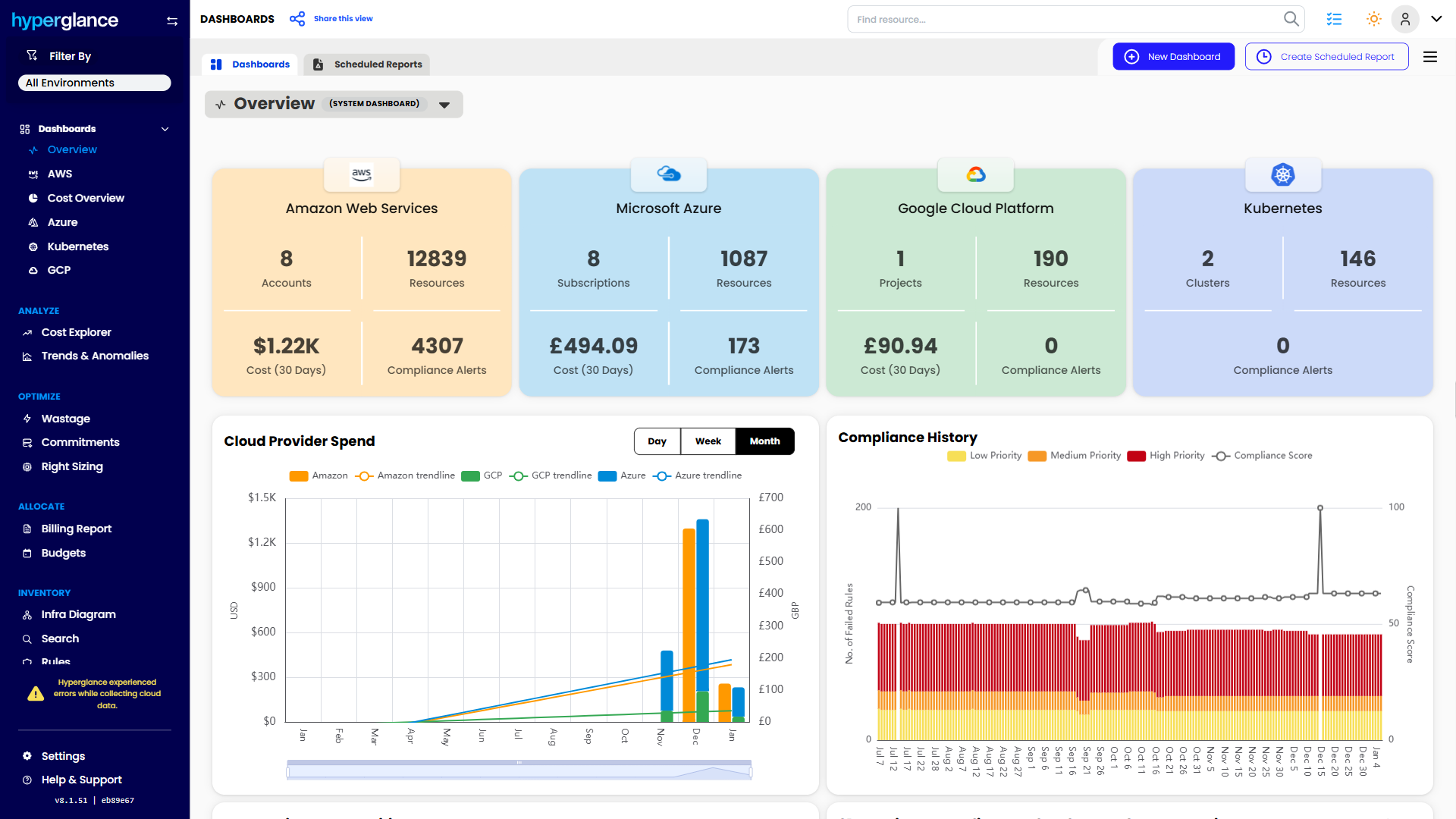
What You Can Do With Hyperglance
- See cost, resources, relationships, and ownership in one place
- Visualize cloud architecture with interactive diagrams
- Find waste, policy issues, and cost anomalies faster
- Route findings to the right team through existing workflows
- Use no-code automation for approved fixes
- Run Hyperglance in your own environment when data control matters
Want to see where Hyperglance fits in your FinOps stack?
Explore the product, start a free trial, or book a demo with the team.

About The Author: David Gill
As Hyperglance's Chief Technology Officer (CTO), David looks after product development & maintenance, providing strategic direction for all things tech. Having been at the core of the Hyperglance team for over 10 years, cloud optimization is at the heart of everything David does.