Contents
- What Changed Since July 2025 (Quick Check)
- The Most Common S3 Bill Drivers
- A Quick Reality Check for Common Patterns
- AWS S3 Pricing Structure Explained
- Storage Classes That Matter in 2026
- Lifecycle Guardrails: Durations and Deletion Fees
- How to Calculate Your S3 Costs (Step-by-Step)
- Requests: The Quiet Cost Multiplier
- Data Transfer: Where S3 Bills Get Expensive
- Newer Cost Considerations: Metadata and Tables
- How to Estimate Your S3 Costs (Practical Model)
- Common Mistakes That Inflate S3 Costs
- S3 Free Tier (2025 Reality Check)
- How Hyperglance Helps You Control S3 Costs
- Simplify S3 Pricing to Master Cloud Cost Control
- Frequently Asked Questions (FAQ)
🆕 This guide includes the latest 2026 updates to AWS S3 pricing and storage tiers.
Amazon S3 remains the default storage layer for data lakes, applications, analytics, and backups on AWS. What hasn’t changed in 2026 is that S3 pricing still looks simple on the surface and gets expensive fast when usage patterns aren’t understood.
This guide focuses on what actually drives your S3 bill today, what changed in late 2025, and how FinOps teams should model and control S3 costs going into 2026.
What Changed Since July 2025 (Quick Check)
Checked for 2025 accuracy
- S3 Tables: Expanded support and improved cost visibility (mid‑2025) means table‑level attribution is now practical for FinOps teams.
- S3 Metadata: Pricing reductions and support for existing objects rolled out in 2025, but availability is still region‑limited.
- S3 Express One Zone: Price reductions introduced in 2025 remain in effect; it’s still a premium tier best suited for high‑performance workloads.
- No major pricing model changes announced for 2026: The same four pricing dimensions apply. The complexity comes from how they combine.
The Most Common S3 Bill Drivers
For most AWS environments, S3 costs are driven by a short list of factors:
- Storage class selection (Standard vs IA vs Glacier vs Express)
- Request volume (especially PUT, LIST, and lifecycle transitions)
- Data transfer out of S3 (internet, inter‑region, or acceleration)
- Management features (versioning, inventory, Storage Lens, Metadata, Tables)
If your S3 bill is growing faster than your data volume, one or more of these is usually the reason.
A Quick Reality Check for Common Patterns
- If you store everything in S3 Standard → You’re likely overpaying for cold data
- If you serve data publicly from S3 → Internet egress will dominate your bill
- If you have millions of small objects → Request costs and IA minimums matter
- If you enabled versioning “just in case” → Storage grows quietly every month
- If you query S3 like a database → LIST and GET costs escalate fast
AWS S3 Pricing Structure Explained
Before we dissect the costs, let’s quickly define what Amazon S3 is for context.
What is Amazon S3?
Amazon S3 is an object storage service. It’s designed to store and retrieve any amount of unstructured data from anywhere on the web.
S3 pricing is not one number. It’s a combination of four dimensions, all of which vary by storage class.
1. Storage Used (GB‑Month)
You pay a monthly rate based on the storage class for the amount of data stored. Higher availability and lower latency cost more per GB.
2. Requests and Retrieval
Every interaction with S3 is billed per request:
- PUT / COPY / POST / LIST: Higher cost, lower volume
- GET / SELECT: Lower cost, very high volume
- Retrieval fees apply for IA and Glacier tiers, in addition to request charges
At scale, request costs can rival or exceed storage costs.
3. Data Transfer
Data movement is often the largest surprise on the bill:
- Inbound transfers are generally free, with service‑specific caveats
- Outbound transfers (egress) are billed on a tiered basis
- Inter‑region transfers are always charged
- Transfer Acceleration adds additional per‑GB charges on top of standard transfer pricing
4. Management and Analytics Features
Optional features introduce their own pricing models:
- Inventory reports
- Storage Lens (advanced metrics)
- Versioning
- Replication
- S3 Metadata
- S3 Tables
Individually small, these costs add up across large environments.
Storage Classes That Matter in 2026
The storage class you choose has the single biggest impact on your base S3 cost.
Always confirm pricing in your AWS region; examples below are illustrative only.
- S3 Standard: Frequently accessed data, lowest latency, highest storage cost
- S3 Intelligent‑Tiering: Unknown or changing access patterns; adds per‑object monitoring fees
- S3 Standard‑IA / One Zone‑IA: Lower storage cost, retrieval fees apply, minimum storage duration
- S3 Glacier Instant Retrieval: Low storage cost, fast access, higher retrieval pricing
- S3 Glacier Deep Archive: Lowest storage cost, long retrieval times, long minimum retention
- S3 Express One Zone: Very low latency, very high cost; optimized for performance‑critical workloads
Key trade‑off: As storage costs per GB decrease, retrieval costs and access constraints increase.
Call Out
Find hidden cloud spend instantly with Hyperglance’s Cost Wastage tool
Lifecycle Guardrails: Durations and Deletion Fees
Infrequent and archival tiers come with minimum storage periods:
- Standard‑IA / One Zone‑IA: ~30 days
- Glacier Instant / Flexible Retrieval: ~90 days
- Glacier Deep Archive: ~180 days
Deleting data early results in early deletion charges, which are easy to overlook in cost models. Lifecycle policies should align with actual retention requirements, not assumptions.
How to Calculate Your S3 Costs (Step-by-Step)
The only way to truly master calculating AWS S3 pricing is to quantify every dimension. We recommend breaking down your consumption based on these five steps.
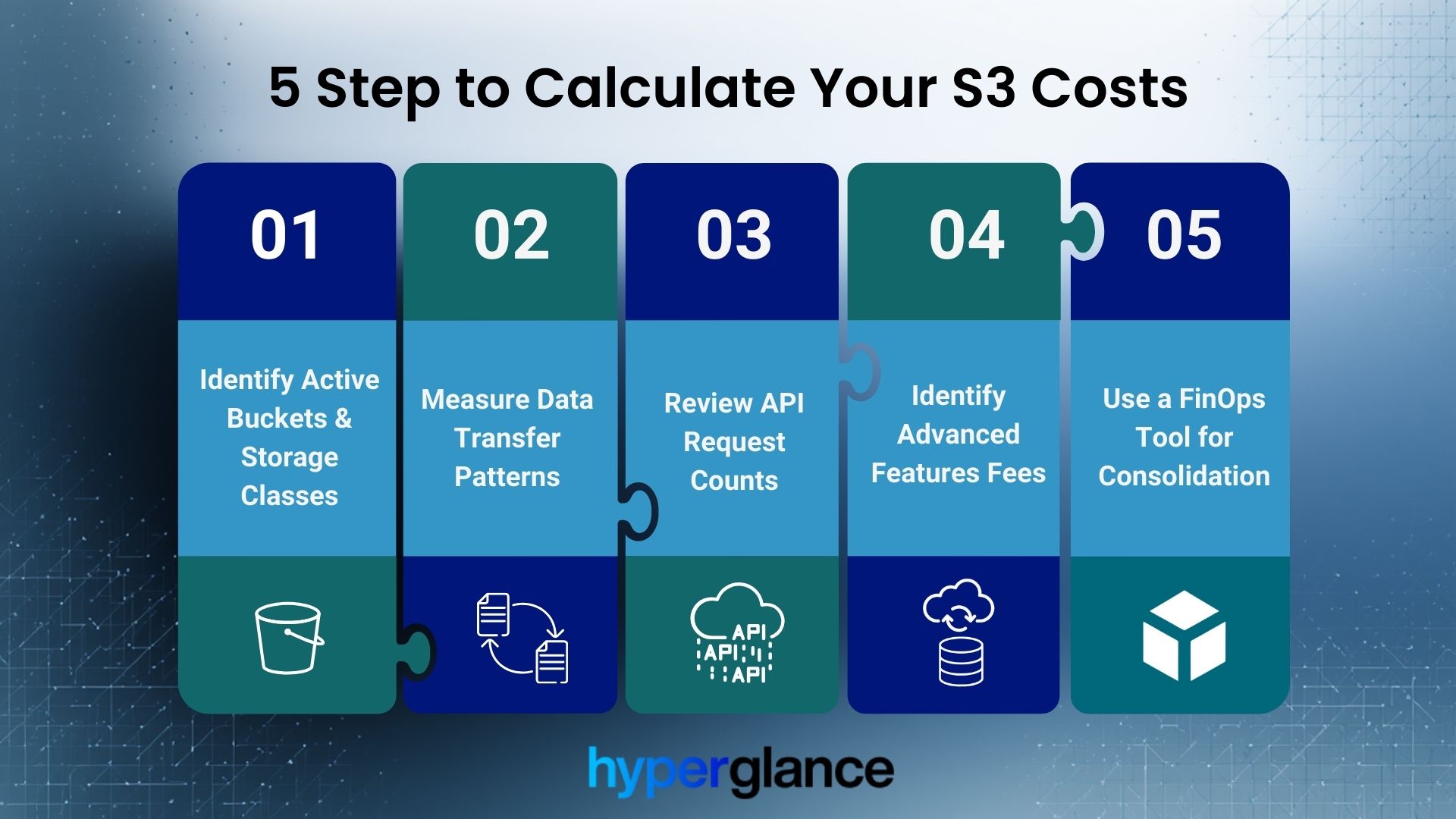
Calculate Your S3 Cost In 5 Simple Steps
This process is applicable whether you’re using the AWS Pricing Calculator, Cost Explorer, or a sophisticated FinOps tool.
Step 1: Identify Active Buckets & Storage Classes
Group all your S3 data by storage class. Note the total GB stored in each tier (Standard, IA, Glacier, etc.). This determines your base monthly storage cost.
Step 2: Measure Data Transfer Patterns
Focus strictly on outbound data (egress). Review the data transfer logs for traffic going to the internet or crossing region boundaries. This is the volume that determines your data transfer fee tiers.
Step 3: Review API Request Counts
Use AWS Cost Explorer or S3 Storage Lens to analyze request volume. Segregate GET requests (high volume, low cost) from PUT/COPY/LIST requests (lower volume, higher cost).
Step 4: Identify Advanced Features Fees
Identify any enabled, high-cost features, such as S3 Inventory, Versioning (the extra storage used by old versions), or Advanced Storage Lens metrics. Calculate their associated fees.
Step 5: Use a FinOps Tool for Consolidation
Manually tracking AWS S3 storage pricing across hundreds of accounts and buckets is impractical. A dedicated tool can consolidate and categorize these fees in real-time. This enables accurate forecasting of your AWS S3 costs per TB.
Requests: The Quiet Cost Multiplier
At a small scale, request pricing looks trivial. At a large scale, it’s not.
Examples of high‑impact patterns:
- Applications writing millions of tiny objects
- Frequent recursive LIST operations
- Data lake queries without partition pruning
Reducing request volume often delivers faster savings than changing storage classes.
Data Transfer: Where S3 Bills Get Expensive
For many workloads, data transfer costs exceed storage costs.
Key points for 2026:
- Internet egress is billed on a tiered basis
- Inter‑region traffic is always charged
- Transfer Acceleration adds extra cost, not a replacement fee
- VPC endpoints change traffic routing, but don’t magically remove all transfer‑related costs
The most common surprise is NAT Gateway data processing charges, not S3 itself.
Newer Cost Considerations: Metadata and Tables
S3 Metadata (Region‑Limited)
S3 Metadata adds queryable object metadata tables.
Cost components include:
- Metadata table storage
- Per‑object fees
- Change‑tracking journal fees
FinOps risk: High object churn can drive journal costs above expectations.
S3 Tables
Designed for managed tabular data (e.g., Iceberg‑based lakes).
Additional cost vectors:
- Table metadata and manifest storage
- Compaction and maintenance operations
As of mid‑2025, table‑level cost visibility in Cost Explorer is necessary for proper attribution.
How to Estimate Your S3 Costs (Practical Model)
A realistic S3 cost model answers four questions:
- How much data is stored, and in which classes?
- How often is that data read, written, or listed?
- How much data leaves the region?
- Which management features are enabled?
AWS Pricing Calculator and Cost Explorer help, but spreadsheets break down quickly at scale.
😃 Want to see these savings in action? Watch our AWS cost optimization best practices webinar.
Common Mistakes That Inflate S3 Costs
Even experienced cloud teams can fall into common traps that needlessly inflate their S3 storage costs. Avoiding these mistakes is crucial for keeping your bill in check.
- Leaving cold data in S3 Standard
- Enabling versioning without lifecycle cleanup
- Replicating data across regions without a clear requirement
- Treating S3 like a transactional database
- Ignoring request and transfer costs during architecture design
Most of these are configuration issues, not technical limitations.
S3 Free Tier (2026 Reality Check)
AWS continues to offer an S3 Free Tier for new accounts, but terms and limits change over time.
For accuracy:
- Avoid assuming fixed durations or quotas
- Always reference the current AWS Free Tier documentation
- Treat the Free Tier as a temporary offset, not a cost strategy
How Hyperglance Helps You Control S3 Costs
We know that understanding the technical components of AWS S3 pricing is only half the battle. The real challenge is implementing change and maintaining vigilance across a complex, multi-account cloud environment.
We designed Hyperglance to automatically visualize your S3 spend across all your accounts and regions in one unified dashboard. We don’t just show you the raw numbers; we show you the story behind the numbers.
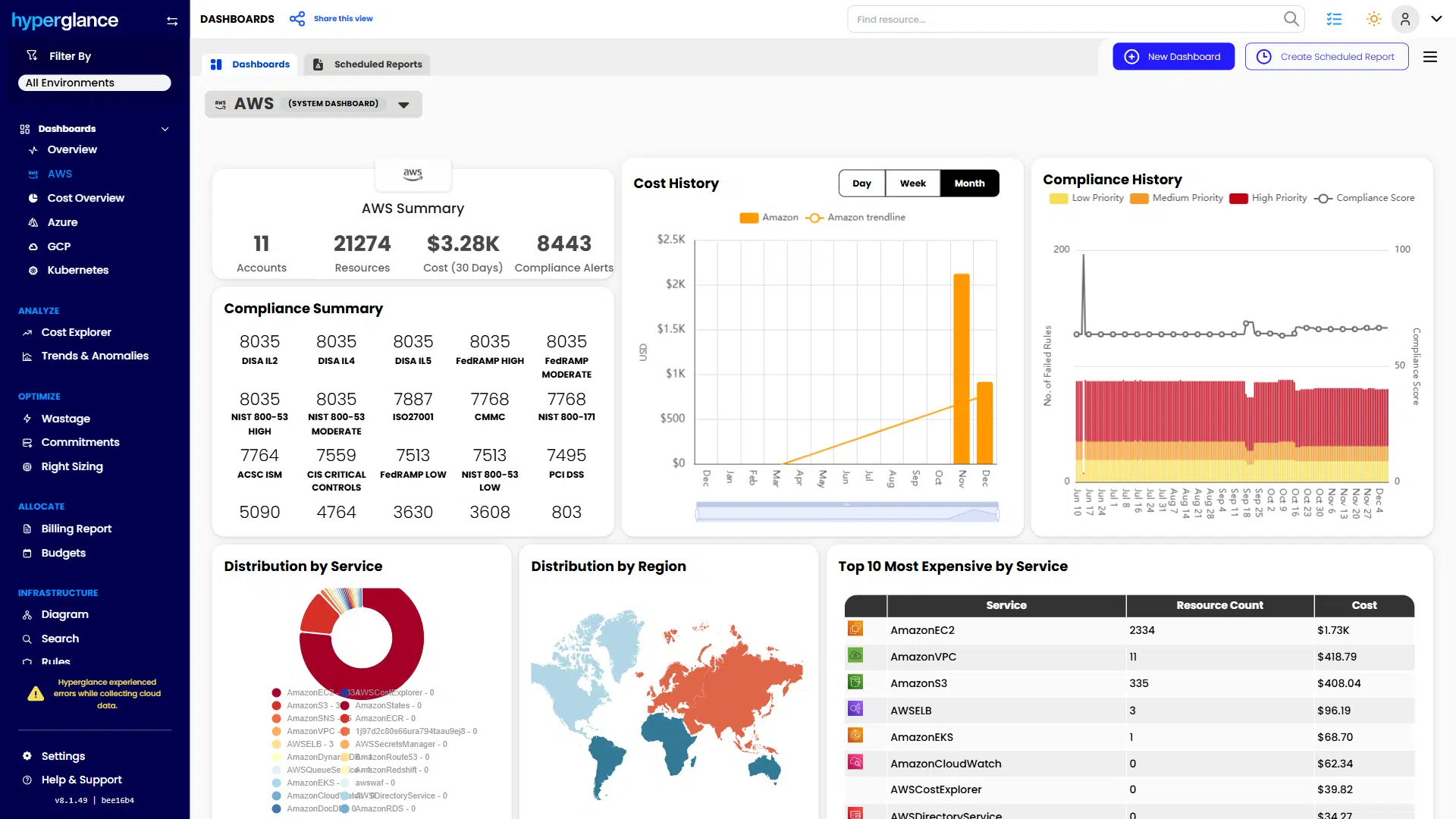
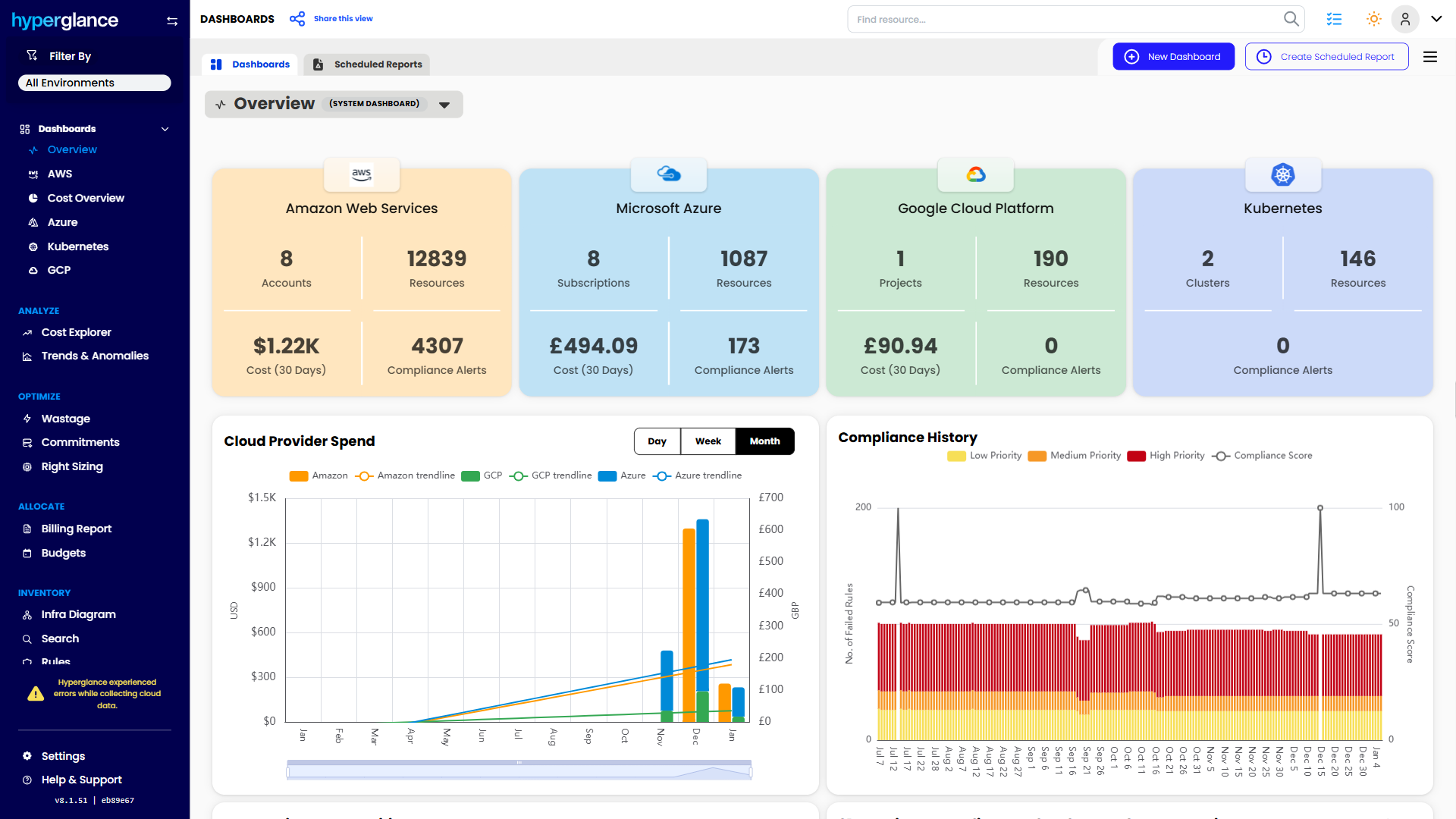
Summary of cloud accounts, cost, compliance, and top services.
Hyperglance’s deep analysis instantly detects inefficient storage patterns, such as finding large objects lingering in S3 Standard that haven't been accessed for months. Our system then surfaces explicit recommendations, such as suggesting the ideal class transitions.
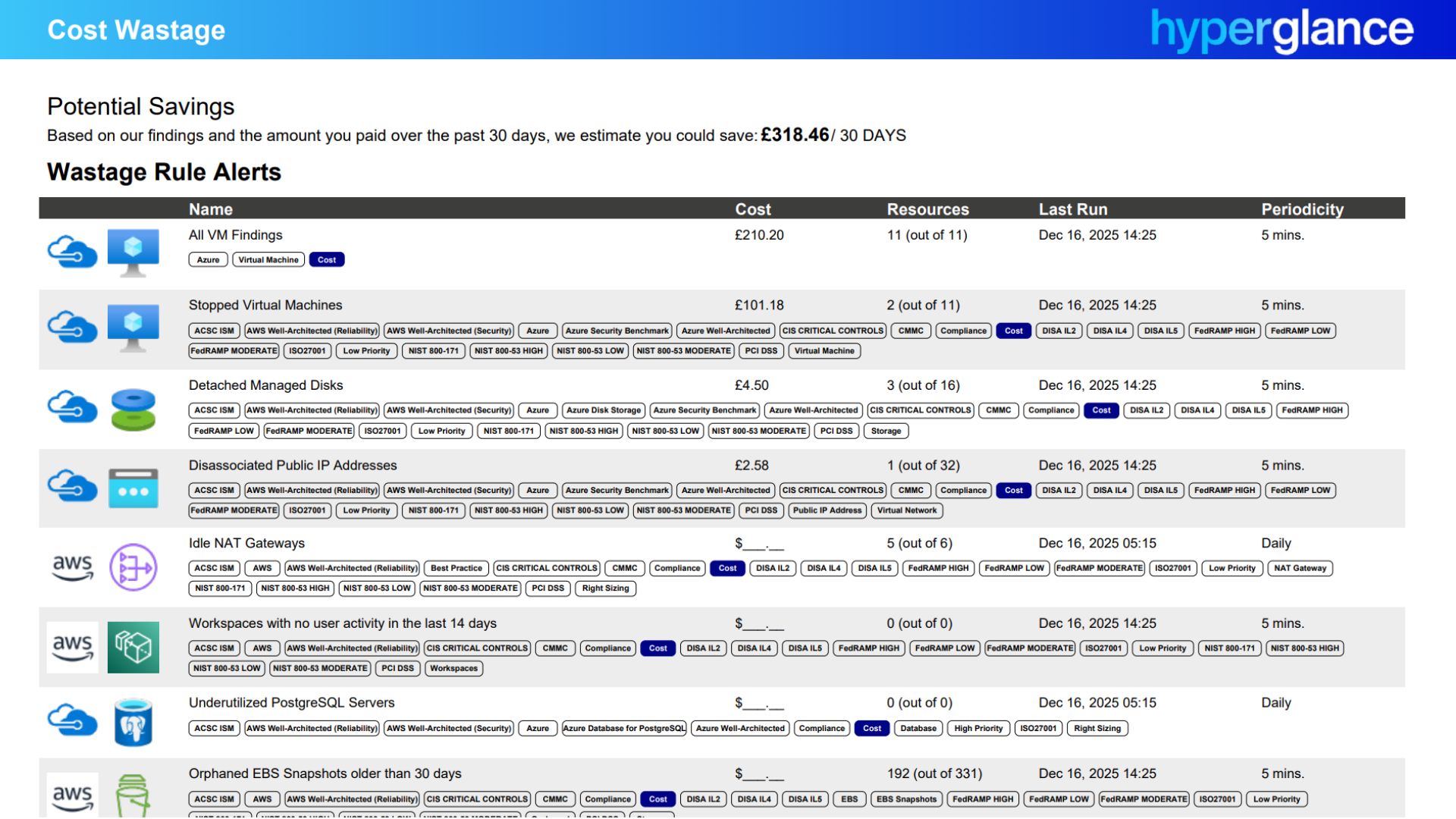
Potential savings from eliminating idle and orphaned cloud resources.
By integrating these insights directly into your FinOps workflows, we move you past manual cost reporting. We help you set guardrails, monitor against budgets, and flag anomalies, ensuring you benefit from the new 2025 S3 pricing changes without the daily manual audit.
🤩 Looking for a FinOps-ready toolset? See why Hyperglance was named a FinOps Certified Platform.
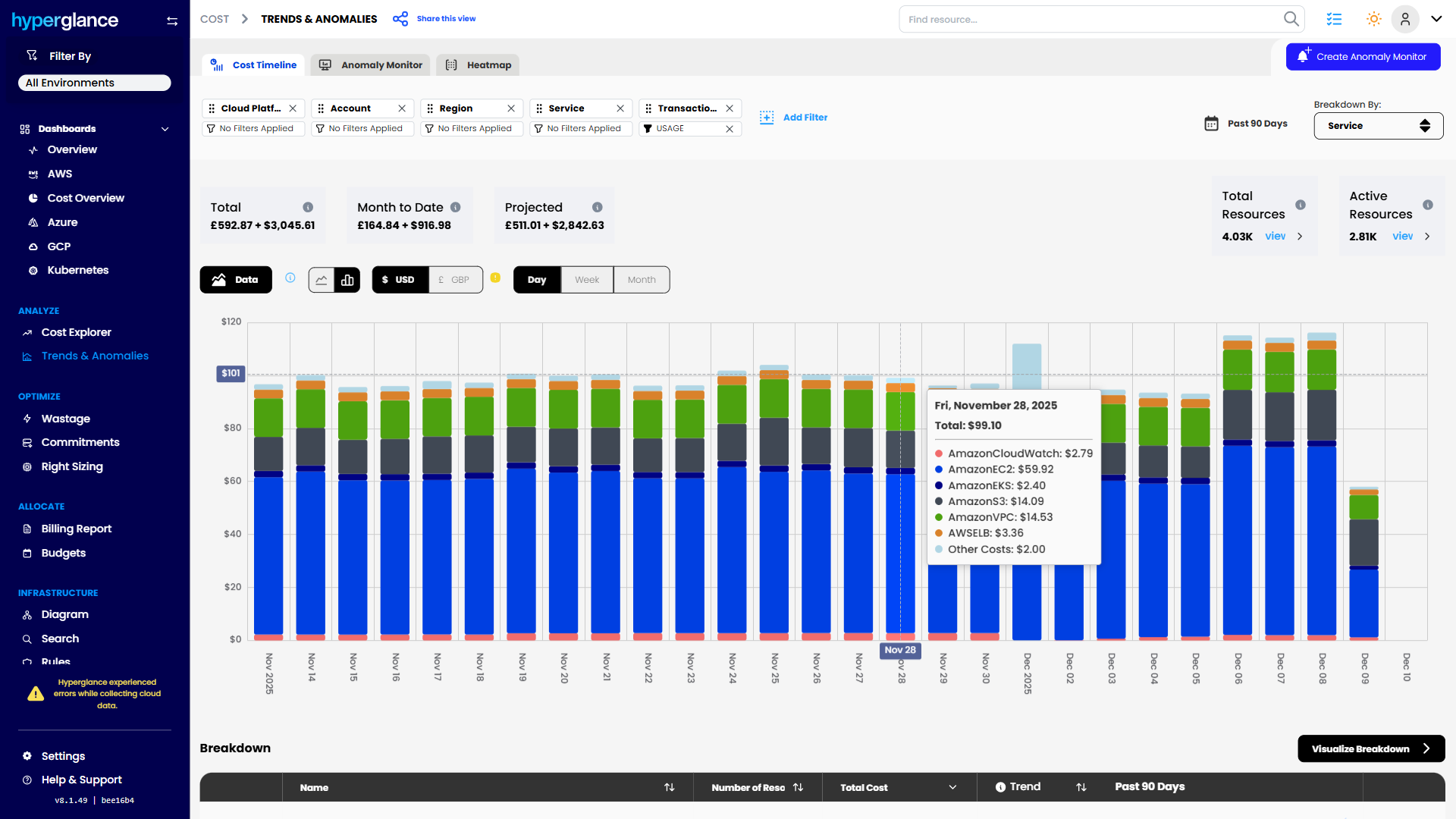
Daily total and projected cloud spending by service
Simplify S3 Pricing to Master Cloud Cost Control
Mastering to control AWS S3 Pricing means accepting that it’s a multidimensional beast.
- S3 pricing hasn’t simplifiedbut it has stabilized
- Storage class choice sets the baseline, but requests and transfer drive overruns
- New features (Metadata, Tables) add value and cost; both must be modeled
- Cost control comes from aligning architecture, access patterns, and lifecycle rules
💥 Designing for resilience and efficiency? Explore our definitive guide to the AWS Well-Architected Framework.
Frequently Asked Questions (FAQ)
Is AWS S3 good for big data?
Yes, S3 is arguably the best cloud object storage solution for big data architectures, primarily acting as the foundation for modern data lakes. Its scale, durability, and integration with processing tools like Amazon Athena, EMR, and SageMaker make it ideal.
Can you host your own S3 bucket?
You can create and manage your own S3 buckets within AWS, yes. S3 is not something you host on-premises. AWS provides the service (including the physical hardware, APIs, and management plane), and you provision and manage the buckets, define the access policies, and control the data stored within them.
Which is cheaper, AWS or Google Cloud, for cloud storage?
While base storage pricing per GB often appears comparable (and sometimes Google Cloud Storage is slightly cheaper on the surface), the total cost of ownership (TCO) depends on your workload. Google's pricing model, particularly its egress fees and network tiers, can differ significantly from AWS S3 pricing.
Why Teams Choose Hyperglance in 2026
Hyperglance is a strong fit when cost data alone doesn’t give your team enough context.
That often happens when teams are asking questions like:
- What is running across our cloud estate?
- Who owns this resource?
- Why did this cost change?
- What else depends on it?
- Is it safe to clean up?
- Which policy, security, or compliance issue needs attention?
- Can we route this to the right owner or trigger an approved action?
We help teams connect cloud cost to infrastructure context across AWS, Azure, Google Cloud, and Kubernetes. That means FinOps, CloudOps, platform, security, and leadership teams can work from the same view.
Hyperglance is especially useful for mid-market, enterprise, MSP, public sector, and regulated teams where ownership, governance, automation, and data control matter.
What You Can Do With Hyperglance
- See cost, resources, relationships, and ownership in one place
- Visualize cloud architecture with interactive diagrams
- Find waste, policy issues, and cost anomalies faster
- Route findings to the right team through existing workflows
- Use no-code automation for approved fixes
- Run Hyperglance in your own environment when data control matters
Want to see where Hyperglance fits in your FinOps stack?
Explore the product, start a free trial, or book a demo with the team.

About The Author: Stephen Lucas
As Hyperglance's Chief Product Officer (CPO), Stephen is responsible for the Hyperglance product roadmap. Stephen has over 20 years of experience in product management, project management, and cloud strategy across various industries.