Contents
- Why AWS, Azure, and Google Cloud Cost Tools Are Only Part of the Picture
- Native Tools Solve Provider Problems, Not Whole-Environment Problems
- What Native Cloud Cost Tools Do Well
- Where Native Cloud Cost Tools Fall Short
- A Simple Comparison
- Example: Why Native Tools Stop Being Enough
- Why This Breaks Down Faster in Real Environments
- Where Hyperglance Pulls Ahead
- Native Tools Shouldn't Be Your Whole Strategy
- Final Thought
Why AWS, Azure, and Google Cloud Cost Tools Are Only Part of the Picture
Native cloud cost tools are useful. That is not the problem.
The problem is that they can show you spend long before they can show you enough context to act on it.
AWS Cost Explorer is built to view and analyze AWS costs and usage, with forecasting and Reserved Instance recommendations.
Microsoft Cost Management is positioned as a suite of FinOps tools for analyzing, monitoring, and optimizing Microsoft Cloud costs.
Google Cloud Billing and FinOps Hub help teams track spend, monitor savings, and surface optimization opportunities.
That is fine when the question is, “What did we spend?”
It is much less useful when the question is, “What changed, who owns it, what does it support, and can we safely do something about it?”
That is where native cloud cost tools start to fall short.
Native Tools Solve Provider Problems, Not Whole-Environment Problems
This is the real issue.
Native tools are built around the provider boundary.
AWS tools are designed for AWS. Azure tools are designed for Azure. Google Cloud tools are designed for Google Cloud.
The FinOps Foundation’s own multi-cloud terminology guide makes that fragmentation very clear. It maps similar FinOps functions across providers and shows that the same jobs are spread across different tools, names, and workflows.
That is manageable if you have:
- 1 cloud
- 1 billing structure
- 1 team
- Clean ownership
- Consistent tags
But most growing cloud environments are not that tidy.
They have multiple accounts, subscriptions, business units, teams, and reporting needs. That is the point where native tooling starts to create friction instead of clarity.
What Native Cloud Cost Tools Do Well
To be fair, native cloud cost tools are often the right starting point.
They are good at:
- Reviewing provider-specific spend and usage
- Setting budgets and alerts
- Showing trends and forecasts
- Surfacing provider-native recommendations
- Helping teams understand billing inside that provider’s own structure
AWS Cost Explorer, AWS Budgets, Microsoft Cost Management, and Google Cloud FinOps Hub all do useful work in those areas.
The problem starts when teams expect them to do more than they were built to do.
Where Native Cloud Cost Tools Fall Short
They Fragment the Picture
If your estate spans AWS, Azure, and Google Cloud, native tools force you to work tool by tool, not environment by environment.
You end up switching consoles, translating naming conventions, lining up billing scopes, and stitching together different views of cost and ownership. The FinOps Foundation’s terminology guide exists for a reason: even common cost-management concepts are expressed differently across providers.
That is not just annoying.
It slows decisions down.
They Show Spend, but Not Enough Context
A cost report can show that spend increased.
It usually cannot show the full operational context around that increase.
It does not automatically answer:
- What is this resource part of?
- Who owns it?
- Is it tagged properly?
- What else depends on it?
- Is this a safe optimization target, or a risky one?
That gap is why so many cost conversations stall. Cost data points to a symptom. It does not always explain the system around it.
They Do Not Give You a Strong Control Layer Across the Estate
Cloud cost management is not just about spotting waste.
It is about proving control.
Microsoft’s Cost Management documentation ties the product to reporting, monitoring, exports, and analysis across billing scopes. Google Cloud’s billing documentation points to FinOps Hub, reporting, forecasting, permissions, and optimization recommendations. Those are useful building blocks, but they still live inside each provider’s own model.
That means teams still run into the same problems:
- Inconsistent tagging
- Unclear ownership
- Manual allocation work
- Separate reporting logic by cloud
- Too much spreadsheet glue holding the process together
This is where cloud cost becomes a governance problem.
A Simple Comparison
That is the real gap.
Native tools are solid inside each cloud. Hyperglance is stronger when you need a wider operational view across the environment, especially when cost, ownership, and governance questions cut across teams, accounts, or providers.
Example: Why Native Tools Stop Being Enough
A shared service suddenly costs 30% more than last month.
AWS Cost Explorer, Azure Cost Analysis, and Google Cloud FinOps Hub can all help you see the increase and investigate the trend.
But those tools still leave important questions open:
- Which team really owns the service?
- Are the underlying resources tagged properly?
- What does that service connect to?
- Is the increase tied to a real business change, bad hygiene, or waste?
- What can you safely change without breaking something important?
That is the moment when cost data alone stops being enough.
You need context around the environment, not just a chart of the spend.
That is the point where teams stop asking for better reporting and start looking for better visibility.
Why This Breaks Down Faster in Real Environments
Native tools tend to feel fine at first, especially in smaller estates.
The cracks start to show as the environment grows.
More accounts appear. More subscriptions get opened. More teams launch services. More reports are needed. A cost spike happens, and someone needs an explanation by Friday.
That is when the gap gets exposed.
The problem is no longer access to cost data.
The problem is a lack of shared context across the estate.
Where Hyperglance Pulls Ahead
Hyperglance is not stronger because native tools have no value.
It is stronger because it helps teams solve a wider problem.
Native tools are useful when you want to inspect spend inside a single provider. Hyperglance is built for teams that need to understand cost in the context of the wider environment, across clouds, accounts, teams, and services.
1. Hyperglance Gives You a Cross-Cloud View
Native tools work inside their own platforms.
Hyperglance helps you see across the estate, which matters when you are dealing with AWS, Azure, GCP, multiple accounts, and mixed teams. Instead of jumping between separate consoles and translating different billing structures, you can work from one place.
That makes it easier to answer bigger questions, such as where costs are rising, which teams are affected, and where ownership or tagging gaps are making decisions harder than they should be.
2. Hyperglance Connects Cost to Live Architecture and Inventory
This is one of the biggest practical differences.
Native cost tools can show spend. Hyperglance helps you see that spend in the context of the live environment, including the inventory and architecture around it.
That makes it easier to answer the questions that usually slow teams down: what is this resource, why is it here, who owns it, what does it support, and what happens if we change it?
That extra context matters because cost optimization is rarely just a finance exercise. Teams need enough confidence to act without creating risk elsewhere.
3. Hyperglance Makes Governance Easier to Operationalize
It is one thing to notice a problem.
It is another to make that problem visible, assignable, and actionable across the estate.
Hyperglance is stronger here because it brings together broader visibility, dashboards, billing drilldown, anomaly detection, tagging views, and workflow-friendly action in one operational layer.
That is a better fit for teams trying to move from “we spotted something” to “we dealt with it,” especially when the estate is large, shared, or harder to govern.
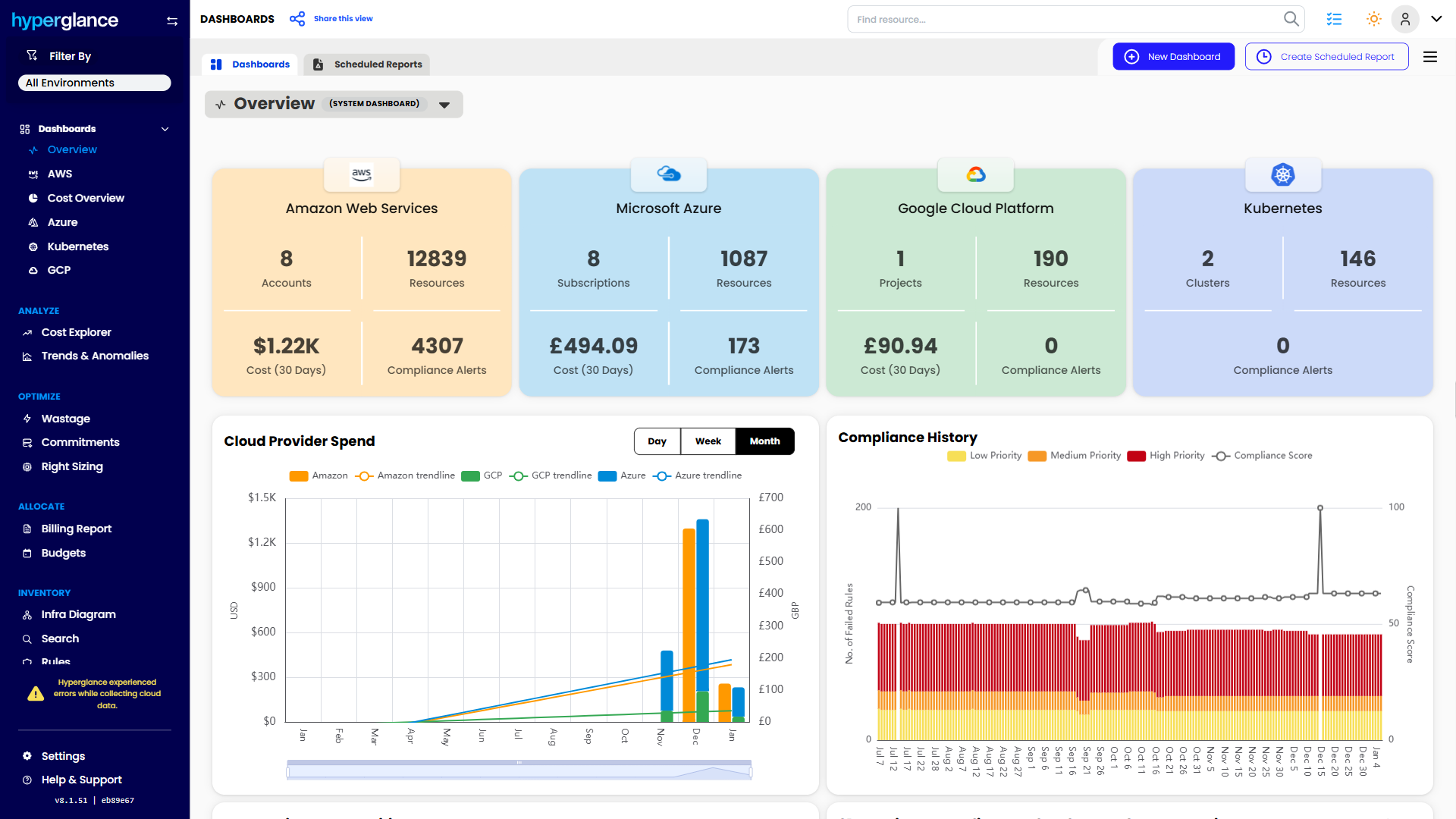
An example multi-cloud dashboard in Hyperglance
Native Tools Should Not Be Your Whole Strategy
This is not an argument for ignoring native tools.
They still matter. They are useful for provider-specific analysis, billing tasks, and recommendations inside each cloud.
But they are not a complete answer for teams that need clear visibility and control across a real-world cloud estate.
That is the gap.
And that gap gets wider as environments become more distributed, more expensive, and harder to govern.
Final Thought
Native cloud cost tools are good at showing slices of the problem.
They are much weaker at helping teams see the whole picture.
Once your environment spans multiple teams, accounts, subscriptions, or providers, cost data alone stops being enough. You need context, ownership, governance, and a practical way to move from “something looks off” to “we know what to do next.”
That is why native cloud cost tools fall short.
And that is where Hyperglance pulls ahead.
Why Teams Choose Hyperglance
Hyperglance gives FinOps teams, architects, and engineers real-time visibility across AWS, Azure, and GCP. See cost, security, and performance in one view.
Spot waste, route findings to owners, and trigger automated actions where configured with no-code automation.
- Visual clarity: Interactive diagrams show every relationship and cost driver.
- Actionable automation: Detect and fix cost and security issues automatically.
- Built for FinOps: Hundreds of optimization rules and analytics, out of the box.
- Agentless & Secure: Self-hosted, so sensitive data never leaves your cloud.
- Multi-cloud ready: Unified visibility across AWS, Azure, and GCP.
Book a demo today, or find out how Hyperglance helps you cut waste and complexity.

About The Author: David Gill
As Hyperglance's Chief Technology Officer (CTO), David looks after product development & maintenance, providing strategic direction for all things tech. Having been at the core of the Hyperglance team for over 10 years, cloud optimization is at the heart of everything David does.