Simple Pricing for Complex Cloud Estates
Pricing is based on the number of cloud resources we ingest, not a % of cloud spend.
Try Hyperglance Free for 14 Days
See your real inventory, costs & architecture in one place. Deploy it self-hosted, connect AWS/Azure/GCP/K8s. Find answers, fast.
| Resources Included What counts as a resource? | Monthly Cost USD monthly equivalent, billed annually |
|---|---|
| Up to 500 resources | $899 |
| Up to 1,000 resources | $1,459 |
| Up to 3,000 resources Popular | $3,144 |
| Up to 5,000 resources | $4,492 |
| More than 5,000 resources | Request a Quote |
Need 10k, 100k, or more? We'll size it with you.
ℹ️ A resource is a cloud object we ingest and inventory, such as an instance, VM, database, load balancer, gateway, bucket, disk, or serverless function. Tags and metadata don’t count as separate resources.

Pricing That Scales With Your Inventory
Hyperglance pricing is based on the number of cloud resources we ingest and inventory, not a percentage of your cloud bill. That means your costs stay predictable, even as spend changes.
Your license includes unlimited users and works across single or multi-cloud environments.
Plans
Hyperglance scales from a few hundred resources to tens of thousands, and beyond. Start with a trial to see your real resource count, or book a demo and we’ll help you pick the right tier.
Prefer to buy via a marketplace or partner? You can purchase through approved Hyperglance partners, or the AWS, Azure, and GCP Marketplaces.
✅ 14-day trial ✅ No credit card required ✅ Self-hosted deployment

FAQs
What does Hyperglance count as a resource?
A “resource” is a cloud object Hyperglance ingests and inventories as a single entity in its source platform.
Examples include instances/VMs, load balancers, gateways, buckets, database instances, and serverless functions.
We don't count interfaces, links, attributes, or chart data as separate resources.
Here's the full resource list for AWS, Azure, GCP, and Kubernetes.
How can I find out how many resources I have?
The quickest way is to start a trial. Hyperglance will ingest your environment and show your live resource count.
If you prefer to estimate first, you can also calculate it from AWS billing data or Azure tooling (GCP tool coming soon) - here's how.
Is Hyperglance SaaS?
No. Hyperglance is self-hosted in your environment, rather than running as a shared SaaS service.
That gives you more control over where the application runs and how data is handled.
How long does it take to get started?
Most teams can get Hyperglance up and running quickly. If you use our Docker trial, setup typically takes 15-20 minutes.
Is data secure in Hyperglance?
Hyperglance runs in your environment, so you stay in control of where it’s deployed and how access is managed.
Most teams use least-privilege cloud permissions and restrict access using SSO and standard network controls.
Can I add data into Hyperglance?
Yes. You can use the Hyperglance API to add or enrich data such as links, interfaces, alarms, and attributes.
You can also add hyperlinks to entities to connect diagrams to runbooks, tickets, dashboards, and docs.
Do you support Government cloud environments?
Yes. Hyperglance supports AWS GovCloud and Azure Government.
For Google Cloud Public Sector, not yet. Support is on our roadmap.
How much does Hyperglance cost?
Hyperglance pricing is based on the number of resources ingested and inventoried, not a percentage of your cloud bill.
We also don’t charge by the number of accounts or subscriptions you connect. Those simply contribute to your total resource count.
Licenses include unlimited users and can cover single-cloud or multi-cloud environments.
If you’re unsure which tier fits, start a trial to see your live resource count, or book a demo, and we’ll help you choose.
How do I pay for Hyperglance?
You can purchase directly from Hyperglance and pay by bank/wire transfer, ACH debit, or credit/debit card.
Select plans are also available via AWS, Azure, and GCP Marketplaces and will be billed on your marketplace invoice.
Can I cancel Hyperglance?
If you start a trial with a license issued by Hyperglance, it expires automatically at the end of the trial. You will not be charged unless you choose to upgrade.
If you start a trial through a marketplace, billing and renewal follow that marketplace’s terms.
You can also end the trial at any time by shutting down the Hyperglance instance or by contacting us.
Every Plan Includes
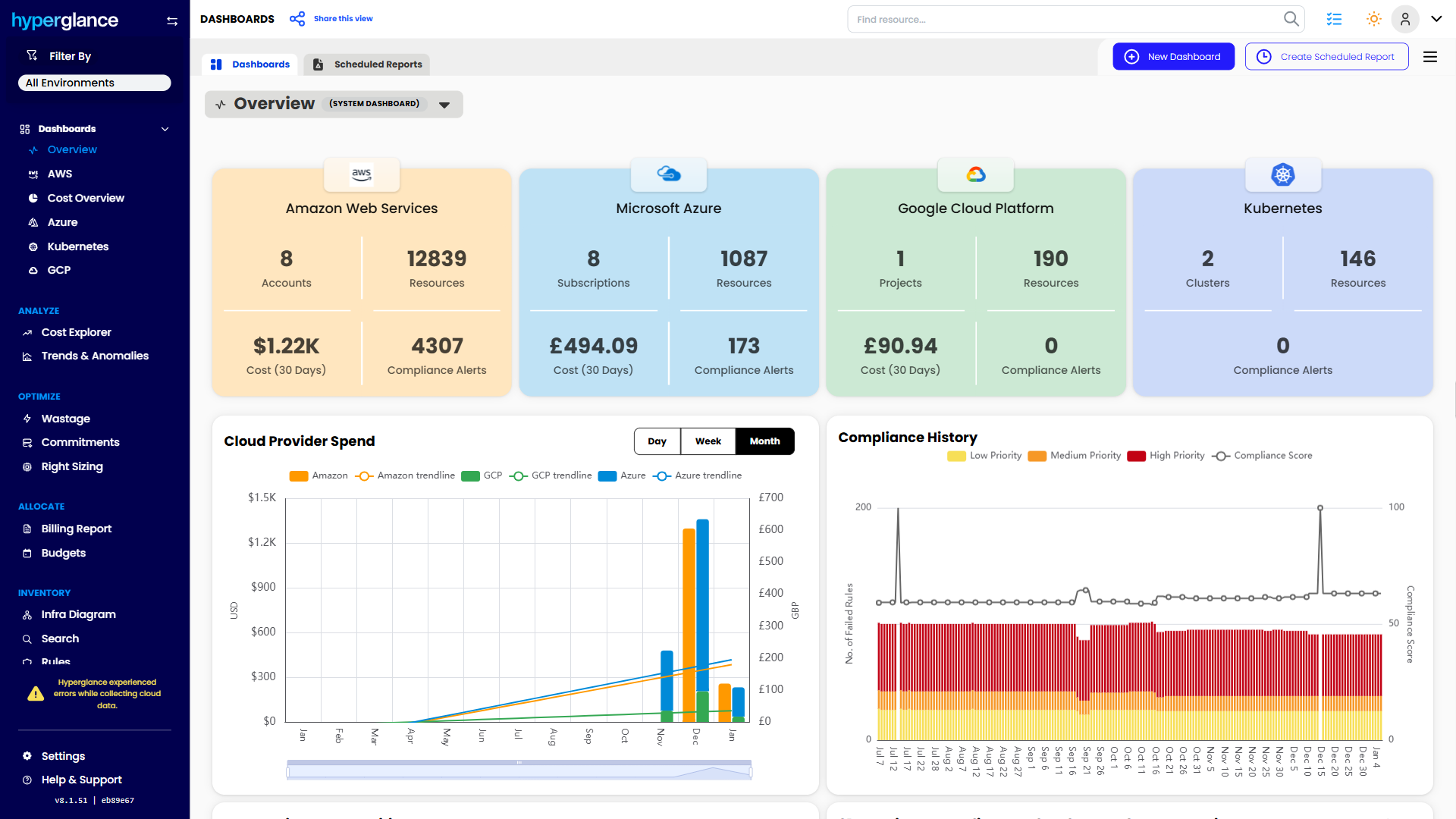
Cost visibility and control
- Cost explorer, trend reporting, budget-friendly dashboards
- Anomaly detection and alerting
- Chargeback-ready reports for teams and business units
- Savings recommendations (rightsizing & commitments)
Inventory and architecture
- Searchable inventory across cloud and K8s, with export
- Explore & export auto-generated architecture diagrams
- Heatmaps and visuals that make hotspots obvious
Governance and automation
- Policy checks for security and compliance
- 200+ rules and alerts you can tailor
- Codeless automation for common fixes and guardrails
Platform essentials
- Multi-cloud support: AWS, Azure, GCP, and Kubernetes
- Secure, agentless, self-hosted deployment
- REST API access and SAML SSO